Paying 1099 Subcontractors: A Contractor's Guide
"1099 payroll" is a phrase that gets used loosely, and it causes real confusion. A subcontractor is not on your payroll. You do not withhold taxes, you do not pay their share of FICA, and you do not run them through the same system as your W-2 crew. What you do is buy their work like you'd buy any other job cost — an invoice comes in, you pay it, and it needs to land against the right job. Get that part sloppy and you will not know your real margin until the job is long finished.
1099 sub vs. W-2 crew — the practical difference
Your own crew clocks in, you set their schedule and how they do the work, and you cut a paycheck with taxes withheld. A subcontractor runs their own business: their own tools, their own crew or none, their own schedule within the deadline you agreed to, and their own tax filing. You pay them the amount on their invoice or contract, full stop — no withholding.
That distinction matters for more than paperwork. Whether a worker is legitimately a 1099 sub or should actually be a W-2 employee is a real legal question, and getting it wrong is a real risk — back taxes, penalties, and in some states a workers' comp exposure if that "sub" gets hurt on your site. The line depends on control, tools, and how the work is structured, and it is not something to eyeball on a job site. If you are unsure whether someone you are paying should be a 1099 or a W-2, that is a conversation for a CPA or employment attorney, not a guess.
Why job costing subs correctly is the part that protects your margin
Here is where most of the damage actually happens, and it has nothing to do with the IRS. A sub's invoice comes in, you pay it, and if it just gets marked "paid" in your bank app or bookkeeping software without a job attached, that cost is gone from the number that matters: what this specific job cost you.
Say you've got a framing sub on one job and a drywall sub on another, both invoicing the same week. Pay both out of the same checking account without tagging each payment to its job, and by the time the framing job wraps, you have no clean answer to "what did subs cost me on this one." You're back to guessing from the bid, the same trap as guessing your labor or material cost — see our job-costing guide for the full case on why that guess is expensive.
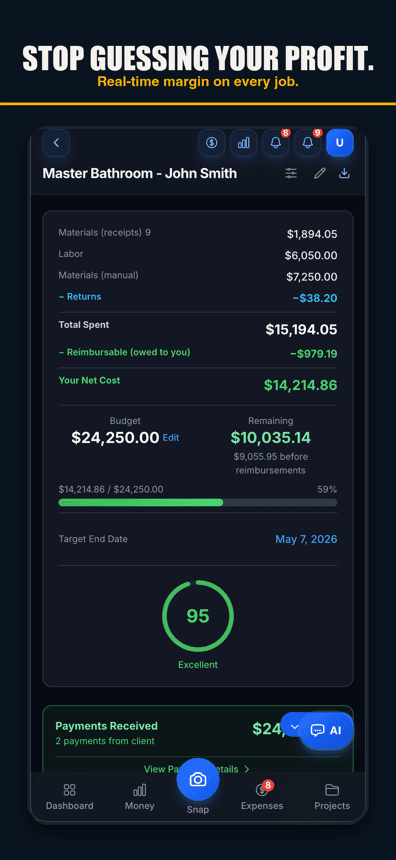
A sub invoice is a job cost exactly like a lumber receipt. It needs a job, a category, and a date, the moment it's paid — not reconstructed from bank statements at tax time. With Job Cost Pro's Team & Payroll (Contractor tier and up), you set a sub's pay rate, log their hours or invoice against a specific job, and the job's profit so far updates as the cost is entered — not three months later when the paperwork catches up.
Sub payments tagged to the job, and the margin that protects
The paperwork side, in plain English
This section is general information on how contractors typically handle the paperwork — not tax advice, and not a substitute for your own CPA or accountant, especially the first time you set this up.
W-9 before the first check
Before you pay a sub anything, get a completed W-9 from them. It has their legal name or business name, address, and taxpayer ID (SSN or EIN). The habit that saves you a scramble in January: no W-9, no check. Collect it up front, not after you've already paid them for three jobs and are chasing down a form they don't remember agreeing to send.
1099-NEC at year end
If you pay a subcontractor at or above the reporting threshold in a calendar year ($600 for payments made in 2025, $2,000 starting with 2026 payments), the general rule is you owe them (and the IRS) a Form 1099-NEC reporting what you paid. The exact thresholds, deadlines, and filing mechanics change and carry real penalties if missed — that part belongs with your CPA or accountant, every year, not something to eyeball off a blog post. What you can control yourself, all year, is having a clean total of what you actually paid each sub, by job, ready to hand over instead of rebuilt from memory in the first week of January.
That's exactly what falls out of tagging every sub payment to a job as it happens: at year end, you're not digging through twelve months of bank statements to figure out what you paid one sub across four jobs. You export it.
| Step | When | Why it matters |
|---|---|---|
| Collect the W-9 | Before the first payment | No scramble chasing it down at year end. |
| Set the pay rate / invoice terms | When the sub is hired | Keeps every payment consistent and job-tagged from day one. |
| Log each payment to its job | As it happens | Protects real per-job margin, not a guess from the bid. |
| Export the year's totals | Tax season | Hands your CPA a clean per-sub, per-job total instead of a shoebox. |
Where QuickBooks export fits
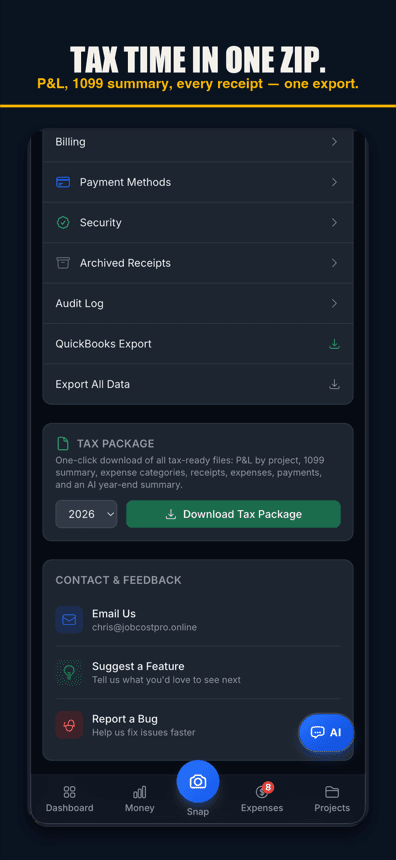
Job Cost Pro's QuickBooks export (Pro tier and up) is a one-tap CSV, IIF, or full ZIP bundle — job-tagged, with sub payments already categorized — ready to hand your bookkeeper or CPA at tax time instead of a pile of invoices and Venmo screenshots. It doesn't file anything for you; it gets your numbers into the hands of the person who does. For the fuller deduction side of tax season, see our tax deductions guide.
The habit that actually protects you
None of this is complicated in theory. Get the W-9 first. Tag every sub payment to the job it belongs to, the day you pay it. Keep a running total by sub, by job, all year. Hand your CPA clean numbers instead of a reconstruction project. The contractors who get burned aren't the ones who misunderstand the rules — they're the ones who meant to track it and didn't, until the job was done and the receipts were scattered across three job sites and a truck console.
Run three or four subs across a busy month and the untagged version compounds fast. A plumbing sub gets paid out of the same account as a drywall sub on a different job, both checks written the same Friday, and by the time either job wraps you're reconstructing who got paid for what from memory and old bank statements. Tag the payment to the job the moment it's made and that reconstruction never has to happen — the job's cost total already includes it, correctly, without a second pass.
The same discipline that protects your margin protects you at tax time. If every sub payment already carries a job and a date, building the sub's year-end total is pulling one report, not re-reading twelve months of check stubs. That's the real payoff of doing this right all year instead of catching it up in January: the tracking work and the tax-prep work are the same work, done once.
Job Cost Pro is free on the App Store — 3 projects, 50 receipts a month, full AI scanning. No credit card. Get it here. Every plan can build the tax package, and it includes a 1099 summary: each worker or sub at or above the 1099 reporting threshold, with totals (check the threshold for your payment year) — a list for your accountant, not a filed form (Free includes 1 tax export a year; Pro, $29.99/mo, and up are unlimited). Team & Payroll tools are on the Contractor tier ($49.99/mo).
Track your next job with Job Cost Pro
Scan receipts, confirm the suggested job, and see your recorded costs against your budget. Start with the free plan in your browser or get the iPhone app.
Free plan available. Some features require a paid plan.
FAQ
Is paying a 1099 subcontractor the same as running payroll?
No. Payroll is for W-2 employees and involves withholding taxes. A 1099 subcontractor is paid the full amount on their invoice or contract with no withholding — it functions as accounts payable against a job, not payroll. General information only; ask a CPA about your specific setup.
When do I need to send a subcontractor a 1099-NEC?
The general rule is a reporting threshold per calendar year — $600 for payments made in 2025, $2,000 starting with 2026 payments — but exact thresholds, exceptions, and deadlines change and carry real penalties if missed. Confirm the specifics with a CPA or accountant — what you can do yourself is keep a clean, job-tagged total of what you paid each sub all year.
What do I need from a subcontractor before I pay them?
A completed W-9 with their legal name or business name, address, and taxpayer ID. Collecting it before the first check, rather than chasing it down at tax time, is the habit that saves a January scramble.
Why does it matter which job a sub payment is tagged to?
Because a sub invoice is a job cost like any other. Pay it without tagging the job and that cost disappears from the number that tells you whether the job actually made money — you end up guessing your margin from the original bid instead of knowing it.
How do I know if a worker should be a 1099 sub or a W-2 employee?
It depends on factors like who controls the work, whose tools are used, and how the arrangement is structured, and misclassifying a worker is a real legal and financial risk. This is a question for a CPA or employment attorney — not something to decide on the job site.
Can a job costing app help with 1099 subcontractors?
It can handle the tracking side — setting a sub’s pay rate, logging hours or invoices against a specific job, and keeping a running per-sub, per-job total you can export at tax time. It does not file your 1099s or make classification calls; that stays with your CPA.