Job costing app for contractors
Job Costing App for Contractors — Job Costs So Far. Live. From Your Phone.
Snap a receipt at the supply house, the AI suggests the right job, one tap confirms it, and your margin updates before you get back to the truck. Built by a Texas contractor who got tired of QuickBooks lag and Excel chaos.
Free plan: 3 projects, 50 receipts a month. No credit card. Some features require a paid plan.
Most contractors find out a job lost money three weeks after the punch list
You hand a stack of receipts to the bookkeeper. Two weeks later they show up in QuickBooks. Another week to reconcile. By the time you see real numbers the next two jobs are already underway — and you’re repeating the same mistake. Job costing only matters if it’s fast enough to change a decision while you can still change it.
This is the actual app
Get the job costing app on iPhone
JobCost Pro is on the App Store for iPhone, and the same account works in any browser. The free tier needs no card. Receipts queue on the phone when the jobsite has no bars and upload the moment service comes back.
Download JobCost Pro on the App StoreNew on the App Store — free tier, no card required.
What a job costing app has to do on an actual jobsite
Receipts come with the right job suggested
Snap any receipt. The AI reads the vendor, line items, and total, then suggests the closest active job. One tap confirms it; wrong project? Pick another.
Live margin, not month-end margin
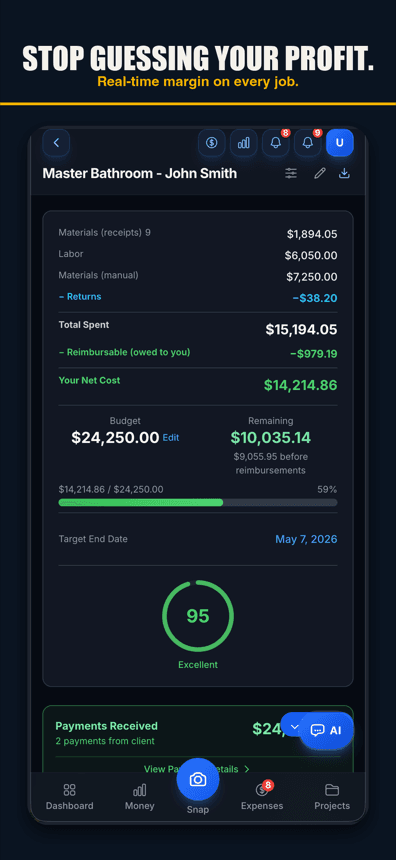
The P&L updates as each receipt is filed. Budget vs actual, gross profit so far, and overrun risk move with every cost you record. If a job is heading underwater you see it while it is still running — not after the change order is too late.
Built for the truck, not the office
Voice capture logs expenses without typing (voice works in browsers with speech input, like Chrome and Safari, and in the iPhone app on version 1.0.8 or newer). Works on a $200 phone in spotty service. Field foreman scans, owner sees the number as soon as it is saved. Same data, no double entry, no Friday-night reconciliation.
Free plan: 3 projects, 50 receipts a month. No credit card. Some features require a paid plan.
What you get, compared with most job costing apps
AI receipt scanning
OCR plus an LLM second-pass that catches what plain OCR misses — line items, returns, and the difference between a deposit and a final payment. Scans handwritten and faded thermal receipts that tools like Expensify give up on.
Voice-to-expense
Tap once, say "fifty-three twenty at Home Depot for the Garcia kitchen, paint and rollers." Done. No forms, no driving back to the office to update a spreadsheet.
Smart project matching
The app suggests a job for each receipt from recent activity, GPS proximity, and similar past purchases. You confirm it with one tap, and a wrong suggestion is one tap to fix.
Real-time budget vs actual
Per-project P&L from the costs recorded so far, with materials, labor, equipment, and subcontractor splits. Overrun warnings fire when actuals trend toward 90 % of budget — not after you’ve already blown it.
GPS clock-in for crews
Geofenced jobsites prompt the crew to clock in — one tap. A 12-hour backstop closes forgotten shifts. Log mileage between jobs at the IRS rate for tax season.
Invoices and client portal
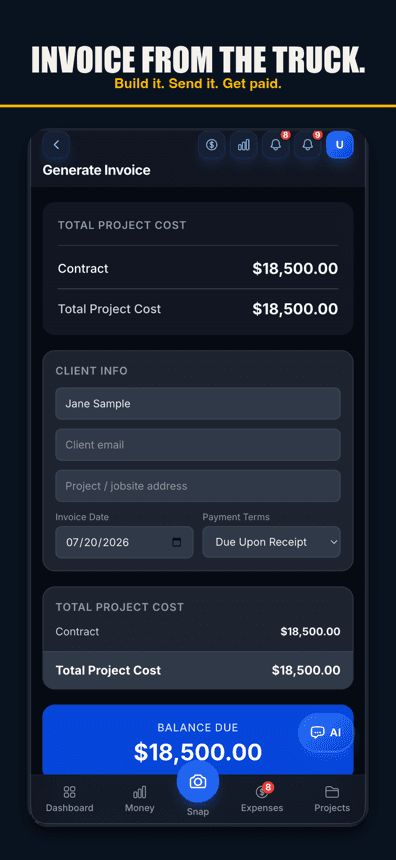
Send a clean PDF invoice from your phone, and the invoice page your client opens shows your bank or check details. No third tool to subscribe to. Branded with your logo. AI-drafted email body if you want it.
Tax export, not tax surprise
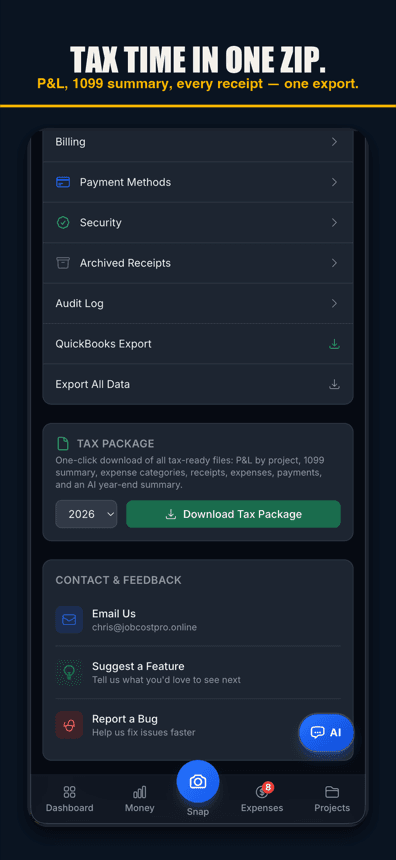
A one-click year-end package: categorized expenses, mileage, 1099s, and deductible receipts in the format your CPA actually wants. Zero shoebox.
QuickBooks export
Already running QuickBooks? Export categorized transactions in the right format. We don’t replace your accountant; we replace the receipt-shoebox-to-QuickBooks step.
Simple pricing — including a real free tier
Start free. Upgrade when you have unlimited projects to manage or a crew to track. No demo required. No onboarding fee. Cancel any time.
Simple pricing
Less than a single trip to Home Depot.
Start free. Upgrade when you're ready.
Free
3 projects, 50 receipts/month — get started free
- 3 projects
- 50 receipts/month
- AI receipt scanning
- Voice capture (web; iPhone app 1.0.8+)
- 1 tax export/year
- Basic reports
- 3 crew seats: clock in + My Pay
- Client portal
- Payroll exports
Pro
For small crews — unlimited projects & receipts, 10 crew
- Unlimited projects
- Unlimited receipts
- 10 team members
- AI scans & chat (monthly AI allowance)
- Budget alerts
- Invoice sending
- All exports (tax, CSV, PDF)
Contractor
For crews — unlimited team, auto clock-in & payroll
- Unlimited projects
- Unlimited receipts
- Everything in Pro
- Unlimited team members
- Opt-in automatic clock-in
- Run payroll & record paychecks
- Custom branding
Paid plans renew automatically at the price shown for the selected interval (monthly or yearly) until you cancel. You'll be charged in US dollars plus any applicable sales tax.
Cancel anytime in Settings → Billing — no refunds for past billing periods. Refund Policy · Terms

Who built this
Chris Sibley — remodeling contractor, Fort Worth, TX
Chris closed a $42,000 bathroom remodel thinking he’d made 30%. His accountant ran the real numbers months later: 12% — $7,500 in receipts never made it onto the job. He built Job Cost Pro so that never happens again, and still runs his remodeling company with it every day. That company is the legal entity behind this app: Salvation Home Remodeling LLC, doing business as Job Cost Pro.
FAQ
Is there a job costing app for QuickBooks Online?
JobCost Pro works alongside QuickBooks Online rather than replacing it. You capture costs in the field and tag them to a job as they happen, then export a clean tax package — profit and loss by project, 1099 summary, and a list of your receipts — at year end. QuickBooks stays your books of record; this is the job-level detail QuickBooks alone makes you reconstruct weeks later.
Is JobCost Pro an iPhone app or a website?
Both. It is a real iOS app on the App Store, and the same account opens in any browser on a laptop. Scan from the phone and read reports on a bigger screen. There is no Android app yet.
What should a job cost app do that a spreadsheet can’t?
A job cost app has to capture the cost at the moment it happens, in the field, without anyone typing it twice. A spreadsheet only knows what someone remembered to enter on Sunday night. That gap is where the margin goes: the forgotten supply run, the return nobody credited back, the hours logged from memory a week later.
How is JobCost Pro different from QuickBooks?
QuickBooks is your accounting system. JobCost Pro is what fills it. We capture every cost in the field, you confirm the job with one tap, and we show live margins — then export clean to QuickBooks at month end. You keep your accountant; you just stop losing receipts and margins along the way.
Is there a real free tier or just a trial?
Real free tier — 3 projects and 50 receipts per month, with AI scanning and voice capture included. No credit card. If you outgrow it, Pro is $29.99/month flat.
How accurate is the AI on contractor receipts?
It’s built for the ugly ones — faded Home Depot thermal paper, handwritten lumber-yard tickets, Lowe’s app emails. The AI reads line items, not just totals, so a $1,200 receipt with a $400 return shows the right net cost. Anything it can’t read lands in "needs attention" instead of being filed wrong.
Can my foreman use it without seeing my margins?
Yes. Crew accounts can scan receipts and clock in without seeing financials — 10 crew seats on Pro, no seat limit on Contractor. Owners control what each role sees.
Does it work in spotty service at a remote jobsite?
Partly. A tapped clock-in or clock-out needs a signal: if the tap can’t get through, the app tells you nothing was saved, so tap again once you have service. With automatic clock-in (Contractor plan, turned on with each worker’s consent), arrivals and departures the phone logged with no signal are sent once it reconnects. A receipt photo whose upload is cut off stays on the phone, and you finish it in Snap when you’re back on service.
How long does setup take?
Sign up, name your first project, snap a receipt — that is the whole setup. There’s no implementation call, no training fee, and no contract length.
Will I outgrow it?
If you hit a 30+ person crew with multi-PM scheduling and complex bid workflows, you’ll eventually want a tool like Buildertrend or JobTread. Until then JobCost Pro is the right fit. Contractor ($49.99/mo) has unlimited crew seats.
Related
No credit card. No demo. No contract.
Start the next job
with live job costs.
Start freeSign up free — no demo call.