Automatic Clock-In at the Jobsite: No More Forgotten Timesheets
It is 4:45 on a Friday and you are standing in the driveway with your phone out, asking Danny what time he actually got to the Hendricks job on Tuesday. He is not lying to you. He genuinely does not remember. Neither do you. So you split the difference, write down a number that feels about right, and move on to the next guy — because you have four more of these conversations before you can run payroll.
That is not a time-tracking system. That is a guessing system with a spreadsheet attached. And every guess is either money you overpaid or money your crew got shorted — neither of which is a conversation anyone wants to have twice.
The problem isn't your crew. It's the punch.
Nobody forgets to clock in because they are trying to steal time. They forget because the first ten minutes on a jobsite are chaos — unloading the truck, checking the plan, answering a text from the supply house. Clocking in is step nine on a list where step one already has your hands full. By the time anyone remembers, twenty minutes are gone and nobody wrote them down.
Clocking out is worse. That happens after quitting time, when everyone is tired, the truck is loaded, and the last thing on anyone's mind is opening an app to tap a button. So the app stays open. The clock keeps running in someone's pocket on the drive home, through dinner, sometimes overnight — and now you have a nine-hour shift on the books for four hours of real work, and an argument nobody wins.
Run that same pattern across a five-man crew and it is not a rounding error anymore. Two forgotten hours a week, per guy, at even a modest loaded labor rate, is real money bleeding out of every single job — every week, whether you catch it or not. Most contractors never catch it, because nobody is auditing punch times against what actually happened on site. You just eat it, job after job, and wonder why your labor line never quite matches the bid.
What the office manager actually deals with
If you have someone running payroll for you, this is their Friday: a spreadsheet with gaps, a text thread of "were you even on site Tuesday?", and a set of numbers nobody fully trusts by the time they hit the pay run. They are not bad at their job. They are trying to reconstruct history from memory, and memory is a terrible timesheet.
Every one of those conversations costs time you are not billing anyone for, and it puts your office manager in the position of either taking your crew's word for it or pushing back and starting a fight over an hour and a half. Neither option is good, and the job that caused it doesn't care — the labor cost still landed wherever it landed, tracked or not.
What an automatic clock-in actually does
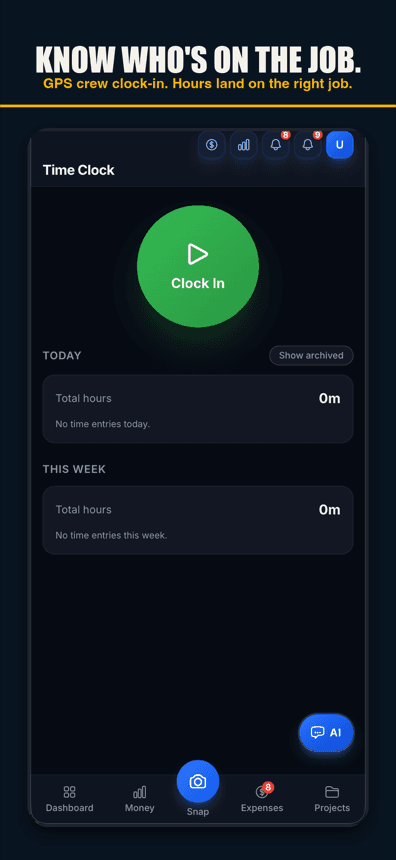
You set a boundary around the jobsite once, when you create the project. From then on, a crew member's phone crossing into that boundary sends them a one-tap prompt — confirm and they are clocked in, no app to open, no typing, no reconstructing Tuesday from memory. The same one tap closes it out when they leave. A crew member can also opt in to automatic clock-in, but only after they review a location disclosure and agree: arrival clocks them in, and if they do not come back they are clocked out about an hour after they leave, stamped at the time they left. Each automatic clock-in or clock-out sends them a notice with a 2-hour undo, and it only runs during work hours.
Either way, that removes the two failure points that cause almost every disputed timesheet: the forgotten punch and the phantom hours after everyone went home. The clock reflects who was actually on site, for as long as they were actually there — not what someone typed in from memory two days later.
The one-tap prompt is on every plan of Job Cost Pro; opt-in automatic clock-in lives inside the Contractor tier ($49.99/mo), built alongside full Team & Payroll tracking — pay rates and hour totals per crew member. The GPS clock and the payroll math run on the same data, so an hour worked on a job shows up as a labor cost on that job without anyone re-typing it into a second system.
Crew crosses the jobsite line — one tap starts the clock, or opt-in automatic clock-in does
Why this matters more than it sounds like it should
Labor is usually the biggest line item on a job, and it is the one most contractors track the loosest. You will chase down a $40 receipt because the paper is right there in your hand. Two hours of drifted labor time is invisible — it is just a slightly-wrong number in a spreadsheet — and invisible costs are the ones that eat your margin without you ever seeing them do it.
With Job Cost Pro, labor hours land on the job automatically, and your per-job profit and margin update as that cost comes in — while the job is still running, not three months later when your accountant hands you a number you can no longer do anything about. That is the same logic covered in our job-costing guide: the cost has to get captured at the moment it happens, or it quietly disappears from the number that matters.
What it looks like on a real week
Take a five-man crew, average loaded labor rate around $28/hour, and just two forgotten clock-out hours per guy per week — a fifteen-minute drift here, a forgotten punch there, nothing dramatic. That is 10 crew-hours a week nobody billed correctly, roughly $280 a week in labor cost that either vanished from your job cost tracking or got argued over at the truck. Add it up over a year and you are looking at real money — enough to notice, and enough that it was never worth the fight in the first place.
| Failure point | What happens without auto clock-in | What happens with it |
|---|---|---|
| Arrival | Crew forgets to punch in for the first 10–20 minutes on site. | One tap clocks in when the phone crosses the line; with opt-in automatic clock-in, arrival clocks them in, with a notice and a 2-hour undo. |
| Departure | Clock keeps running after the truck leaves — sometimes for hours. | One tap closes it on the way out; with automatic clock-in on, it closes about an hour after they leave, stamped to when they actually left. |
| Payroll day | Office manager reconstructs hours from memory and text messages. | Hours are already logged, per job, no reconstruction needed. |
| Job cost | Labor hits the job weeks late, if it gets tagged to the right job at all. | Labor lands on the job as it is worked, feeding profit and margin from the costs recorded so far. |
This isn't about catching anyone
The instinct when you hear "automatic clock-in" is to think it is a policing tool — something to catch a guy padding his hours. That is not really what it fixes. Most drifted time isn't dishonesty, it is a forgotten button on a busy morning. Taking the button away protects your crew as much as it protects you: nobody gets shorted because they forgot to punch in, and nobody has to defend a guess about what time they showed up three days after the fact.
It also ends the awkward part of the job — the Friday conversation where you have to ask someone to justify their own timesheet. That conversation is bad for morale even when everyone is being honest, because it turns trust into an argument about memory. Automatic clock-in just removes the need for the conversation.
Get it running
Job Cost Pro is free on the App Store — 3 projects, 50 receipts a month, full AI scanning. No credit card. Get it here. When you are ready to stop chasing timesheets, upgrade to Contractor for GPS auto clock-in and full Team & Payroll — pay rates and hours, all feeding the same live job cost number.
Track your next job with Job Cost Pro
Scan receipts, confirm the suggested job, and see your recorded costs against your budget. Start with the free plan in your browser or get the iPhone app.
Free plan available. Some features require a paid plan.
FAQ
What is an automatic clock in app for contractors?
An app that uses a GPS boundary drawn around each jobsite so a crew member clocks in or out with one tap when their phone crosses the line. A crew member can also opt in to automatic clock-in after reviewing a location disclosure: arrival clocks them in, and they are clocked out about an hour after they leave if they do not come back (stamped at the time they left), each with a notice and a 2-hour undo, during work hours only. In Job Cost Pro, one-tap GPS clock-in is on every plan; opt-in automatic clock-in is part of the Contractor tier ($49.99/mo).
How much time does a crew actually lose to forgotten clock-ins?
It adds up faster than most contractors think. Even a modest two forgotten hours per person per week, across a five-man crew, is 10 crew-hours a week of labor cost that either goes untracked or gets argued over — real money bleeding out of every job, every week.
Does automatic clock-in replace manual time tracking entirely?
It replaces the guesswork, not necessarily the tap. By default, crossing the jobsite boundary sends a one-tap confirm — no app to open, no memory required. A crew member can also opt in to automatic clock-in (Contractor and up): after a one-time location disclosure, arrival clocks in and a notice with a two-hour undo follows. Either way, arriving at the jobsite is what prompts or records the clock-in, not a time typed in from memory later.
Is GPS auto clock-in included in the free version of Job Cost Pro?
The one-tap GPS clock-in prompt is on every plan, including the free tier (3 projects, 50 receipts a month, full AI receipt scanning and 3 crew seats). Opt-in automatic clock-in ships with the Contractor tier ($49.99/mo), alongside full Team & Payroll tracking: pay rates and hour totals.
How does automatic clock-in affect job costing?
Labor hours land on the correct job as they happen instead of getting reconstructed at payroll time, so your per-job profit and margin from the costs recorded so far update as labor cost comes in — while the job is still running, not months later.
What stops a crew member from clocking in without actually being on site?
The clock is tied to the GPS boundary itself, not a manual entry — a punch cannot happen without the phone actually being inside the jobsite boundary, which is the whole point: it reflects where people actually were, not what someone typed in later.