Change Orders: How to Track Them Without Losing Money
You know the moment. You're three weeks into a job, the client walks up while you're mid-task and says something like "hey, while you're at it, could you also—" and it sounds small. Move an outlet. Swap a fixture. Add a shelf. You say "sure, no problem," because saying no over something that small feels petty, and stopping to write up paperwork feels like it'll slow the job down more than the change itself will.
That one sentence — "sure, no problem" — is where contractors lose their margin. Not on the big stuff. Nobody forgets to bill a $6,000 scope change. It's the string of small "while you're at it" requests that never get written down, never get priced, and either vanish off the invoice entirely or show up weeks later as a vague number nobody can defend.
What a change order actually is
A change order is nothing more than a written record of a change to the original contract — what's being added or altered, what it costs, and both sides signing off before the work happens or right after. That's it. It doesn't need to be a legal document with a letterhead. It needs three things: what changed, what it costs, and proof the client agreed to the price. Everything else is optional.
The paperwork isn't there to protect you from an honest client. It's there for the two situations that cost real money: the client who genuinely forgets they asked for the extra work by the time the final invoice shows up, and the job that runs long enough that you can no longer remember which changes you actually priced and which ones you just absorbed.
Why the verbal "sure, no problem" is a margin trap
Do the math on what actually happens when you skip the change order. You stop what you're doing, walk to the truck or the supply house, buy the extra material, drive back, and do the extra labor — all real cost, all real time. Then one of three things happens to that cost:
- It never gets billed at all.The job wraps, you invoice the original contract price, and the extra hour of labor and the $40 in fittings just come out of your pocket because nobody wrote it down and you've moved on to the next job by the time you'd remember.
- It gets billed as a guess. You remember there was something extra, so you tack $150 onto the final invoice and hope that covers it. It rarely does — you're guessing at a cost you never actually tracked.
- The client disputes it.No signed price, no paper trail, just your word against a number on a final bill they weren't expecting. Even when you win that conversation, you've spent goodwill and time you didn't need to spend.
None of those three outcomes is good, and all three are avoidable with thirty seconds of writing something down before the work starts. A job with a healthy bid margin can bleed out entirely through a season of unpriced "small" changes — not because any single one was big, but because none of them were ever counted.
Price it fast — the goal is thirty seconds, not thirty minutes
The reason contractors skip change orders isn't that they don't know better. It's that stopping a job to fill out a form feels like it costs more time than the change itself. So the fix isn't "always do more paperwork" — it's making the paperwork faster than the temptation to skip it.
A fast change order needs four things, and you can get all four standing in the hallway with the client:
- What's changing.One sentence. "Move the outlet from the west wall to the north wall."
- Materials cost, roughly. A fast, honest estimate beats no estimate. You can true it up once the receipt is in hand.
- Labor cost. Your loaded hourly rate times your best guess at the extra hours. Round up, not down — small changes always take longer than they look.
- A price and a yes.Quote the total, get a verbal or texted "yes, do it," and you're covered. A photo of a handwritten note with a thumbs-up text reply holds up fine for a $150 change. Save the formal signature for anything that changes the scope in a real way.
The point isn't precision. It's that a number exists, in writing, that both of you agreed to before the work happened. A change order that's off by ten dollars and actually gets written down beats a perfect number that only exists in your head.
Where the cost side falls apart — and how capture fixes it
Even contractors who are good about pricing the change order up front lose the thread on the cost side. The client agreed to $220 for the outlet move. Fine. But what did it actually cost you? The extra romex, the box, the wire nuts — bought on a separate trip, on a receipt that gets tossed in the truck console with everything else from that week. By the time the job closes, that receipt is indistinguishable from every other material cost on the job. Nobody goes back and checks whether the $220 change order actually covered its own cost.
This is the piece that makes tracking change orders worth doing at all — not just pricing them, but knowing afterward whether the price held up. With Job Cost Pro, you snap the receipt for that extra romex run right at the counter and tag it to the job. The app's AI reads the vendor and amount and files it, so the material cost from a change order lands in the same running total as everything else on that job — no separate spreadsheet, no relying on memory three weeks later.
That matters because the number you actually want to see isn't "did I bill the change order" — it's "did the change order make money." A job can have every single change order billed and still be quietly losing money on half of them, if the labor and materials those changes cost never got weighed against the price you quoted.
Track the cost against the price, not just the invoice
Here's the piece most contractors skip entirely: after the change order is priced and billed, does anyone ever check what it actually cost? Most don't, because checking means pulling receipts, matching them to a date range, and doing math by hand — the exact kind of after-the-fact reconstruction that job costing is supposed to replace.
Our job-costing guidecovers the full picture of why tracking cost against price matters for a whole job. A change order is the same idea at a smaller scale, and it's actually the easier place to catch a leak — because a change order is a small, bounded chunk of work with a clear start and end, which means a bad number is easy to spot if you're actually looking at it.
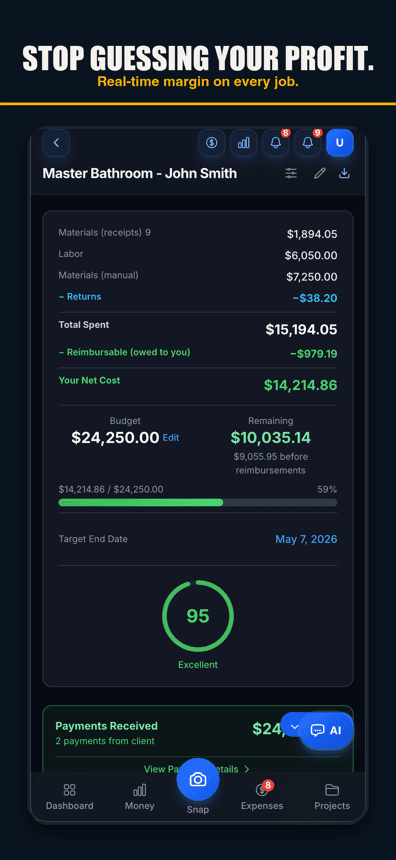
Job Cost Pro's per-job profit and margin view shows this from the costs recorded so far, without extra work on your end — every receipt tagged to the job feeds it automatically, change-order materials included. If a job's margin dips right after a run of "while you're at it" requests, you see it on the job screen while you can still do something about it, instead of finding out at tax time that a string of small favors quietly ate the whole profit on the job.
Live margin, and a fast invoice for the extra work
Billing the change order without slowing the job down
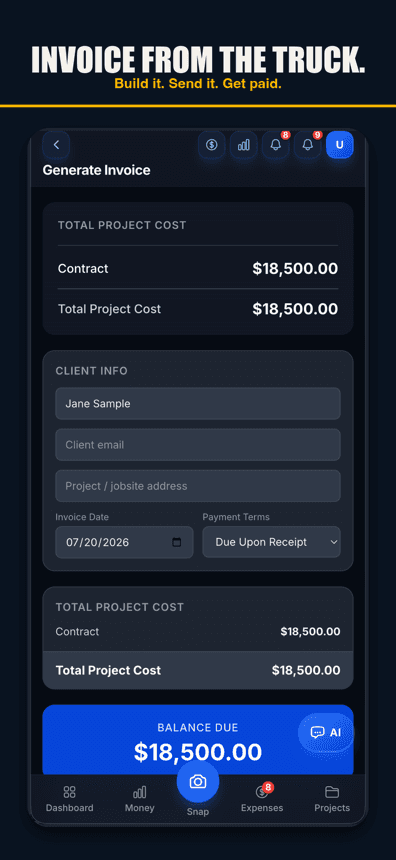
Once a change order is priced and the work is done, the last step is getting paid for it — and that shouldn't mean waiting until the final invoice to mention it. On Job Cost Pro's Pro tier, invoice sending lets you send a quick additional invoice for just that change order, right from the job, instead of holding it hostage to the final bill where it's easiest to forget or easiest for a client to dispute. Bill it close to when the work happened, while the conversation that led to it is still fresh for both of you. Our invoicing guide covers the mechanics of that if you want the full walkthrough.
Billing change orders as they happen, instead of batching them into a surprise at closeout, does two things at once: it gets you paid sooner, and it means the client sees the price coming instead of discovering it all at once at the end. Both of those cut disputes down to almost nothing.
The habit that actually sticks
None of this works as a one-time fix. It has to become the default reaction the moment a client says "while you're at it." Not a form you dread filling out — a thirty-second price-and-yes, followed by capturing the real cost the same way you'd capture any other job cost. The contractors who protect their margin on change orders aren't the ones with the fanciest paperwork. They're the ones who never let a change happen without a number attached to it, and who actually look at whether that number held up.
Job Cost Pro is free on the App Store — 3 projects, 50 receipts a month, full AI scanning. No credit card. Get it here. Built by a Fort Worth contractor who learned this one the expensive way.
Track your next job with Job Cost Pro
Scan receipts, confirm the suggested job, and see your recorded costs against your budget. Start with the free plan in your browser or get the iPhone app.
Free plan available. Some features require a paid plan.
FAQ
What is a change order in construction?
A written, priced record of any work added to or altered from the original contract — what changed, what it costs, and proof the client agreed to the price before or right after the work happened.
Why do verbal change orders cost contractors money?
Because a verbal "sure, no problem" has no price and no paper trail attached to it. The extra labor and materials either never get billed, get billed as a rough guess that undercharges the real cost, or get disputed by a client who does not remember agreeing to a number that was never written down.
How do you price a change order without slowing down the job?
Keep it to four things you can gather in under a minute: what is changing, a rough materials cost, a rough labor cost at your loaded hourly rate, and a quoted total with a yes from the client — texted or verbal is fine for smaller changes. Precision matters less than the fact that a number exists and both sides agreed to it.
How do you track whether a change order actually made money?
Tag every receipt and labor hour tied to the change order to that job the same way you would any other cost, then compare the total against what you priced and billed. Job Cost Pro does this automatically — receipts captured at the counter roll into the job's profit and margin view (costs recorded so far), so a change order that quietly cost more than it billed shows up while the job is still open.
Should a change order be billed at the end of the job or right away?
Right away, if possible. Billing a change order close to when the work happened keeps the price fresh in the client's mind and cuts down on disputes, and it gets you paid sooner instead of bundling every small extra into one surprise at closeout.
Is a text message enough to document a change order?
For a small change, a texted price with a "yes, go ahead" reply is enough to establish that the client agreed before the work happened — the goal is a written record, not a specific document format. Larger scope changes still deserve a signed, itemized change order.