Remodeling Job Costing: What Chris Wishes He'd Known
I run remodels in Fort Worth. Bathrooms mostly, some kitchens, the occasional whole-house job. If you do the same work, you already know the particular way remodeling eats margin — it's not one big mistake, it's a dozen small ones that never get written down. This post is what I wish someone had told me before I found out the hard way.
The $7,500 gap that started this
In 2024 I closed a $42,000 bathroom remodel. I bid it at 30% margin and felt good about it — solid job, good client, no drama. Three months later my accountant ran the actual numbers: 12%. Not a loss, but a third of my profit had just quietly disappeared, and I couldn't tell you where. So I went and found it.
The $7,500 gap was lumber runs, fixtures, and two Home Depot trips I paid out of pocket and never logged. None of it was a single big number I'd have caught. It was a $38 fitting here, a $60 return of tile mastic there, a box of screws on my own card because the truck was closer than the supply house. Each one forgettable. Together, a third of my margin. (I broke down the full job, receipt by receipt, here if you want to see exactly where it went.)
That job is the reason Job Cost Pro exists. I built it so that gap never happens to me again — or to anybody else running remodels the way I was running mine.
Scope creep and change orders that never get priced right
Every remodel has the moment. You're three days into the tear-out and the client says "while you're in there, can you just—" and you say sure, because saying no over a small ask feels petty and the relationship matters more than an extra hour of drywall. Then it happens four more times over the job, and none of those four got written down or priced. That's not generosity. That's margin you agreed to give away without doing the math.
The fix isn't saying no more. It's pricing the yes in the moment, before the work happens, so the change order is a real number attached to the job instead of a favor you'll forget you did. When I log a change order the day it's agreed to — even a small one — it shows up against that job's running total immediately. Nothing to reconstruct at the end. Small change orders are exactly the kind of thing that vanish from memory but not from your bank account.
Materials bought for one job, used on another
This is the trap that's specific to remodeling, and it's the one that cost me the most before I fixed it. You've got two jobs running. You're at the supply house buying tile for the bathroom on Elm Street, and while you're there you grab the PEX fittings you also need for the kitchen job across town — same trip, one receipt, two jobs. If that receipt gets tagged to whichever job you happened to be thinking about when you filed it, one job's cost report is wrong and the other one is wrong in the opposite direction. Do that a few times over a busy month and neither job's numbers mean anything anymore.
Job Cost Pro has receipt splittingfor exactly this — one Home Depot run that covers two remodels gets split line by line, each item landing on the right job's actual cost instead of getting dumped on whichever job you swiped the card for. That one feature alone paid for the Pro tier the first month I used it, because it was the single biggest source of bad numbers on my job reports.
Sub invoices that show up three weeks late
Plumbers, electricians, tile guys — good subs, the ones worth keeping, are also often the slowest to invoice. They finish the rough-in on a Tuesday and the invoice lands in your inbox seventeen days later, after you've already told the client (and yourself) what the job's costing. If you're checking margin off memory instead of a running number, that invoice either gets forgotten entirely or it lands as a surprise that retroactively wrecks a job you thought was fine.
The habit that fixes this isn't chasing subs harder — it's logging the committedcost the day the work happens, not the day the paper shows up. Snap the sub's scope or a rough number the day they're on site, then reconcile to the real invoice when it lands. That way the job's running total is never more than a rough estimate off, instead of missing a $4,000 electrical bill entirely until it's three weeks stale and nobody remembers which walk-through it was for.
Multiple remodels running at once, blurring together
One job at a time, you can hold the numbers in your head. Three jobs at once — which is most of the year if you're staffed for it — and the receipts, the crew hours, and the sub costs all start sounding the same by Thursday. Which job got the dumpster rental this week? Did the tile guy's deposit come out of the Elm Street budget or the one on Oakhurst? If the answer lives in your memory, it's going to be wrong some of the time, and you won't know which time.
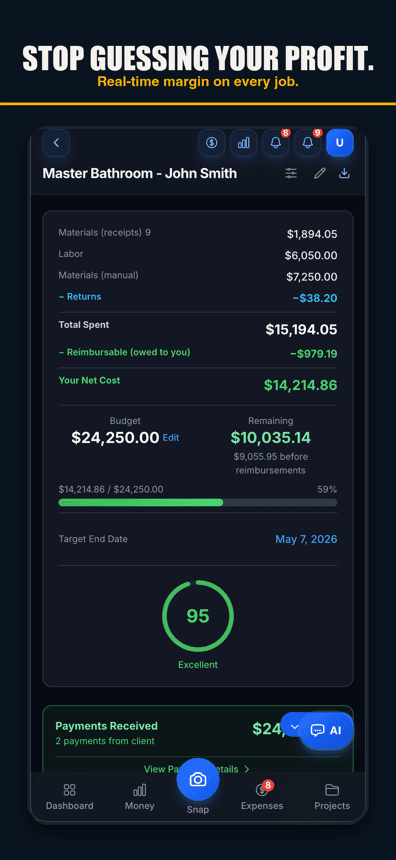
This is where Job Cost Proearns its keep for a remodeler specifically: every receipt, every logged hour, every change order gets tagged to a project the moment it's captured, not sorted out later from memory. Each job carries its own live running total, so "how's the Oakhurst job doing" is an answer, not a guess, even when you've got two other remodels pulling at your attention the same week.
Three jobs running, three honest numbers

What actually changed for me
I still job-cost the same trade, the same city, mostly the same kind of bathroom and kitchen work. What changed is where the cost gets captured. AI receipt scanning reads the vendor, items, and price off the photo and suggests the job when the receipt names it or you scan at the jobsite — one tap files it before I've walked back to the truck. When my hands are full mid-demo and I remember I need to log a materials return, I say it out loud and voice-to-expensepulls it out — I check it and tap save. (Voice works in browsers with speech input, like Chrome and Safari, and in the iPhone app on version 1.0.8 or newer.) No stopping, no typing later from memory, no forgetting by the time I'm free to type anything.
The result is a per-job profit number from the costs recorded so far that I can trust while the job is still running — not three months later when the accountant hands me the real total and I have to go figure out what happened. If a job's margin starts sliding in week two, I see it in week two, while there's still something I can do about it. That's the whole difference between the $42,000 job and every remodel I've run since. (For the fundamentals behind all of this, our job-costing guide covers the full picture.)
Start where I should have started
Job Cost Pro is free on the App Store — 3 projects, 50 receipts a month, full AI scanning. No credit card. Get it here. If you're running more than one remodel at a time and buying materials across jobs on the same trip, receipt splitting is on the Pro tier ($29.99/mo) and it is worth it the first time it saves you from tagging a job wrong.
Track your next job with Job Cost Pro
Scan receipts, confirm the suggested job, and see your recorded costs against your budget. Start with the free plan in your browser or get the iPhone app.
Free plan available. Some features require a paid plan.
FAQ
What is remodeling job costing?
Tracking every dollar a specific remodel actually costs you — materials, subcontractors, labor, and change orders — against what you bid it for, so you know your real margin on that job instead of guessing from your bank balance or last quarter’s average.
Why do remodeling jobs lose margin that other trades don’t see as much?
Remodelers run multiple jobs at once and buy materials for more than one job on the same supply-house trip, so receipts get mistagged. Add change orders that get done as a favor without being priced, and sub invoices that arrive weeks after the work, and margin leaks in a dozen small places instead of one big one.
How do I stop materials from one remodel getting counted on another?
Split the receipt at the item level instead of tagging the whole ticket to one job. Job Cost Pro’s receipt splitting (Pro tier) lets you divide a single Home Depot or supply-house run across the jobs it actually covered, so each project’s cost report reflects what really went into it.
How should I handle a sub invoice that comes in weeks after the work?
Log a rough committed cost the day the sub is on site, then reconcile it against the real invoice when it lands. That keeps the job’s running total close to accurate the whole time, instead of the job looking fine right up until a late invoice shows up and wrecks the number.
What should I do about change orders on a remodel?
Price the change order the day it’s agreed to, even a small one, and log it against that job immediately. The scope creep that actually kills margin is rarely one big change — it’s several small favors done without a number attached, each one forgettable on its own.
What is a good profit margin on a remodeling job?
It varies by market and job type, but the number that matters most is the one you can prove per job, not a company average. I bid the $42,000 bathroom job at 30% and found out three months later I’d actually made 12% — the bid margin means nothing until you’ve tracked every real cost against it.