How to Track Multiple Jobs at Once Without Losing Your Mind
One job is easy to keep in your head. You know what you spent, you know who showed up, you know if you are making money. Three jobs running at once and that same brain starts dropping things — not because you got worse at the work, but because the work stopped fitting in your head. Nobody warns you about this part. You just wake up one Tuesday with a truck full of receipts, two crews on two sites, and a bank account that could mean anything.
The receipt you can't place
You are standing at the supply house counter with a receipt in your hand three days after you bought it, and you genuinely cannot remember which job it was for. Was that the lumber for the Aledo addition or the deck repair in Keller? You bought both that week. The receipt does not say. Your memory does not say. So it goes in a pile, and the pile becomes "materials, unassigned" on somebody's spreadsheet, and every job it could have belonged to now has a cost hole in it. Multiply that by every receipt you collect across every job all month, and you get a set of books that are technically complete and practically useless — the totals add up, but you have no idea which job ate the money.
Your crew is not where you are
With one job, you see your crew because you are standing next to them. With three jobs running, your framer is in Colleyville, your two laborers are finishing a punch list in Southlake, and you are stuck in traffic between the two trying to figure out who clocked in where. Paper timesheets get filled out from memory at the end of the week — which means the hours get split evenly across whatever jobs someone remembers working, whether that is accurate or not. Labor is usually the biggest cost on any job. If it is getting guessed instead of tracked, your job costs are guesses too, no matter how careful you are with the receipts.
The job that's quietly bleeding
Here is the one that actually costs you money: while you are focused on the job that is behind schedule or the client who keeps calling, the job that is going fine keeps going — and nobody is watching its budget. A change order gets verbally approved and never priced out. A sub's invoice comes in higher than the bid and nobody flags it. Small overruns stack up quietly because that job isn't the one making noise. By the time you circle back to it, the margin you thought you had is gone, and you cannot point to the moment it happened because nobody was watching in real time. The squeaky-wheel job gets your attention. The quiet job gets your money.
End of month: which jobs actually made money?
This is where it all lands. You look at the bank account and it tells you one number — what came in, what went out — blended across every job you touched that month. It cannot tell you that the Weatherford remodel cleared 24% while the Fort Worth kitchen barely broke even. One bank balance covering multiple jobs is the same problem as one company P&L covering multiple jobs: it hides exactly the information you need to bid better next time. You need a live, per-job margin number, not a company-wide guess that only tells the truth in hindsight, if ever.
Why this gets worse, not better, as you add jobs
It is tempting to think the fix is just being more organized — write it down faster, keep a better notebook, try harder to remember. That works at two jobs. It stops working somewhere around three or four, because the problem is not effort, it is volume. Every job you add multiplies the number of receipts, the number of crew locations, and the number of budgets you have to hold in your head at once. Effort scales linearly. The mess scales faster than that. The contractors who run five or six jobs at a time without losing track of any of them are not working harder than the ones stuck at two — they built a system that captures the data at the source instead of trying to reconstruct it from memory after the fact.
What actually fixes this
None of these problems are really about running too many jobs. They are about capture — getting the cost or the hour attached to the right job at the moment it happens, instead of trying to sort it out later from memory, a pile of paper, or a bank statement. Fix capture and multiple jobs stop being a mess to manage and go back to being a set of numbers you can actually trust.
That is the whole idea behind Job Cost Pro. AI receipt scanning solves the "which job was this for" problem directly — snap the photo at the counter and it reads the receipt and suggests the right project when the receipt names it (or you scan at the jobsite) — one tap files it, so nothing sits in an unassigned pile waiting for you to remember. Every project shows its own live budget and margin, not one blended company total, so you can see at a glance which jobs are healthy and which one needs a look before it gets worse. And a one-tap GPS prompt clocks your crew in and out on the jobsite they are actually standing on (every plan), with opt-in automatic clock-in on the Contractor tier after a one-time location disclosure — useful when your crew is scattered across two or three sites and you are not there to watch it happen.
Every job, its own real number
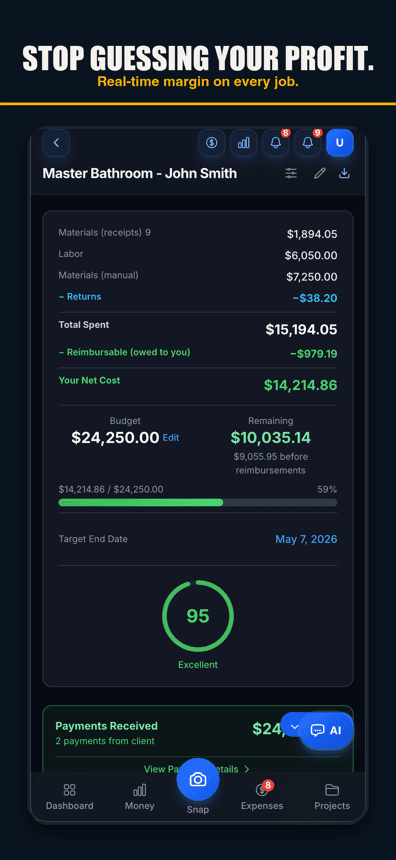
What running multiple jobs well actually looks like
- Every receipt gets tagged the moment it's in your hand.Not at the end of the day, not at the end of the week — at the counter, before it has a chance to end up in an "unassigned" pile.
- Labor hours attach to the site they were worked on. Auto clock-in tied to the actual jobsite beats a timesheet filled out from memory every time.
- Every job shows its own number, live. Not a blended total you have to untangle after the fact — a real per-job margin you can check between jobsites.
- You check the quiet job on purpose.The job that isn't making noise is the one most likely to be losing money without you noticing. Build in the habit of looking at it anyway.
Start small — the free tier is built for this
You do not need every job on your plate wired up on day one. Job Cost Pro's free tier covers 3 projects and 50 receipts a month with full AI scanning — plenty of room to run your first few jobs this way and feel the difference before you decide whether to move up a tier. Once you are past three active jobs, Pro and up remove that cap. Read our job-costing guide if you want the fundamentals behind all of this first.
Job Cost Pro is free on the App Store — 3 projects, 50 receipts a month, full AI scanning. No credit card. Get it here. Built by a Fort Worth contractor who has run more than one job at a time and lost money to exactly these problems.
Track your next job with Job Cost Pro
Scan receipts, confirm the suggested job, and see your recorded costs against your budget. Start with the free plan in your browser or get the iPhone app.
Free plan available. Some features require a paid plan.
FAQ
How do you manage multiple construction projects at once?
The core habit is capture, not willpower: every receipt and every labor hour gets tagged to its job the moment it happens instead of being sorted out later from memory. Tools that make this fast — AI that suggests the job when a receipt names it or you scan at the jobsite, per-jobsite clock-in — turn three or four simultaneous jobs into something you can actually track, instead of a blur you reconstruct at month end.
What is the biggest mistake contractors make running multiple jobs?
Letting the quiet job go unwatched. Attention naturally goes to the job that is behind or the client who is calling, while the job that seems fine keeps racking up small, unflagged overruns. By the time you check it, the margin is already gone.
How do I know which job a receipt belongs to if I forget to write it down?
In practice, you often can't — which is why the fix is capturing it at the moment of purchase, not reconstructing it later. AI receipt scanning at the counter removes most of the guesswork: scan from inside the job and the receipt goes on that job, and when the receipt names the job or you scan at the jobsite, the app suggests that job for one tap to confirm.
How many projects can I run on Job Cost Pro's free plan?
The free tier supports 3 projects and 50 receipts a month with full AI scanning, no credit card required. Contractors running more than 3 jobs at once move up to Pro ($29.99/mo) or higher for additional project capacity.
How do I track crew hours across multiple jobsites?
Paper timesheets filled out from memory tend to split hours evenly across whatever jobs someone remembers, whether that's accurate or not. On every Job Cost Pro plan, a one-tap GPS prompt clocks crew in and out based on the jobsite they are actually standing on; the Contractor tier ($49.99/mo) adds opt-in automatic clock-in (after a location disclosure, with a two-hour undo) so labor cost lands on the right project.
How do I tell which of my jobs are actually profitable?
You need a live, per-job margin number, not one blended bank balance covering every job you touched that month. A job costing app that shows real-time budget and margin per project makes this visible at a glance instead of something you find out at tax time.