Construction profit tracking app
Know Your Margin Before the Job Ends.
Most contractors find out a job lost money three weeks after the punch list. JobCost Pro shows each job's margin from the costs recorded so far — while you can still change the outcome.
Free plan: 3 projects, 50 receipts a month. No credit card. Some features require a paid plan.
The "after-the-fact" trap costs more than any software
You bid the job at 22 % gross. The crew goes to work. Receipts pile up in the truck. By the time the bookkeeper has it categorized in QuickBooks the kitchen is half-tiled and the lumber budget is already 18 % over. Now what? You either eat it, or you have a hard conversation with the homeowner about a change order three weeks too late.
This is the actual app
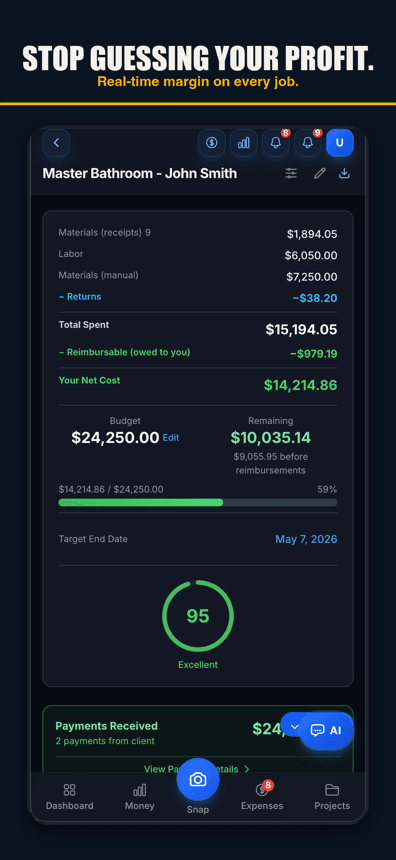
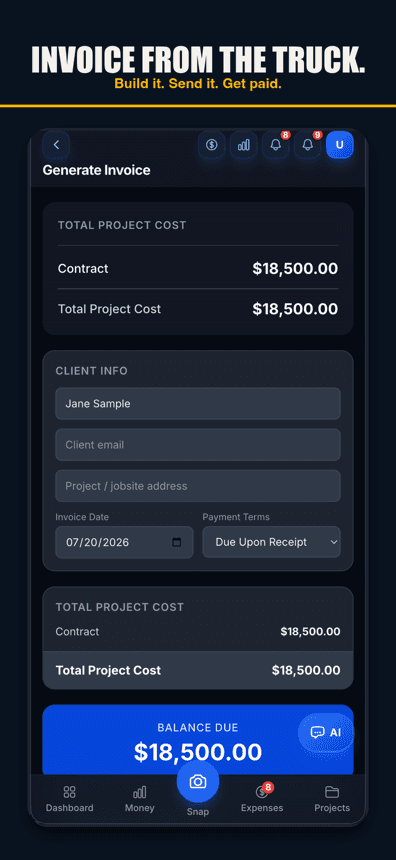
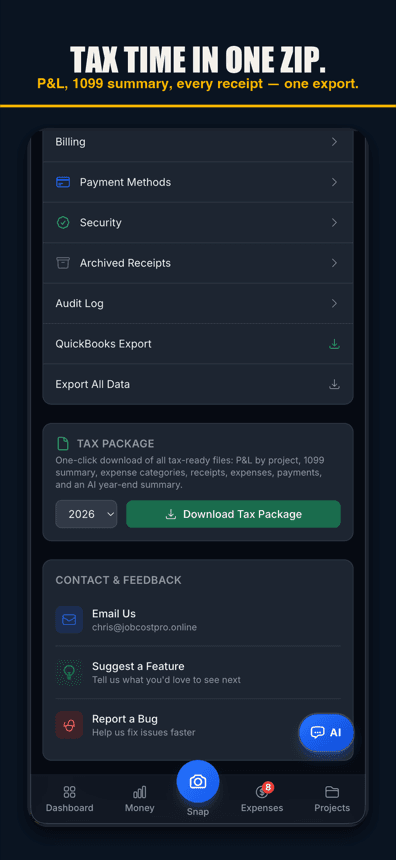
Margin updates the moment a receipt is filed
Gross profit per project from the costs recorded so far. Materials, labor, and subcontractor cost lines update as you record them. The number on the dashboard is today's number, not last month's.
Overrun warnings, not overrun surprises
A daily check warns you as a job nears its budget — and its labor budget, if you set one — before the overrun lands. You see the warning while there's still room to call the supplier, adjust scope, or write the change order.
P&L the way contractors actually think
Project-level P&L, not just company-level. Bid vs actual at the line-item level. Filterable by project type — kitchens, baths, additions — so you learn which jobs are quietly losing you money.
Free plan: 3 projects, 50 receipts a month. No credit card. Some features require a paid plan.
Per-project P&L
Each project gets its own P&L from the costs recorded so far: revenue, materials, labor, sub costs, equipment, gross profit, gross margin. Tap any line for the receipts behind it.
Budget vs actual at line-item depth
Set the bid by line. Watch each line tick toward the cap. Know whether you're losing on cabinets or labor before the punch list.
Ask AI how a job is tracking
Ask the AI chat how any job's budget is tracking against its timeline, or which jobs are using their budget fastest. It answers from the receipts, labor and expenses recorded on the job.
Reimbursable vs hard cost
Crew gas, tolls, and out-of-pocket spend track separately so you don't accidentally bill them as job costs and tank your margin twice.
Change-order capture
When scope changes, add a change order from the job page (Pro plan or higher) with a description and an amount. It shows up when you build the invoice, and one sent for signature counts once your client signs it.
Dashboard widgets
Pick and reorder your dashboard cards: cash in and spending up top, what clients owe you and what you owe your crew, and a budget bar for each job that has a budget.
Cross-project compare
Pick three jobs and compare them side-by-side. See which project type runs the tightest margin in your business and bid the next one with real data.
Tax-clean exports
CSV, PDF, and tax-package exports for your CPA, with every expense sorted by category.
P&L on every tier — including free
The free tier ships with project-level cost tracking. Pro adds unlimited projects and budget alerts. Contractor adds opt-in automatic clock-in and Run payroll with recorded paychecks; payroll exports are on every plan.
Simple pricing
Less than a single trip to Home Depot.
Start free. Upgrade when you're ready.
Free
3 projects, 50 receipts/month — get started free
- 3 projects
- 50 receipts/month
- AI receipt scanning
- Voice capture (web; iPhone app 1.0.8+)
- 1 tax export/year
- Basic reports
- 3 crew seats: clock in + My Pay
- Client portal
- Payroll exports
Pro
For small crews — unlimited projects & receipts, 10 crew
- Unlimited projects
- Unlimited receipts
- 10 team members
- AI scans & chat (monthly AI allowance)
- Budget alerts
- Invoice sending
- All exports (tax, CSV, PDF)
Contractor
For crews — unlimited team, auto clock-in & payroll
- Unlimited projects
- Unlimited receipts
- Everything in Pro
- Unlimited team members
- Opt-in automatic clock-in
- Run payroll & record paychecks
- Custom branding
Paid plans renew automatically at the price shown for the selected interval (monthly or yearly) until you cancel. You'll be charged in US dollars plus any applicable sales tax.
Cancel anytime in Settings → Billing — no refunds for past billing periods. Refund Policy · Terms

Who built this
Chris Sibley — remodeling contractor, Fort Worth, TX
Chris closed a $42,000 bathroom remodel thinking he’d made 30%. His accountant ran the real numbers months later: 12% — $7,500 in receipts never made it onto the job. He built Job Cost Pro so that never happens again, and still runs his remodeling company with it every day. That company is the legal entity behind this app: Salvation Home Remodeling LLC, doing business as Job Cost Pro.
FAQ
How fast does the margin actually update?
A receipt scanned at 9:47 a.m. shows in the project P&L as soon as you confirm its job with one tap. Voice-captured expenses land the same way. Voice works in browsers with speech input, like Chrome and Safari, and in the iPhone app on version 1.0.8 or newer.
Is there an automatic overrun prediction?
No. The automatic part is a daily check that warns you as a job nears its budget and again if it goes over. For more, ask the AI chat how a job is tracking against its budget and timeline — it answers from the costs recorded so far.
Does it integrate with QuickBooks?
Yes. Categorized exports drop straight into QuickBooks Online or Desktop. We don't replace your accountant; we replace the receipt-to-bookkeeper handoff that loses you days.
Can I see margins per crew member?
Not as its own report. Each job’s cost includes your crew’s hours at each worker’s own rate, and Labor by job shows the month’s crew hours and labor cost for each job against its labor budget.
What about subcontractors?
Sub costs flow into the project P&L the same way as material costs. Subs can submit receipts directly through a sub-portal link without needing a paid seat.
How does the free tier work for profit tracking?
Three projects with full P&L visibility. Try it on a current job and a past one to see if the numbers match what you know, then upgrade when you need unlimited projects.
Is my P&L data private?
Yes. Owner-only by default. Crew accounts see clock-in and project assignments, never financials, unless you grant the role explicitly.
Related
Stop finding out after the punch list.
Live margins,
on every job.
Start freeFree tier ships with project P&L. No credit card.