Painting Contractor Job Costing: A Practical Guide
Painting is one of the hardest trades to job cost well, and one of the easiest to get wrong. A framer or a plumber bids materials that barely move job to job. A painting contractor bids a job where the paint alone can run $28 a gallon or $90 a gallon depending on sheen and brand, where "two coats" can turn into three because the walls needed more prep than the walk-through showed, and where the crew is often splitting the same day across two or three small jobs instead of camping on one big one. Every one of those variables eats into a bid that looked fine on paper.
This is a practical guide to job costing for painting contractors — interior, exterior, and commercial — built around the pain points that actually cost painters money: paint and material variance, labor hours that run over without anyone noticing, small material runs that never make it onto a job's books, and crews that bounce between multiple jobs in a single day. If you want the fundamentals of job costing first, our job-costing guide covers the basics this post builds on.
Why painting jobs are harder to cost than most trades
A remodeler's materials list is mostly fixed once the scope is set: this much lumber, this many fixtures, this much tile. A painter's materials list moves underneath the job. The same 2,400-square-foot exterior can call for two gallons of primer or six, depending on whether the siding was already sealed. The same living room can take one coat of a mid-grade eggshell or three coats of a premium color trying to cover a dark accent wall. Sheen changes the price per gallon. Brand changes the price per gallon. Prep condition changes the gallon count. None of that shows up until the crew is standing in the room.
That variance is exactly why bidding painting jobs off a rule of thumb — so many dollars per square foot, so many gallons per room — works until it doesn't. The rule of thumb is an average across every job you've ever painted. The job in front of you isn't average. It's either better or worse than that number, and the only way to know which is to track the real cost of the jobs you already did and compare them against what you bid.
Labor hours are the number that actually decides your margin
Paint and material variance matters, but for most painting contractors, labor is the biggest cost driver by a wide margin — and it's the easiest one to underestimate. A bid built on "two guys, three days" assumes a pace that holds up on a clean job with good access and no surprises. It doesn't assume a ladder that has to come down and go back up four times, a client who wants to talk through color choices for forty-five minutes, or trim that needs an extra sanding pass because the last painter left brush marks. Every one of those adds hours nobody bid for.
The problem isn't that painters can't estimate labor — most can, pretty well, from experience. The problem is that nobody checks the estimate against what actually happened. If a job was bid at 24 labor hours and it took 34, that's a 40% labor overrun sitting quietly in a job that still "felt" fine because the crew got paid and the client was happy. It only shows up as a margin problem when you add it up — and by then the next bid has already gone out using the same wrong assumption.
Job costing fixes that by putting real hours against the real job, in real time, so an overrun shows up on day two instead of at the end of the month. That's the whole point: not to catch the loss after the fact, but to see it early enough to do something — call the client about the extra coat, adjust the crew, or at minimum walk away knowing next time's bid on a similar job needs more hours built in.
The small material runs nobody tracks
Ask a painting contractor what a job cost in paint and most can tell you — the paint is the big, visible line item, usually bought up front from one supply run. What's much harder to answer is everything around the paint: the extra roll of tape when the first one ran out mid-room, the plastic sheeting for a room that wasn't on the original prep list, a pack of brushes because the good ones were left on the last job, a second tape-and-drape trip because the first prep missed a window. None of those individually feels like it matters. A $9 roll of tape isn't going to sink a job.
But painting jobs run on dozens of these small purchases, and small purchases are exactly the kind that get paid out of pocket, forgotten in a truck console, or never turned into a receipt at all. A handful of untracked $20-$40 runs on every job adds up the same way it did on one $42,000 remodel I ran here in Fort Worth: I figured that job cleared about 30% margin. The real number, once every receipt was counted, was 12% — a $7,500 gap made almost entirely of small purchases nobody wrote down. Painting jobs are smaller than that remodel, but the pattern is identical: it's never the big receipt that gets lost. It's the twenty small ones.
The fix isn't discipline — everyone already intends to save the receipt. The fix is capturing the cost the moment it happens instead of relying on somebody remembering to enter it later. That's what the receipt scanner in Job Cost Prois built for: photograph the receipt at the counter, AI reads the vendor, the line items, and the price, and, when the receipt names the job or you are at the jobsite, suggests it for one tap to confirm — before it has a chance to disappear into a console or a coat pocket. Running several small supply runs in one day across different jobs? Batch receipt scanning lets a crew lead upload a stack at once instead of processing them one at a time, which matters when you're running three small paint jobs in a week instead of one big remodel.
Multiple small jobs, one crew, and where hours actually go
A remodeler usually has a crew on one job at a time. A painting contractor is often running two or three jobs a day with the same two or three painters — a half-day exterior touch-up in the morning, an interior repaint in the afternoon, a same-week callback squeezed in between. That schedule is good for keeping a crew booked, but it makes labor tracking genuinely hard. If a painter clocks eight hours today and worked three different addresses, which job absorbs which hours? Without a system, the answer is usually "however the crew lead remembers it at the end of the week" — which means the job that got remembered gets charged, and the job that didn't get remembered eats the loss silently.
GPS geofence clock-in and clock-out (every plan) solves that specific problem for painters bouncing between jobsites. When a crew member arrives at a jobsite, a one-tap prompt clocks them in on that job; when they leave for the next address, the same prompt clocks them out. Automatic clock-in is also available as an opt-in on the Contractor tier, with a location disclosure and a 2-hour undo. Nobody has to remember to switch which job they're logged against, and the hours land where the work actually happened instead of where someone guessed once the week was already over.
Hours land on the right job, and the margin updates as they do
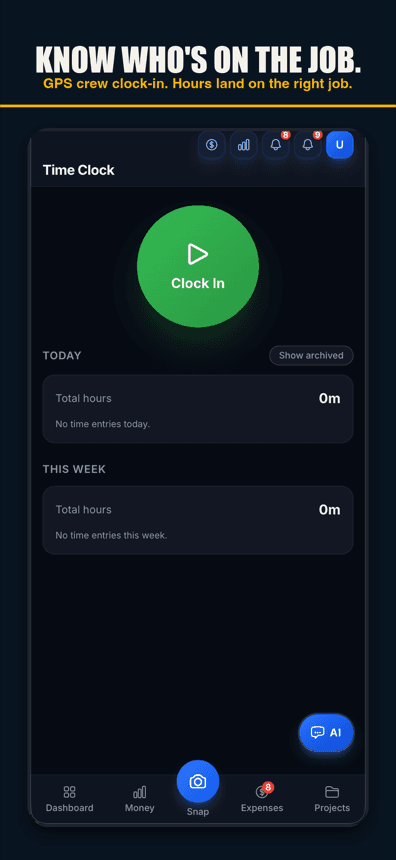
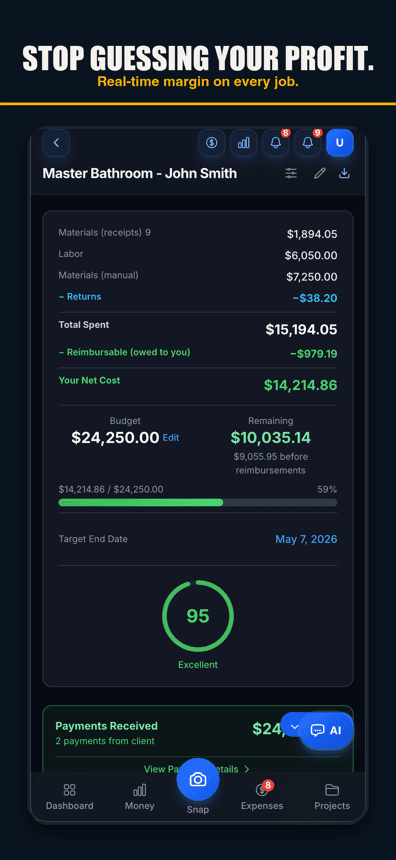
Once labor and material costs are both landing on the correct job as they happen, the job's margin can update in real time instead of waiting for someone to reconcile everything after the invoice goes out. That's the difference between finding out a job ran thin three months later at tax time, and finding out on day two while there is still a chance to adjust the next job's bid — or have the conversation with the client about the extra coat before it's a surprise on the final invoice.
What painting contractor job costing actually requires
- Labor hours per job, not per week — logged against the specific address the crew was actually painting, especially when the same day covers more than one job.
- Every material receipt, including the small ones — paint, primer, tape, plastic, brushes, rollers, and the second trip when the first run came up short.
- Sheen and brand tracked at the line-item level, since two jobs with the same square footage can have very different paint costs.
- A real bid-vs-actual comparison once the job closes, so the next bid for a similar job starts from what actually happened instead of a rule of thumb.
Painting job costing: spreadsheet, QuickBooks, or a field app
The same three options apply to painting contractors that apply to any trade, but the volume of small transactions makes the choice matter more. A spreadsheet works if every receipt and every hour gets entered the same day — realistic for one job at a time, much harder across three small jobs in a week. QuickBooks can tag expenses to a job, but the data still has to be typed in after the fact, and a $9 roll of tape from a supply-house counter is exactly the kind of receipt that never makes it that far. A field-capture app moves the tracking to where the cost happens — the jobsite and the supply counter — so the numbers are already right by the time the job closes instead of needing to be reconstructed.
| Cost driver | Where it hides | What tracks it |
|---|---|---|
| Paint & primer | Sheen/brand swings the per-gallon price | AI receipt scanning tagged to the job |
| Labor hours | Underbid, then lost across multiple jobs a day | GPS geofence clock-in/out prompts (every plan) |
| Small supply runs | Tape, plastic, brushes — paid out of pocket, forgotten | Batch receipt scanning |
| Job margin | Invisible until the invoice is long paid | Per-job profit from costs recorded so far |
Pricing
Job Cost Pro has a free tier built for exactly the kind of small painting job that makes up most of the trade's week:
| Plan | Price | Built for |
|---|---|---|
| Free | $0 | 3 projects, 50 receipts a month, full AI scanning |
| Pro | $29.99/mo | More projects and receipts for a growing crew |
| Contractor | $49.99/mo | Adds GPS geofence auto clock-in/out for crews working multiple jobsites a day |
Get started
Job Cost Pro is free on the App Store — 3 projects, 50 receipts a month, full AI scanning. No credit card. Get it here. If you want the fundamentals of what job costing is and why it matters, start with our job-costing guide, and if receipts are the part of your week eating the most time, take a closer look at the receipt scanner.
Track your next job with Job Cost Pro
Scan receipts, confirm the suggested job, and see your recorded costs against your budget. Start with the free plan in your browser or get the iPhone app.
Free plan available. Some features require a paid plan.
FAQ
How do painting contractors job cost a job?
Track labor hours, paint and material cost, and every supply run against that specific job — not the crew’s week as a whole. Compare the total against the bid once the job closes so the next similar bid starts from what actually happened.
Why is paint cost so hard to estimate accurately?
Paint cost swings with sheen, brand, and how much prep the surface actually needs. Two jobs with identical square footage can use very different gallon counts once one wall needs three coats to cover a dark color and the other needs one.
What is the biggest cost driver on a painting job?
Labor, almost always. Paint and materials are visible and usually get tracked; labor hours are easy to underbid and easy to lose across a day when the same crew works more than one job.
How do I track crew hours across multiple small painting jobs in one day?
GPS geofence clock-in and clock-out prompts a one-tap clock-in when a crew member arrives at a jobsite and clock-out when they leave (every plan), and Job Cost Pro’s Contractor tier adds opt-in automatic clock-in after a one-time location disclosure, so hours land on the correct job instead of relying on someone remembering after the fact.
How do I stop losing money on small material runs like tape and plastic?
Capture the receipt the moment it happens instead of relying on memory. AI receipt scanning photographs the receipt at the counter and suggests the job when the receipt names it or you scan at the jobsite — one tap files it, and batch receipt scanning lets you upload several at once when you’re running multiple small jobs in a week.
Is there a free tool for painting contractor job costing?
Yes. Job Cost Pro’s free tier includes 3 projects, 50 receipts a month, and full AI receipt scanning, no credit card required.