Receipt scanner for contractors
Receipt Scanner Built for Contractors — Suggests the Right Job.
General-purpose receipt apps stop at "vendor and total." Contractors need the line items, the return, the deposit vs. final payment, and the project it belongs to. We built that.
Free plan: 3 projects, 50 receipts a month. No credit card. Some features require a paid plan.
Why your current receipt app is the wrong tool
Expensify, Veryfi, Shoebozed, SparkReceipt — good apps, built for road warriors and CFOs. None of them know what a "deposit on cabinets" means or that a $200 lumber return needs to net against a $1,200 lumber receipt on the same job. Generic categorization doesn’t replace project-aware job costing.
This is the actual app
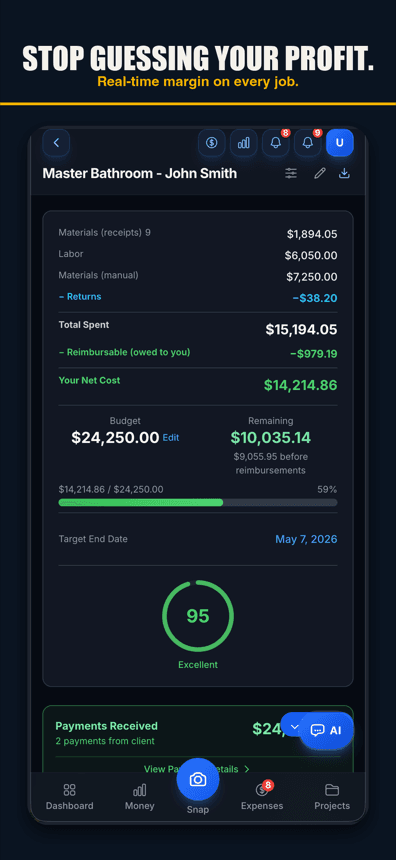
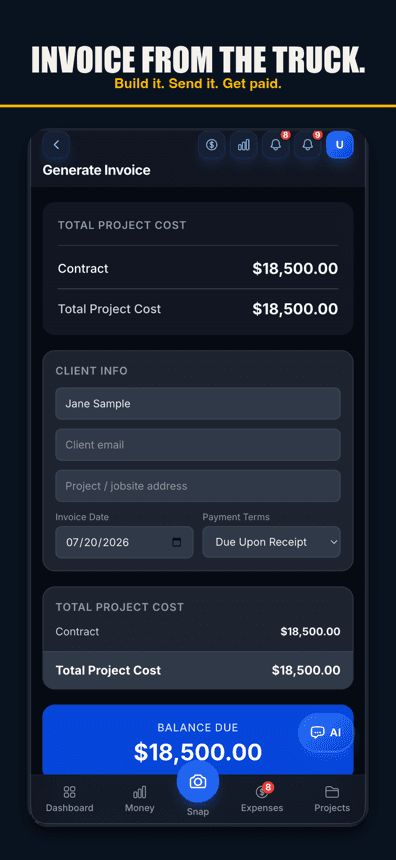
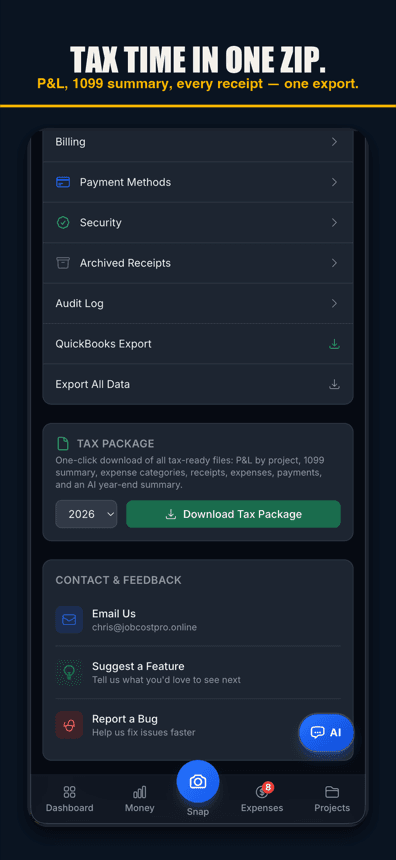
Snap once, project suggested for a one-tap confirm
The scanner reads the receipt, and the AI looks at your active jobs and recent purchases to suggest the most likely project. One tap confirms it. Wrong guess? Pick another project.
Returns and deposits handled correctly
A negative line shows up as a credit, not a separate weird transaction. A $500 cabinet deposit with a final $4,500 invoice tracks as one $5,000 cost when both receipts are filed. Margins stop lying to you.
Voice capture when your hands are dirty
Drywall mud on your fingers? Hold the mic, say the amount, vendor, and project. Done. No camera needed. The AI parses spoken cents, fractional yards, and the names of all your active projects. Voice works in browsers with speech input, like Chrome and Safari, and in the iPhone app on version 1.0.8 or newer.
Free plan: 3 projects, 50 receipts a month. No credit card. Some features require a paid plan.
Multi-page batch scan
Run a roll of supply-house receipts through in one session. Scan, swipe, scan, swipe — the queue uploads in the background while you keep working.
AI line-item extraction
Beyond total + tax, we pull line items so reports break out lumber vs. fasteners vs. subcontractor billing for the same job.
Material-return detection
A return ticket with a negative total auto-nets against the original receipt for that vendor and project — no more inflated cost reports because someone forgot to apply the credit.
How it was paid
Reads how the receipt was paid — like "VISA ****4432" — and shows it on the receipt.
Recover failed scans
Couldn’t read it? The receipt lands in a "needs attention" tray with the original photo for one-tap manual entry. Nothing gets lost.
Reimbursable tracking
Mark a receipt as reimbursable in one tap. The owner gets a clean weekly report of crew expenses to repay — no more spreadsheets.
Receipt splitting
A single Home Depot trip covering three jobs? Split the receipt across all three with the right amount on each. Your books stay clean even when the field doesn’t.
Search and audit
Every scanned receipt is searchable by vendor, amount, date, project, or text on the page. The audit log shows who scanned what and when, so disputes are quick to settle.
Free tier scans 50 receipts/month
The free plan includes 50 receipts a month. Upgrade when you need more, not before.
Simple pricing
Less than a single trip to Home Depot.
Start free. Upgrade when you're ready.
Free
3 projects, 50 receipts/month — get started free
- 3 projects
- 50 receipts/month
- AI receipt scanning
- Voice capture (web; iPhone app 1.0.8+)
- 1 tax export/year
- Basic reports
- 3 crew seats: clock in + My Pay
- Client portal
- Payroll exports
Pro
For small crews — unlimited projects & receipts, 10 crew
- Unlimited projects
- Unlimited receipts
- 10 team members
- AI scans & chat (monthly AI allowance)
- Budget alerts
- Invoice sending
- All exports (tax, CSV, PDF)
Contractor
For crews — unlimited team, auto clock-in & payroll
- Unlimited projects
- Unlimited receipts
- Everything in Pro
- Unlimited team members
- Opt-in automatic clock-in
- Run payroll & record paychecks
- Custom branding
Paid plans renew automatically at the price shown for the selected interval (monthly or yearly) until you cancel. You'll be charged in US dollars plus any applicable sales tax.
Cancel anytime in Settings → Billing — no refunds for past billing periods. Refund Policy · Terms

Who built this
Chris Sibley — remodeling contractor, Fort Worth, TX
Chris closed a $42,000 bathroom remodel thinking he’d made 30%. His accountant ran the real numbers months later: 12% — $7,500 in receipts never made it onto the job. He built Job Cost Pro so that never happens again, and still runs his remodeling company with it every day. That company is the legal entity behind this app: Salvation Home Remodeling LLC, doing business as Job Cost Pro.
FAQ
How does this compare to Expensify or Veryfi?
Expensify is built for corporate expense reports and Veryfi is built for general OCR. Both are good at what they do. Neither suggests a construction project for each receipt, handles material returns, or knows the difference between a deposit and a final payment. Different tools for different jobs.
What if the scanner gets the project wrong?
You tap the project name and pick the right one. The model learns from the correction so the same vendor + jobsite combination matches correctly next time.
Can I scan handwritten receipts?
Often, but not always — clear handwriting on a lumber-yard ticket usually reads fine. Anything the scanner can’t read lands in "needs attention" with one-tap manual entry, so nothing gets lost either way.
How do contractors keep track of receipts?
The system that survives real jobsites: capture every receipt the day you get it, tag it to the job, keep the image. That’s exactly what the scanner automates — snap it in the truck, the AI suggests the right project, one tap files it, and the photo stays attached to that job for taxes.
Can I just take photos of my receipts for taxes?
Digital copies are standard practice for business records — the key is keeping them organized by job and by year (ask your CPA about your specifics). The tax package export bundles a list of your receipts with your P&L by project and 1099 summary in one download; the receipt photos stay on each job in the app.
Is the free scanning full quality, or a trial?
Full quality. The free tier runs the same AI scanning as the paid plans — 3 projects and 50 receipts a month, no card. You upgrade for volume and seats, not for accuracy.
Does it work offline?
Yes. Scans queue locally and upload when you’re back on service. Nothing is lost.
Will my old receipts show up?
Yes, once you upload them. Pick a stack of photos and each one becomes its own receipt, or upload a PDF receipt. There is no email inbox for receipts today, so save an emailed receipt as a PDF or screenshot and upload it.
Is the photo of my receipt safe?
Stored encrypted at rest. Only you and the team members you grant access to can view. We don’t train AI on your data.
Related