Splitting One Receipt Across Multiple Jobs (the Right Way)
Every contractor running more than one job at a time has done this run: you are at the supply house for Job A, you remember Job B needs six sheets of backer board and a box of screws, so you grab them too. One cart. One checkout. One receipt. Two jobs.
Then you get back to the truck and have to decide what to do with that receipt. Most guys pick one of two bad options.
The two ways contractors get this wrong
Option one: dump the whole receipt on whichever job you were thinking about first.Job A eats $340 in materials that really belong to two different jobs. Job A's cost report now says it cost more than it did. Job B's cost report says it cost less than it did. Neither number is real, and if you bid your next tile job off Job A's inflated cost, you will bid too high and lose work you should have won. Bid your next framing job off Job B's deflated cost, and you will underbid and eat the loss.
Option two: don't bother tracking it at all.The receipt goes in the truck console, then the junk drawer, then nowhere. This is worse than option one — at least a wrongly-assigned cost is still a tracked cost. An untracked receipt is a deduction you paid for and never took, and a hole in both jobs' real numbers.
Neither option is really a choice. They are what happens when the system in front of you — a spreadsheet, a shoebox, an app that only tags one job per receipt — does not have a third option. So people default to the path of least resistance and pay for it in margin they can never see.
What a receipt actually looks like when two jobs are on it
Say you are at Home Depot for a bathroom remodel and a deck rebuild on the same street. One $340 receipt, one register tape, two jobs' worth of materials on it:
| Line item | Amount | Actually for |
|---|---|---|
| Cement backer board (6 sheets) | $102.00 | Bathroom remodel |
| Waterproofing membrane | $68.00 | Bathroom remodel |
| Tile screws, 2 boxes | $14.50 | Bathroom remodel |
| Pressure-treated 2x6, 8 count | $96.00 | Deck rebuild |
| Deck screws, 5 lb box | $41.50 | Deck rebuild |
| Post caps | $18.00 | Deck rebuild |
Dump the whole $340 on the bathroom job and its material cost is overstated by $155.50. Dump it on the deck and the bathroom job looks $184.50 cheaper than it was. Either way, one job's margin number is a lie, and the other job's margin number is a bigger lie in the opposite direction. Split it the way the receipt actually breaks down, and both jobs carry exactly what they cost. No guessing, no rounding, no job quietly subsidizing another.
Two ways to split a receipt, and when to use each
Not every mixed receipt needs a line-item breakdown. There are two honest ways to split one, and which you use depends on how the receipt reads.
- Line-item splitting — assign each individual item on the receipt to the job it was actually bought for. This is the accurate method, and it is what the worked example above does. Use it whenever the receipt itemizes clearly enough to tell which items went where — most supply-house tickets do.
- Dollar-amount splitting— divide the total by a percentage or a flat dollar figure per job, without itemizing. Useful for a bulk buy that genuinely serves two jobs in a shared ratio (a truckload of concrete split 60/40 between two foundations, say) or for a receipt with items too generic to attribute individually (a role of tape, a tube of caulk grabbed "for whatever needs it").
Either way, the receipt image itself does not need to be duplicated or re-photographed. One scan, split into however many jobs it actually paid for, each carrying its real share of the cost and its own copy of the receipt for the record.
How this works in Job Cost Pro
Job Cost Pro reads the receipt for you first — AI Receipt Scanning pulls the vendor, the line items, and the total off the photo the moment you snap it at the counter. That is the same scan that runs on every receipt. Receipt Splitting is what happens next: instead of filing that one scanned receipt to a single project, you divide it — by line item or by dollar amount — across every job it actually paid for, right there in the app before you leave the parking lot.
This is the number splitting protects
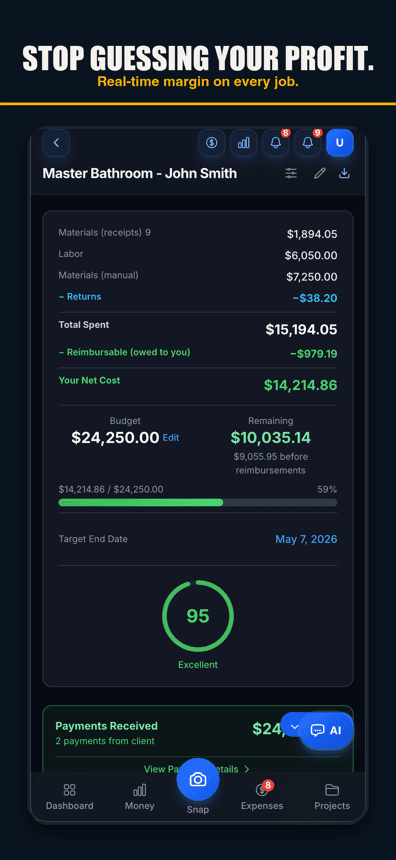
That matters because of what happens on the other side of the split. Job Cost Pro keeps real-time margin trackingrunning per job — the moment a cost lands on a project, that project's profit number moves. An unsplit receipt does not just misfile one transaction. It corrupts two live margin numbers at once: one job looks worse than it is, one looks better than it is, and you are making decisions off both while they are wrong. Split the receipt correctly and both numbers go back to being something you can actually trust and act on mid-job, not three months later when the accountant runs the real math.
Receipt Splitting is a Pro-tier feature
This is worth being straight about: Receipt Splitting is available on Job Cost Pro Pro and above — it is not part of the free tier. AI Receipt Scanning, the scan that reads the receipt in the first place, is on every tier. Splitting the result across multiple jobs is the part that requires Pro.
| Plan | Price | Receipt Splitting |
|---|---|---|
| Free | $0 | Not included |
| Pro | $29.99/mo | Included |
| Contractor | $49.99/mo | Included |
If you only ever run one job at a time, the free tier's scanning alone may be all you need. The moment you are routinely buying for more than one job on the same run — which is most contractors running two or more crews or projects at once — Pro is the tier where your cost data stops quietly lying to you.
The habit that makes splitting actually work
The feature only pays off if you use it at the counter, not later. Three habits keep it honest:
- Split before you leave the parking lot. You know which items were for which job right now. In three days you are guessing, and a guess defeats the entire point of splitting accurately.
- Default to line-item when the receipt allows it. It takes thirty more seconds than a flat percentage split and it is the difference between an estimate and an actual number.
- Use dollar-amount splitting for genuine shared buys, not as a shortcut. A load of concrete split by pour ratio is a real shared cost. A receipt you could not be bothered to itemize is not — that is the old habit wearing a new coat.
Do that consistently and every job's cost report reflects what actually went into it, down to the box of screws. Skip it, even occasionally, and you are back to one job quietly funding another without either of you knowing it.
Why this is worth fixing
A contractor running multiple jobs makes shared supply runs constantly — it is more efficient than a separate trip per job, and nobody is going to stop doing it. The fix was never "stop combining trips." It was always making the receipt tell the truth after the fact. Job costing only works if the cost lands on the job that actually incurred it. A shared receipt that is not split is a small, quiet crack in every report built on top of it — and it never announces itself until a margin number that should have been 28% shows up as 12%, and you cannot figure out why.
Job Cost Pro is free on the App Store — 3 projects, 50 receipts a month, full AI scanning. No credit card. Get it here. When you are running enough jobs at once that one receipt starts covering two of them, Receipt Splitting on Pro is what keeps both job costs honest. For the bigger picture on why any of this matters, see our job-costing guide.
Track your next job with Job Cost Pro
Scan receipts, confirm the suggested job, and see your recorded costs against your budget. Start with the free plan in your browser or get the iPhone app.
Free plan available. Some features require a paid plan.
FAQ
How do I split one receipt between two jobs?
Scan the receipt once, then divide it either by line item (assign each specific item to the job it was bought for) or by dollar amount (a percentage or flat split for a genuinely shared purchase). Line-item splitting is more accurate when the receipt itemizes clearly; dollar splitting works for bulk buys like a shared load of concrete.
What happens if I put a shared receipt on just one job?
That job’s cost is overstated by whatever belonged to the other job, and the other job’s cost is understated by the same amount. Both margin numbers become wrong in opposite directions, and any bid you build off either number will be off.
Is receipt splitting available on Job Cost Pro’s free tier?
No. AI Receipt Scanning — reading the vendor, items, and price off a photo — is available on every tier, including free. Splitting that receipt across multiple jobs requires Pro ($29.99/mo) or above.
Should I split every receipt or just the big ones?
Split any receipt that actually paid for more than one job, regardless of size. A $14 box of screws misfiled to the wrong job is a small error, but a habit of skipping the small ones is how a job’s real cost quietly drifts from its reported cost.
Does splitting a receipt change how it looks for taxes or QuickBooks?
No — the full amount and the original receipt image are still preserved for your records. Splitting only changes which job each portion of the cost is attributed to internally, so your job-level margins are accurate while the total spend stays intact for export and tax purposes.