How to Track Job Costs From Your Phone
Every job costing method ever built for a desk fails the same way in the field: it assumes you'll sit down later and enter what happened. You won't. Not because you're lazy — because you're driving to the next job, unloading lumber, or standing in a supply house line with three other contractors behind you. The receipt goes in the console. The mental note evaporates by lunch. And the spreadsheet you swore you'd update Sunday night gets one honest hour before the game comes on, and it shows.
The only version of job costing that survives real contractor life is the one that happens where the money actually leaves your hand — on the phone that's already in your pocket.
Why desktop job costing loses to the truck
A desktop spreadsheet or a QuickBooks session at night has one structural problem: it depends on you remembering everything that happened between clock-in and clock-out. That is a lot to ask after ten hours on your feet. You'll remember the $600 material order. You will not remember the $14 fitting from the second Home Depot run, or the $22 you paid a helper in cash for two hours of demo. Those are exactly the amounts that disappear into "miscellaneous" — or nowhere at all.
QuickBooks alone has the same gap, just dressed up better. It can absolutely tag an expense to a job and a class. What it can't do is meet you at the counter. Nobody opens a full accounting program standing next to a forklift, and QuickBooks was never built to expect that. It's built for the office, and the office is where costs get entered — days after they happened, from memory, from a pile of receipts that's already missing the small ones. By the time the entry happens, the leak already happened too.
Small receipts are where margin dies. Not the $600 order — you'll remember that one. It's the five $15 to $40 runs in a week that never make it into anything, because none of them individually feels worth writing down, and collectively they can eat a real chunk of what a job was supposed to make.
The mobile workflow that actually holds up
Job costing that survives a real day has four moves, and every one of them happens on the phone, in the moment, not reconstructed later.
1. Snap the receipt at the counter
You're standing at the register. Take the photo before you walk out the door. Job Cost Proreads the vendor, the line items, and the total off the photo and suggests the right project when the receipt names it (or you scan at the jobsite) — one tap confirms, no typing, no waiting until you're home. The cost lands on the job before you're back in the truck. The receipt scanner is built around exactly this moment — the counter, not the desk.
Snap it, say it — the cost lands on the job while you're still standing there
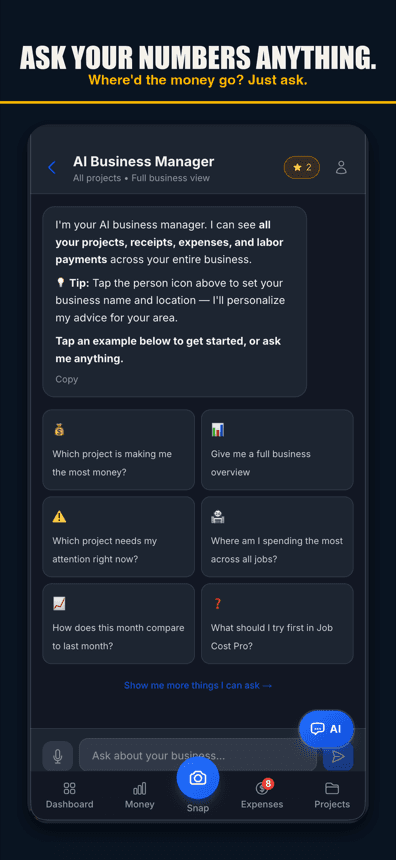
2. Say the expense out loud when your hands are full
Sometimes you can't snap a photo — you're carrying tile, or the receipt is a cash handshake with a helper and there's no paper at all. Voice-to-expense logging handles that: say what you spent and on what, in English or Spanish, without typing, and it's captured (voice works in browsers with speech input, like Chrome and Safari, and in the iPhone app on version 1.0.8 or newer). The point isn't the gadget factor. It's that the cost gets written down the moment it happened, instead of competing with everything else you have to remember by the end of the day.
3. Check the job's live margin between tasks
This is the step a spreadsheet flatly cannot do. Between finishing the tile and starting the trim, pull out your phone and look at where the job actually stands — budget, spend-to-date, margin so far, not a guess. If the number looks wrong, you find out with two weeks of work left to fix it, not at the final invoice when the job is already closed and there's nothing left to adjust.
Live margin, checked from the jobsite, not reconstructed at tax time
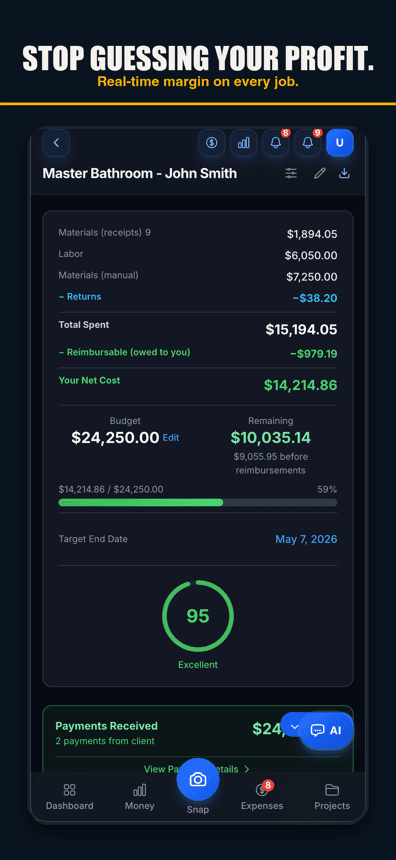
That's the real value of mobile job costing. It's not that the app is on a phone instead of a laptop. It's that the information is available at the moment you can still act on it — mid-job, not post-mortem.
4. Send the invoice from the truck
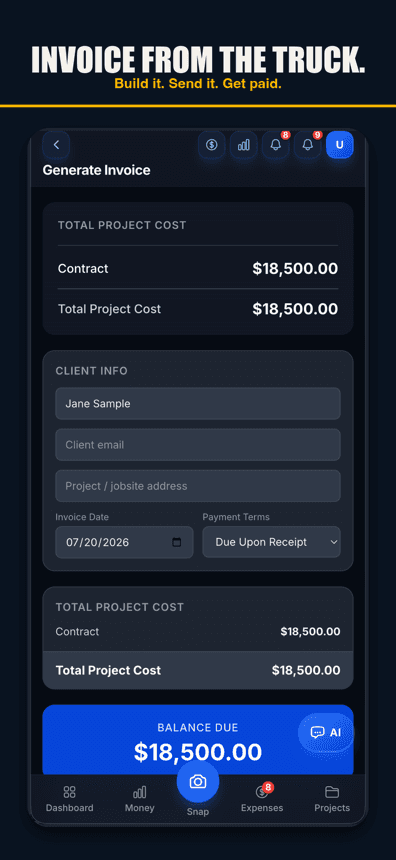
Job's done, or a draw is due. Build the invoice and send it from wherever you are — the driveway, the truck, the next job's parking lot — instead of waiting until you're back at a desk with a laptop open. Job Cost Pro's Pro tier ($29.99/mo and up) sends the invoice by email or link, so the client sees it and can respond without a phone-tag chain. The client portal for the whole job is on every plan.
Build it and send it before you leave the driveway
What breaks when the tool is desktop-only
The failure mode isn't dramatic. It's not that a desktop tool is bad software. It's that it's in the wrong place at the moment the cost happens. A few concrete ways that plays out:
- The receipt gets lost before it gets entered.Truck console, shirt pocket, glove box — paper receipts have a short half-life on a jobsite. If entry happens days later, some percentage of them simply won't exist anymore.
- Cash and small vendor payments never make it in at all.There's no receipt to lose because there was no receipt to begin with — just a memory that fades by the time you're at a keyboard.
- Margin visibility arrives too late to matter.A desktop-only system tells you a job ran hot after it's finished. By then the crew's off the job, the material's already bought, and there's nothing left to change — only a number to be disappointed by.
- Data entry becomes a second, unpaid job.An hour of typing receipts at night, every night, is real labor that never shows up on any invoice. It's also the first thing that gets skipped when you're tired, which is most nights.
None of that is a knock on QuickBooks — it's an excellent ledger. It's just not a capture tool, and capture is where job costing actually gets won or lost. See our job-costing guidefor the full breakdown of what should go into a job's cost in the first place.
What mobile job costing looks like over a real week
- Monday morning: material run, receipt snapped at the counter before loading the truck.
- Tuesday: helper paid cash for a half-day of demo, logged by voice on the drive home.
- Wednesday: quick margin check on lunch break — the job's tracking three points under bid, plenty of runway left to tighten it.
- Thursday: a second material run for a fixture nobody planned on, snapped the same way as Monday.
- Friday: job wraps, invoice built and sent from the truck before you're even off the property.
Nothing in that week required sitting down. Every cost landed on the job within minutes of happening. That's the difference between job costing that's real and job costing that's a good intention.
Start on the free tier
Job Cost Pro is free on the App Store — 3 projects, 50 receipts a month, full AI scanning. No credit card. Get it here. It's a real App Store app (id 6764372462), and it works from any phone — no separate setup, no waiting for the desk.
Track your next job with Job Cost Pro
Scan receipts, confirm the suggested job, and see your recorded costs against your budget. Start with the free plan in your browser or get the iPhone app.
Free plan available. Some features require a paid plan.
FAQ
Can I track job costs entirely from my phone?
Yes. Receipt photos, voice-logged expenses, live per-job margin, and invoicing all happen on the phone in Job Cost Pro — nothing requires sitting down at a desktop.
Is a phone app accurate enough for real job costing, or do I need a desktop tool too?
The phone is actually more accurate, not less — because the cost gets captured the moment it happens instead of being reconstructed from memory later. A desktop tool only sees what you remember to type in after the fact.
How do I log a cash expense with no receipt on my phone?
Say it out loud. Voice-to-expense logging captures a spoken expense — what you spent and what job it belongs to — in English or Spanish, without typing, with no paper receipt required. Voice works in browsers with speech input, like Chrome and Safari, and in the iPhone app on version 1.0.8 or newer.
Why does QuickBooks alone not work for tracking job costs from the field?
QuickBooks can tag an expense to a job once it is entered, but it is built for the books, not the counter — nobody opens it standing at a supply house register. The gap between when the cost happens and when it gets entered is where receipts and cash payments get lost.
Can I check a job's profit margin while I'm still working on it?
Yes — that is the point of doing this on a phone instead of a spreadsheet. Job Cost Pro shows live budget, spend, and margin per job, so you can check it between tasks and still have time to fix a job that is running hot.
Can I send an invoice from the jobsite instead of waiting until I get home?
Yes. Job Cost Pro's Pro tier ($29.99/mo and up) sends invoices, so you can build and send an invoice from the truck or the driveway the same day the work finishes. The client portal is on every plan.