QuickBooks vs a Dedicated Job Costing App: When to Switch
I am a remodeling contractor in Fort Worth, and my books have lived in QuickBooks the whole time I have run this company. So this is not a "QuickBooks is outdated, buy our app instead" post — I would be lying, and you would find out the first time your accountant asked for a P&L. This is the honest version of a question I get asked a lot: when does QuickBooks alone stop being enough, and what do you actually add?
What QuickBooks is genuinely good at
Give credit where it is due. QuickBooks ties your books out — income, expenses, invoices, sales tax, payroll, and a P&L your accountant can file straight from. Once a cost is tagged to a project, the profitability report does the math correctly. And your accountant already knows the software, so there is no retraining, no exports nobody trusts, no arguments come tax season. If you want the full setup — Projects on Online, jobs under customers on Desktop, the reports worth opening — we cover all of that in our full QuickBooks job costing guide.
None of that is a knock on the software. QuickBooks does the accounting job as well as anything a small contractor can afford. The question this post answers is narrower: is accounting software the right tool to capture a cost the second it happens, standing in a supply-house line with wet boots and a full cart?
The real distinction: built for the books vs. built for the field
QuickBooks was designed so numbers already in the system add up correctly. It was never designed for the moment the cost is created — the counter, the truck, the jobsite. A dedicated job costing app exists for exactly that moment: it captures the cost where it happens, lets you confirm the job on the spot, and only later does it need to touch the books at all.
That is the whole division of labor. QuickBooks answers "what did this job actually cost, on the record, for the accountant and the IRS." A field app answers "what is this job costing me right now, today, while I can still do something about it." Different jobs, both real, and most contractors need both answers.
| QuickBooks | A dedicated field app | |
|---|---|---|
| Built for | The books — P&L, invoices, taxes, payroll | The jobsite — capturing cost the moment it happens |
| Where data enters | A desk, keyed in from a receipt or a bill | The supply-house counter, the truck, the job |
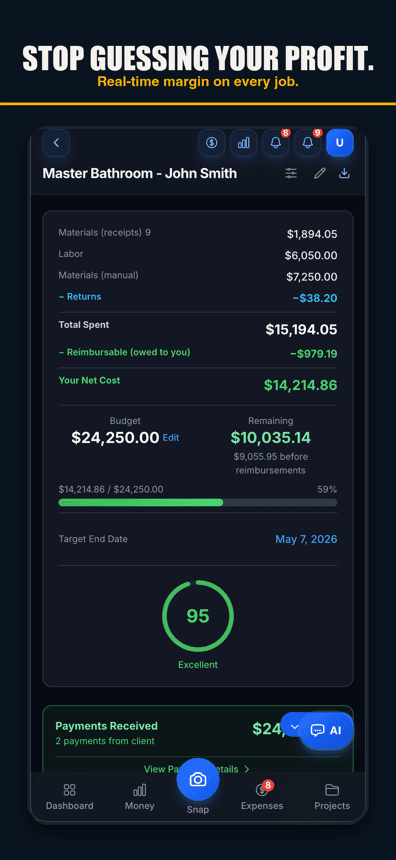
| Margin freshness | As current as the last data-entry session | Live — updates the moment a receipt is scanned |
| Receipt capture | Photo, queued for desk review and manual coding | AI reads it and suggests the job when it names it or you scan at the jobsite — one tap files it |
| Hands-full capture | Not built for it | Voice-to-expense — say it out loud, you check it and tap save (web; iPhone app 1.0.8+) |
| Who uses it | You or your bookkeeper, at a desk | Whoever is standing on the job — often the crew |
| The books | This is where they live | Exports clean into QuickBooks — not a replacement |
Where QuickBooks alone starts to strain
QuickBooks does not fail loudly. It fails quietly, by only knowing what somebody typed in. A few patterns show up over and over with contractors I talk to:
- The margin you see is stale. QuickBooks can only report costs that already made it into the system. Mid-job, the number that matters — am I making money on this job today — is only as fresh as the last time somebody sat down and entered receipts.
- Small receipts are where it leaks. Nobody forgets the $4,000 lumber order. Everybody forgets the $38 fitting run. On one $42,000 bathroom remodel of mine, the small stuff I never got around to entering added up to $7,500 — the gap between the 30% margin I bid and the 12% I actually made. QuickBooks reported the room it could see; it just could not see the whole room.
- Nobody enters receipts from the field.QuickBooks' own mobile capture can photograph a receipt, but it still queues for review and manual coding at a desk. That is fine for an office manager working through a stack. It is not how a crew standing at the counter actually behaves.
- Labor without payroll takes workarounds.Materials and subs tag to a project easily enough. Your own crew's hours need either QuickBooks Payroll or someone building a journal entry by hand every week.
None of that means QuickBooks is broken. It means the field is a different job than the books, and QuickBooks was only ever built for one of them.
What a dedicated job costing app actually adds
The value of a field app is not that it is fancier software. It is that it moves capture to the moment the cost exists, instead of the moment somebody finally sits down to enter it.
- AI receipt scanning. Snap the receipt at the counter and it is read, and it suggests the job when the receipt names it or you are at the jobsite — one tap files it before you are back in the truck — no queue, no desk review later.
- Voice-to-expense. Hands full, gloves on, standing in a doorway holding drywall — say the cost out loud and it logs to the job. That is not a workflow QuickBooks was ever asked to support.
- Per-job profit so far. The margin on the screen updates as costs land, not on a lag. That is the number you actually need mid-build, because it is the only version of the number you can still act on.
Job Cost Pro is built around exactly this — I built it after that $7,500 bathroom taught me the setup was never the hard part; the daily capture habit was. For the general case of what job costing even means before you pick any tool, see our job-costing guide.
Live in the field, clean on export
The bridge: how the two actually connect
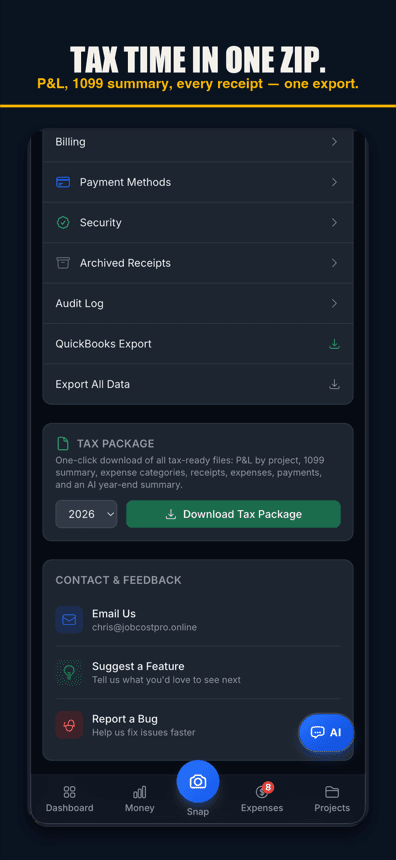
The two systems do not compete for the same job — they hand off. Costs get captured in the field the day they happen, tagged to the right project, and then export cleanly into QuickBooks for the books: a job-tagged CSV for QuickBooks Online, an IIF file for Desktop, or a full bundle with receipt images for your accountant. Your bookkeeper reviews and imports instead of retyping a shoebox. The full walkthrough of that export, including the exact columns bookkeepers ask for, is here: how to export receipts to QuickBooks.
That handoff is the whole point of pairing the two. QuickBooks never has to become a field tool, and a field app never has to become accounting software. Each one does the job it is actually good at.
When QuickBooks alone is honestly enough
Say this plainly, because it is true: if you run one job at a time, buy from two vendors, and genuinely enter every receipt the day it happens, QuickBooks by itself is enough. That is not a small "if" — it describes very few contractors past their first year or two — but for the contractor who fits it, adding another app is just another thing to check.
When it is time to add a field app
The signal is not a calendar date, it is a pattern. If any of these sound like your month, the gap is worth closing:
- You are running two or more jobs at once and the receipts are stacking up unentered.
- You have been surprised by a job's real margin after the fact — the bid said one number, the accountant found another.
- Small receipts — fitting runs, fastener trips, the second Home Depot run — are the ones that go missing.
- You want to know where a job stands this week, not at month-end.
- Your crew is on the truck all day and nobody is realistically sitting at a keyboard entering costs from the field.
If two or more of those are true, the books are not your problem — the capture is. That is exactly what a dedicated app is built to fix, and it fixes it without asking you to give up QuickBooks or retrain your bookkeeper.
What switching actually looks like
"Switch" is the wrong word for most contractors — "add" is closer to what happens. Keep QuickBooks exactly as it is for the books. Put a field app on the truck for capture. Set a rhythm — weekly or monthly — for exporting the field-captured costs into QuickBooks so the bank feed can act as a cross-check. That is the whole migration. Nothing about your accountant's workflow changes; the only thing that changes is where the data comes from and how fresh it is by the time it lands.
Job Cost Pro's pricing scales with that path: Free ($0 — 3 projects, 50 receipts a month, full AI scanning) is enough to try the field-capture habit on a real job. Pro ($29.99/mo) removes those limits for one crew running steadily. Contractor ($49.99/mo) is where the QuickBooks export lives — one-tap CSV for Online, IIF for Desktop, or a full ZIP bundle for your accountant. None of those tiers touch your accounting — they only make sure the numbers reaching QuickBooks are complete.
The honest bottom line
QuickBooks is not the weak link — capture is. Keep QuickBooks for what it does well: the books, the taxes, the reports your accountant trusts. Add a field app for what QuickBooks was never built to do: catching the cost the instant it happens, before it turns into a forgotten receipt in a truck console. Run both, and the number in QuickBooks finally matches the job you actually ran.
Job Cost Pro is free on the App Store — 3 projects, 50 receipts a month, full AI scanning. No credit card. Get it here and keep QuickBooks doing exactly what QuickBooks is good at.
Track your next job with Job Cost Pro
Scan receipts, confirm the suggested job, and see your recorded costs against your budget. Start with the free plan in your browser or get the iPhone app.
Free plan available. Some features require a paid plan.
FAQ
Is there a good alternative to QuickBooks for job costing?
The honest answer for most contractors is not a replacement but a pairing: keep QuickBooks for the books and add a dedicated field app that captures costs the moment they happen, then exports clean into QuickBooks. Contractors who never needed full accounting software can replace it outright, but most keep both.
Do I need to replace QuickBooks to fix my job costing?
Almost never. QuickBooks is good accounting software — the gap is field capture, not the books. A dedicated job costing app fills that gap and exports back into QuickBooks; nothing about your accountant’s workflow has to change.
What is the real difference between QuickBooks and a job costing app?
QuickBooks is built for the books: it reports profit per job once costs are entered. A dedicated job costing app is built for the field: it captures the cost the moment it happens with AI receipt scanning or voice-to-expense, and shows live per-job margin instead of a number that is only as fresh as the last data-entry session.
When should a contractor add a dedicated job costing app to QuickBooks?
When receipts are stacking up unentered, when a job’s real margin has surprised you after the fact, or when you want to know where a job stands this week instead of at month-end. Running two or more jobs at once with a crew that is never at a keyboard is the clearest signal.
Can QuickBooks alone handle job costing for a small contractor?
Yes, if you run one job at a time, buy from a couple of vendors, and genuinely enter every receipt the day it happens. That describes very few contractors past their first year or two, but for the ones it fits, QuickBooks Plus by itself is enough.
Does adding a job costing app mean giving up QuickBooks?
No. A dedicated app is not accounting software — it will not file your taxes or run your general ledger. It captures field costs and exports QuickBooks-compatible CSV or IIF files so the two work together as one system.