Cost-plus invoicing
Cost-Plus Only Works With an Open Book.
Cost-plus billing means the client pays what the job actually cost, plus your fee. The model lives or dies on proof: every dollar you bill needs a receipt behind it, or trust erodes and every invoice becomes a negotiation. This app builds cost-plus invoices where each line carries its receipt image — because its founder bills his own construction clients this way.
Free forever — 3 projects, 50 receipts a month. No credit card.
The model is fair. The paperwork is brutal.
On paper, cost-plus is the fairest deal in construction: the client carries the real costs, you get paid a known fee, and nobody pads a bid to cover the unknowns. In practice it collapses under paperwork — a hundred receipts a month that all have to be found, matched to the job, totaled, and defended line by line when the client asks "what’s this $412?" If the proof takes hours to assemble, it doesn’t get assembled, and the trust the model depends on leaks away.
This is the actual app
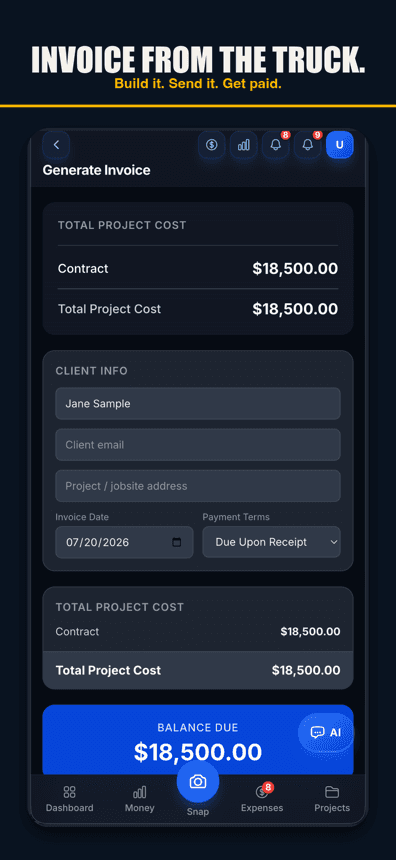
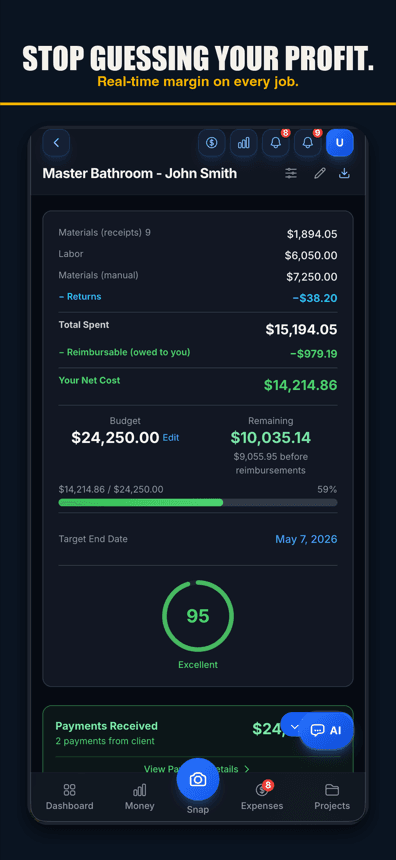
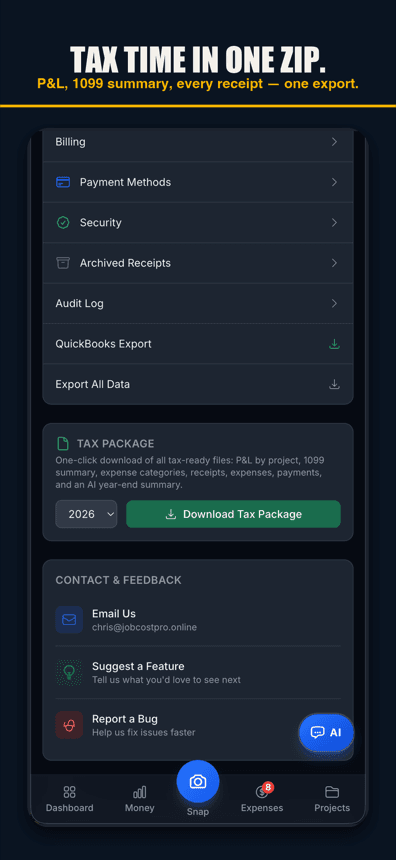
On the App Store, free to start
The free tier runs 3 active jobs with 50 receipts a month and full AI scanning — enough to run one real cost-plus project and see whether the open-book workflow earns its keep. No card.
Get it on the App StoreNew on the App Store — free tier, no card required.
Proof, attached automatically
Every line has its receipt
Costs flow onto the invoice from the job’s scanned receipts — and the receipt image rides along. "What’s this $412?" becomes a tap, not a phone call.
The fee calculates itself
Percentage fee on real costs, or a fixed fee — either way it’s computed from the job’s live numbers, not a spreadsheet you rebuild at midnight.
The client sees an open book
Share a client view showing costs with proof. Clients who can see the receipts stop wondering what they’re paying for — that’s the entire promise of cost-plus, kept.
Free forever — 3 projects, 50 receipts a month. No credit card.
What you get
AI receipt scanning
Every job cost captured in the field, line items read, filed to the job with one tap.
Receipt-backed invoice lines
The proof image is attached to the cost it documents.
Client share view
A read-only open book for the client — costs, proof, running total.
Fee on real costs
Percentage or fixed fee computed from the job’s actual spend.
Labor on the invoice
Crew hours land on the job at real cost and bill through cleanly.
Returns handled
A returned item credits the job — the client never pays for what went back.
Payment tracking
Draws, deposits, and balances per job, with history.
Tax package export
The whole open book — P&L by job and a list of your receipts — in one download.
What cost-plus invoicing is, in one breath
A cost-plus (or "cost plus fee") invoice bills the client for the actual, documented costs of the work — materials, labor, subcontractors, fees — plus an agreed markup: either a percentage of those costs or a fixed fee. The invoice’s job is to make "actual and documented" true. That means itemized costs, receipts available for every line, returns credited back, and the fee computed in the open.
Run the math on a small cost-plus job
Illustrative example: a garage conversion runs $20,000 in documented hard costs — $8,400 materials across 61 receipts, $9,200 labor, $2,400 subs. The agreement is cost plus 15%. The invoice shows the costs by category, each line traceable to its receipts, a $3,000 fee line, and a $23,000 total. The client can open any line and see the lumber ticket behind it.
Now imagine assembling that by hand: 61 receipts photographed, matched, totaled, and formatted — call it three evenings, done monthly. That administrative tax is why contractors quietly abandon cost-plus and go back to padded fixed bids. Automating the proof is what makes the fair model affordable to run.
Draws, deposits, and the running balance
Real cost-plus jobs rarely settle in one invoice at the end — they bill in draws as costs accumulate, often against a deposit paid up front. That bookkeeping is where spreadsheets fall apart: which costs landed in draw two, what part of the deposit is still unapplied, what the client’s true running balance is today. The app keeps the job’s payment history and balance next to its cost history, so each draw bills the costs since the last one and the balance line on every invoice is simply true. When the client asks "where are we," the answer is a screen, not an afternoon.
Why we built this one honestly
The founder of this app is a remodeling contractor who bills real construction clients on cost-plus. The receipt-proof invoice exists because he needed it — clients asked what a number was, and the answer had to be a tap away. That’s also the honest limitation: this is a money tool. It doesn’t write your cost-plus contract (talk to your attorney), doesn’t estimate, and doesn’t schedule. It makes the billing side of a cost-plus agreement fast, provable, and calm.
Free to run your first open-book job
3 active jobs and 50 receipts a month free, AI scanning included. Bigger cost-plus operations upgrade for volume — Pro $29.99/month, Contractor $49.99/month with crew seats.
Simple pricing
Less than a single trip to Home Depot.
Start free. Upgrade when you're ready.
Free
3 projects, 50 receipts/month — get started free
- 3 projects
- 50 receipts/month
- AI receipt scanning
- Voice capture (web; iPhone app 1.0.8+)
- 1 tax export/year
- Basic reports
- 3 crew seats: clock in + My Pay
Pro
For small crews — unlimited projects & receipts, 10 crew
- Unlimited projects
- Unlimited receipts
- 10 team members
- AI scans & chat (monthly AI allowance)
- Budget alerts
- Client portal
- Invoice sending
- All exports (tax, CSV, PDF)
Contractor
For crews — unlimited team, auto clock-in & payroll
- Unlimited projects
- Unlimited receipts
- Everything in Pro
- Unlimited team members
- Opt-in automatic clock-in
- Payroll exports
- Custom branding
Paid plans renew automatically at the price shown for the selected interval (monthly or yearly) until you cancel. You'll be charged in US dollars plus any applicable sales tax.
Cancel anytime in Settings → Billing — no refunds for past billing periods. Refund Policy · Terms

Who built this
Chris Sibley — remodeling contractor, Fort Worth, TX
Chris closed a $42,000 bathroom remodel thinking he’d made 30%. His accountant ran the real numbers months later: 12% — $7,500 in receipts never made it onto the job. He built Job Cost Pro so that never happens again, and still runs his remodeling company with it every day. That company is the legal entity behind this app: Salvation Home Remodeling LLC, doing business as Job Cost Pro.
FAQ
What is cost-plus invoicing?
Billing the client for the job’s actual documented costs — materials, labor, subs — plus an agreed fee, either a percentage of costs or a fixed amount. The invoice itemizes the costs and the fee separately, with proof available for every cost line.
What should be attached to a cost-plus invoice?
Proof of every cost: receipt images for materials, labor records for hours, sub invoices for subcontract work, with returns credited. This app attaches the receipt image to each line automatically as costs are scanned to the job.
How is the fee calculated?
However your agreement says — a percentage of documented costs or a fixed fee. The app computes a percentage fee from the job’s live cost total, so the fee line is always consistent with the costs shown.
Do clients see my receipts?
Only if you share the client view — a read-only open book for that job showing costs and their proof. Many contractors find disputes nearly disappear once clients can check lines themselves.
Does this write my cost-plus contract?
No — the contract is between you and your attorney. This app runs the billing side of the agreement: capturing costs with proof and turning them into clean cost-plus invoices.
Related
No credit card. No demo. No contract.
Run one job
with a truly open book.
Start freeFree — 3 jobs, 50 receipts a month, AI scanning included.