Buildertrend alternative
Buildertrend Alternative — Built for Solo Contractors and Small Crews.
If you mostly need to know what each job really costs, Job Cost Pro starts free, and Contractor is $49.99/month plus any applicable sales tax.
Free plan: 3 active jobs at a time, 50 receipts a month. No credit card. Some features require a paid plan.
Job costing without a big platform
If you are a solo contractor, a 3-person remodel crew, or a specialty trade running 1 or 2 jobs at a time, you may not need a full construction platform. Job Cost Pro does one job well: it tells you what each job really costs, from the receipts you snap in the field. Sign up yourself, free. For Buildertrend's current prices and plans, ask Buildertrend.
Self-serve sign-up
Sign up, name a job, scan a receipt. No demo. No contract. Cancel any time.
Made for the truck
Use it from your phone in the field. Voice capture logs an expense without typing (voice works in browsers with speech input, like Chrome and Safari, and in the iPhone app on version 1.0.8 or newer).
Free plan
Free plan: 3 active jobs at a time and 50 receipts a month. Run a real job through it before you spend a dollar.
Job Cost Pro vs Buildertrend
Here is what Job Cost Pro includes. We do not list Buildertrend's prices or features here because we could not check them on buildertrend.com; ask Buildertrend for their current details.
| Feature | Job Cost Pro | Buildertrend |
|---|---|---|
| Starting price | $0 (Free plan) | Ask Buildertrend |
| Contractor price | $49.99/mo plus any applicable sales tax (Contractor) | Ask Buildertrend |
| Onboarding fee | None | Ask Buildertrend |
| Sign up without a demo | Yes — self-serve | Ask Buildertrend |
| Contract | Month-to-month | Ask Buildertrend |
| Per-user fees | No — unlimited crew on Contractor and up | Ask Buildertrend |
Buildertrend column: we could not check buildertrend.com (October 8, 2026), so we make no claim about its prices, fees, contracts or features. Job Cost Pro prices are list prices.
Independent comparison. Job Cost Pro is not affiliated with or endorsed by Buildertrend.
 Get it onGoogle PlayFreeGoogle Play: US only.
New on the App Store — free tier, no card required.
When to look further
If you run many jobs at once with a full office, project managers and detailed scheduling, you may want a full construction-management platform. Ask Buildertrend what it includes for your size of business.
What Job Cost Pro offers
AI receipt scanning in the field, a phone app, a Free plan and month-to-month plans — at a price that fits a contractor running real jobs.
AI receipt scanning + voice capture
Snap or speak. The AI parses line items and returns. It suggests the job when the receipt names it or you scan at the jobsite; one tap confirms it.
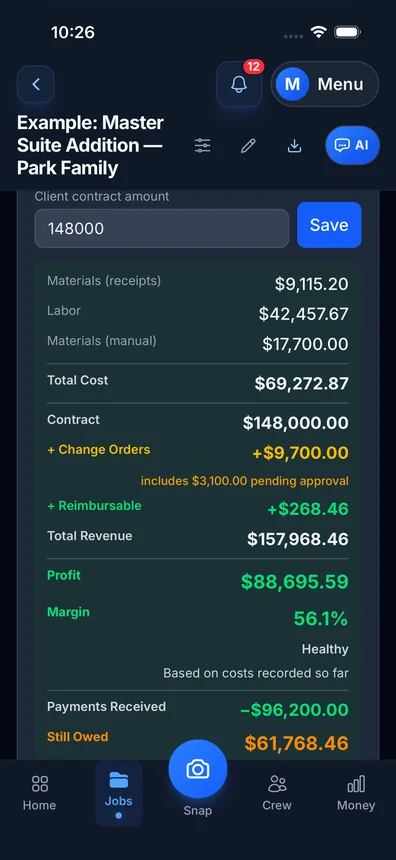
Per-job P&L from costs recorded so far
Gross profit so far and budget vs actual on every job, updated as each cost is recorded in the field.
GPS clock-in and mileage
Geofenced one-tap clock-in in the iPhone app (Android and web: clock in by hand), a 12-hour backstop for forgotten shifts, IRS-rate mileage logging for tax season — on every plan. Opt-in automatic clock-in (iPhone app) is on the Contractor tier and up.
Invoices + client portal
Make an invoice with your bank or check details. On every plan, a client portal link shows your client what they owe and what they have paid. On Pro, email the invoice with its own page; your logo is on it with Pro, your colors with Contractor and up.
Bilingual app and AI
Spanish on most screens plus an AI that responds in the user's preferred language — important for crews where English isn't the first language.
No per-user fees on Contractor and up
Unlimited crew included on the Contractor tier and up; Contractor is $49.99/month plus any applicable sales tax. No per-seat charges as the crew grows.
Plans and pricing
Free for 3 active jobs at a time. Pro at $29.99/mo plus any applicable sales tax, for unlimited jobs. Contractor at $49.99/mo plus any applicable sales tax, for unlimited crew and opt-in automatic clock-in in the iPhone app. Business: $149.99/mo plus any applicable sales tax, with 50-photo receipt batches. Cancel any time.
Simple pricing
Start free. Upgrade when you're ready.
Free
3 active jobs at a time, 50 receipts/month — get started free
- 3 jobs
- 50 receipts/month
- AI chat: 10 messages a month (new each month); 3 per job, never reset
- Help chat: 25 messages/month for you, 15 for each crew member
- AI receipt scanning
- 50 AI actions a month
- 1 tax package/year
- Basic reports
- 3 crew seats: clock in + My Pay
- Client portal
- Payroll exports
- Up to 10 photos per invoice
- Add up to 50 job photos at a time
Pro
For small crews — unlimited jobs & receipts, up to 10 team members
- Unlimited jobs
- Unlimited receipts
- Help chat: 100 messages/month for you, 50 for each crew member
- 10 crew members
- AI receipt scans, AI chat & AI actions: no monthly count
- Invoice sending
- Your logo on invoices
- Unlimited tax packages + QuickBooks export
- Up to 25 photos per invoice
- Add up to 50 job photos at a time
Contractor
For crews — unlimited team, automatic clock-in (iPhone app; opt-in for each crew member) & payroll records
- Unlimited jobs
- Unlimited receipts
- Help chat: 250 messages/month for you, 100 for each crew member
- Everything in Pro
- Unlimited team members
- Automatic clock-in (iPhone app; opt-in for each crew member)
- Track payroll & record paychecks — the app never sends money
- Custom colors & tagline
- Up to 50 photos per invoice
- Add up to 100 job photos at a time
Business
Everything in Contractor, plus 50-receipt scan batches
- Unlimited jobs
- Unlimited receipts
- Help chat: 1000 messages/month for you, 500 for each crew member
- Everything in Contractor
- Scan up to 50 receipt photos at once
- Up to 100 photos per invoice
- Add up to 100 job photos at a time
Website plans renew automatically at the price shown for the selected interval (monthly or yearly) until you cancel, and are charged in US dollars plus any applicable sales tax. Business is monthly only. If we change the price of a website plan, we email you at least 30 days before your next renewal. Plans purchased in the iPhone app are billed by Apple in your App Store currency.
Website plans: cancel anytime in Settings → Billing — iPhone app plans: cancel in iPhone Settings → Subscriptions at least 24 hours before renewal. All sales are final; no refunds except a double charge, or a charge after you cancelled: a renewal of a plan you had already cancelled before the renewal date, or the first charge of a free trial you cancelled before it ended (website purchases; tell us within 30 days). App Store purchases: Apple handles refunds (Refund Policy 3c). Bought on our website before October 22, 2026? Older refund terms may apply. Refund Policy · Terms

Who built this
Chris Sibley — remodeling contractor, Fort Worth, TX
Chris closed a $42,000 bathroom remodel expecting a 50% margin. He made 32% — about $7,500 gone, in costs he had not counted on the job. He built Job Cost Pro after that job, and still runs his remodeling company with it every day. That company is the legal entity behind this app: Salvation Home Remodeling LLC, doing business as Job Cost Pro.
FAQ
How much does Job Cost Pro cost?
Free for 3 active jobs at a time and 50 receipts a month. Paid plans start at $29.99/month plus any applicable sales tax; Contractor is $49.99/month plus any applicable sales tax, with no setup fee. For Buildertrend's prices, ask Buildertrend.
Do I need to talk to sales?
No. Sign up at /login, name your first job, scan a receipt. There's no demo gate, no implementation call, and no contract length to lock you in.
What if I outgrow Job Cost Pro?
If you scale to a large operation with project managers, detailed scheduling and complex bid pipelines, a full construction platform may be a better fit for that profile.
Can I import data from Buildertrend?
There is no one-click Buildertrend import today. Add your open jobs in a few taps and snap receipts as they come in; your costs build up from there.
Is there a free plan?
Yes. Job Cost Pro's Free plan is a plan, not a trial — 3 active jobs at a time and 50 receipts a month.
How long does it take to get started?
No setup call or demo. You sign up yourself, name a job and scan your first receipt. The AI reads each receipt. When the receipt names the job, it suggests that job, and one tap confirms it.
Related
Self-serve. No demo. No contract.
Try the Buildertrend
alternative free.
Start freeFree plan available. Some features require a paid plan.