HVAC job costing software
Know What Every Install Actually Made You.
HVAC job costing means tracking every dollar one job burns — the condenser, the lineset, the refrigerant, the permit, and both techs’ hours — against what you charged. This app does that from the truck: snap the supply-house receipt, clock the techs in, and the job’s margin from the costs recorded so far is on your phone before the punch-out.
Free forever — 3 projects, 50 receipts a month. No credit card.
The bid felt right. The margin wasn’t.
A changeout gets quoted off equipment cost and a labor guess. Then the second trip for a lineset, the recovery tank fee, forty minutes at the supply house, and a helper’s extra half-day quietly eat the spread. Most HVAC shops find out at tax time which installs carried the year and which ones just kept the trucks moving. Job costing per install is how you find out in the same week.
This is the actual app
A real iPhone app, free to start
Job Cost Pro is on the App Store. The free tier is the real product — 3 active jobs, 50 receipts a month, full AI scanning, no card. That covers a lot of one-truck HVAC shops indefinitely.
Get it on the App StoreNew on the App Store — free tier, no card required.
Built for how HVAC jobs actually spend
Receipts land on the right install
Snap the supply-house ticket in the parking lot. The AI reads the line items and suggests the job, one tap files it — the coil lands on the changeout it was bought for, not a pile called "materials."
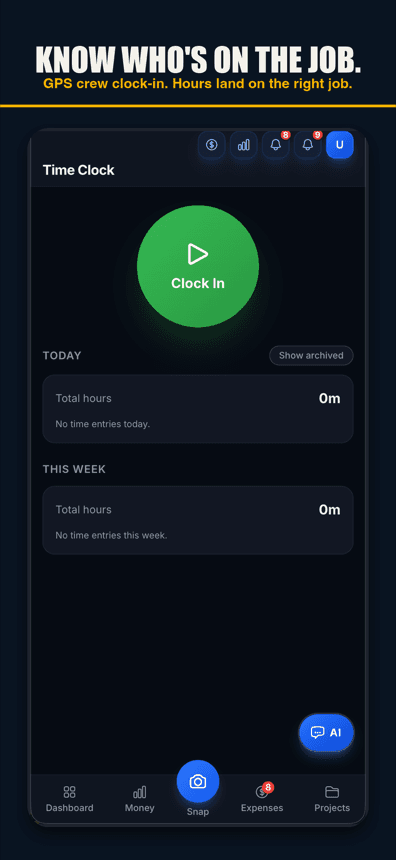
Tech hours hit the job, not a timesheet pile
Techs clock in with GPS from the jobsite. Their hours land on that job at their real cost, so labor stops being a month-end reconstruction.
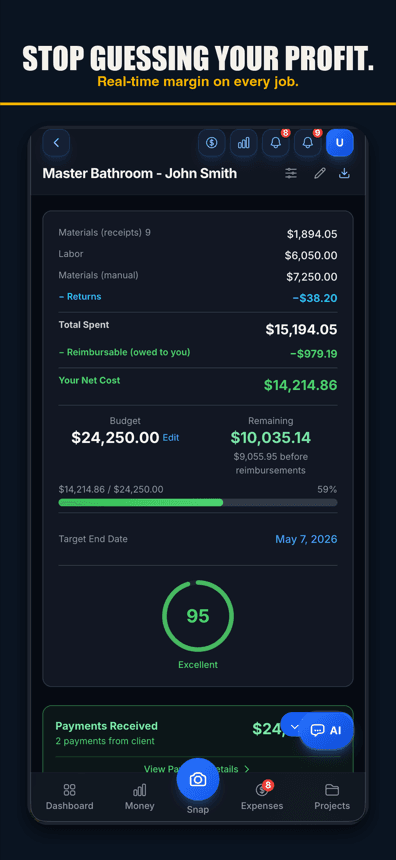
Margin per job, while it’s running
Every receipt and clock-in updates the job’s live margin. A job trending under water shows up while there’s still time to bill the extra, not three weeks after.
Free forever — 3 projects, 50 receipts a month. No credit card.
What you get
AI receipt scanning
Line items, returns, and faded thermal paper — read, with the right job suggested for a one-tap confirm.
GPS crew time clock
Clock-in tied to the jobsite. Hours flow to that job’s labor cost automatically.
Live job margin
Charged minus spent, per job, updated the moment a cost lands.
Invoicing from the truck
Build and send the invoice on-site; track what’s paid against what the job cost.
Material returns handled
The returned TXV nets against the original receipt on the same job — correct cost, not double-counted.
Voice capture
Hands in a condenser? Say the amount, vendor, and job — it’s logged. Voice works in browsers with speech input, like Chrome and Safari, and in the iPhone app on version 1.0.8 or newer.
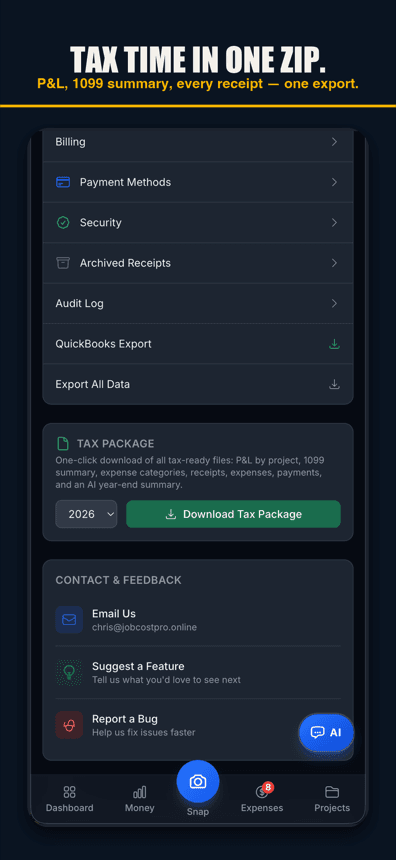
Tax package export
P&L by job, 1099 summary, and a list of your receipts in one download at year end.
QuickBooks export
Clean CSV/IIF out to your books. QuickBooks stays your accountant’s system; this fills it.
What an HVAC job actually costs
Most trades have five or six cost buckets. HVAC has a mean version of each: equipment (the condenser, coil, or furnace itself — usually your biggest single line), rough materials (lineset, pad, whip, disconnect, plenum transitions), consumables that never make the quote (refrigerant, nitrogen, brazing rod, tape, screws), permits and inspection trips, and labor — often two techs at different real costs, plus the drive time nobody bills.
Job costing is nothing fancier than putting every one of those dollars on the job that caused them, the day they happen. The reason it rarely gets done is friction: the receipt is in the truck, the hours are in someone’s head, and the bookkeeping is a Sunday-night job. Kill the friction and the numbers keep themselves.
Run the math on a typical changeout
Say you quote a 3-ton changeout at $7,800. Equipment runs $3,400. Lineset, pad, electrical whip, and transitions: $460. Refrigerant top-off and consumables: $210. Permit: $120. Two techs, six hours each at a true loaded cost of $38/hour: $456. Add the second supply-house run and the recovery fee — call it $90. Total cost: $4,736. Real margin: $3,064, about 39%.
Now let the $460 materials run and the $120 permit slip through untracked, and your books say 47% while the truth says 39. Multiply that gap across thirty installs a year and you’re pricing next season off a number that was never real. That is the whole case for job costing — not paperwork, pricing.
Installs and service calls are different animals
Installs are project jobs: quoted price, real cost stack, a margin worth watching daily. Service calls are volume: small tickets where the win is capturing the parts receipt and the hour without ceremony. The app handles both — a service call is just a small job with one receipt and one clock-in, and the month-end view shows you honestly whether installs or calls carried the month.
What this app is not: flat-rate price books, load calcs, dispatch boards, or estimating software. Plenty of tools do that. This one answers the question none of them answer well — what did the job actually cost, and what did you actually keep?
Free tier first. Paid when you scale.
Free covers 3 active jobs and 50 receipts a month with full AI scanning — a real one-truck workload. Pro is $29.99/month when you need more. No card to start, no demo call, no contract.
Simple pricing
Less than a single trip to Home Depot.
Start free. Upgrade when you're ready.
Free
3 projects, 50 receipts/month — get started free
- 3 projects
- 50 receipts/month
- AI receipt scanning
- Voice capture (web; iPhone app 1.0.8+)
- 1 tax export/year
- Basic reports
- 3 crew seats: clock in + My Pay
Pro
For small crews — unlimited projects & receipts, 10 crew
- Unlimited projects
- Unlimited receipts
- 10 team members
- AI scans & chat (monthly AI allowance)
- Budget alerts
- Client portal
- Invoice sending
- All exports (tax, CSV, PDF)
Contractor
For crews — unlimited team, auto clock-in & payroll
- Unlimited projects
- Unlimited receipts
- Everything in Pro
- Unlimited team members
- Opt-in automatic clock-in
- Payroll exports
- Custom branding
Paid plans renew automatically at the price shown for the selected interval (monthly or yearly) until you cancel. You'll be charged in US dollars plus any applicable sales tax.
Cancel anytime in Settings → Billing — no refunds for past billing periods. Refund Policy · Terms

Who built this
Chris Sibley — remodeling contractor, Fort Worth, TX
Chris closed a $42,000 bathroom remodel thinking he’d made 30%. His accountant ran the real numbers months later: 12% — $7,500 in receipts never made it onto the job. He built Job Cost Pro so that never happens again, and still runs his remodeling company with it every day. That company is the legal entity behind this app: Salvation Home Remodeling LLC, doing business as Job Cost Pro.
FAQ
What is HVAC job costing software?
Software that tracks every cost one HVAC job creates — equipment, materials, refrigerant, permits, and tech hours — against what you charged for it, so you know the real margin per install instead of one blended number at year end.
How is this different from HVAC estimating software?
Estimating software helps you price the job before you win it. Job costing tracks what the job actually costs after you win it. This app is the after side — many shops run it alongside an estimating tool and compare the quote to reality on every install.
Does it handle refrigerant and small consumables?
Yes — anything with a receipt scans in, and anything without one (a top-off from your own tank) can be voice-logged or added manually to the job in a few seconds.
Can my techs use it without seeing my numbers?
Yes. Techs get a worker view for clocking in and submitting receipts. Margins, pricing, and the business dashboard stay owner-only.
Does it do dispatch or flat-rate pricing?
No, and honestly: if scheduling and dispatch boards are the priority, look at a field-service platform. This app does the money side — job costs, receipts, crew hours, invoices, and job margins — better than platforms twice its price.
Related
No credit card. No demo. No contract.
The next changeout
with a real number on it.
Start freeFree — 3 jobs, 50 receipts a month, AI scanning included.