Job costing software
Job Costing Software Built by a Contractor — Not an Accountant.
Most job costing software assumes someone sits at a desk entering costs. This one assumes you're on a ladder. Snap the receipt, one tap files it to its job, and every job's margin from the costs recorded so far is on your phone — starting free.
Free plan: 3 jobs, 50 receipts a month. No credit card. Some features require a paid plan.
What job costing software actually has to do
One thing: tell you what each job really costs while you can still do something about it. Every receipt, sub invoice, labor hour, and dump fee, tied to its job, totaled against the bid — daily, not at closeout. Bigger platforms (Foundation, Sage) do this well for companies with an office staff to feed them. If nobody's entering costs the day they happen, no software on earth can cost your jobs — which is why this one makes capture nearly effortless.
This is the actual app
Receipts cost themselves
Snap it at the supply house. Vendor, line items, and total are read by AI. When the receipt names the job, or you scan at the jobsite, that job is suggested. One tap confirms it; no match, or the wrong job? Pick one.
Margin while the job is live
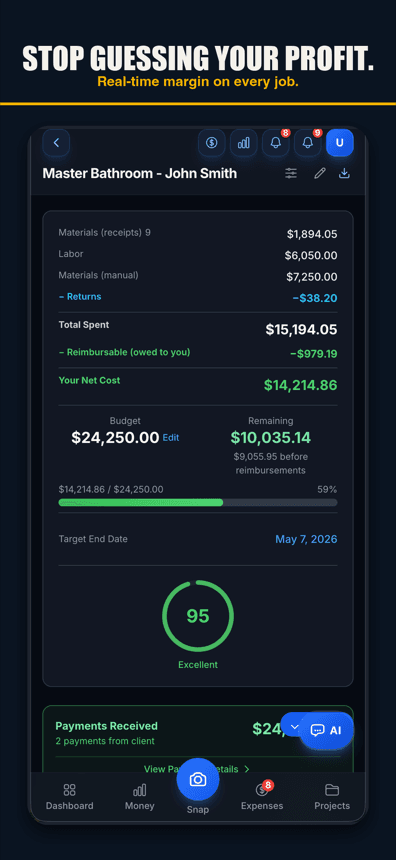
Budget vs. actual updates as costs are recorded. A job running over its budget shows up while it is still running — while a change order can still save it.
Small-crew pricing
Free for 3 jobs. Flat monthly tiers after that — no per-user meter, no implementation fee, no demo call with a sales team.

Free plan: 3 jobs, 50 receipts a month. No credit card. Some features require a paid plan.
AI receipt scanning
Reads line items and returns — not just totals; anything it can’t read clearly is marked Needs Review. A $1,200 receipt with a $400 return books the right net cost.
Voice-to-expense
"Fifty-three twenty at Home Depot for the Garcia kitchen." Logged and categorized, ready for you to confirm on the job. Voice works in browsers with speech input, like Chrome and Safari, and in the iPhone app on version 1.0.8 or newer.
Budget vs. actual per job
P&L per project from the costs recorded so far, with materials and labor shown apart. Overrun warnings before the budget is blown.
GPS crew time tracking
Geofenced one-tap clock-in in the iPhone app (Android and web: clock in by hand) and a forgotten-shift backstop put labor hours on the job at each worker’s own rate.
Invoicing from job costs
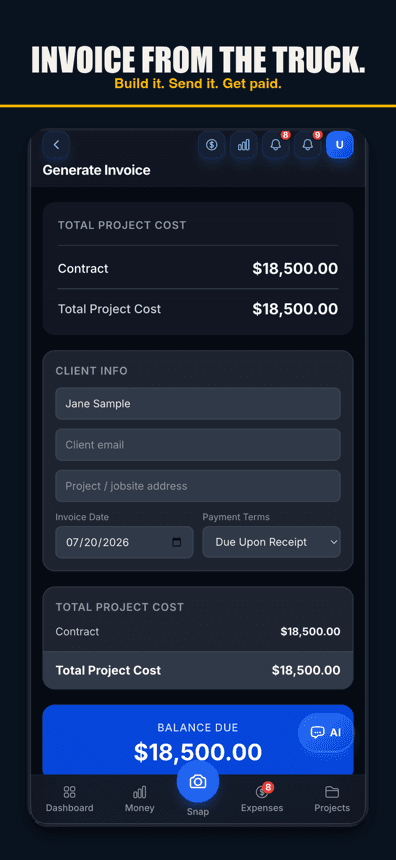
Turn actual costs — reimbursables included — into a clean invoice; on Pro, send it with a share link, with your logo, and your colors on Contractor and up.
QuickBooks export
On the Pro plan, categorized CSV/IIF exports drop into QuickBooks Online or Desktop. Your accountant keeps their system.
Year-end tax package
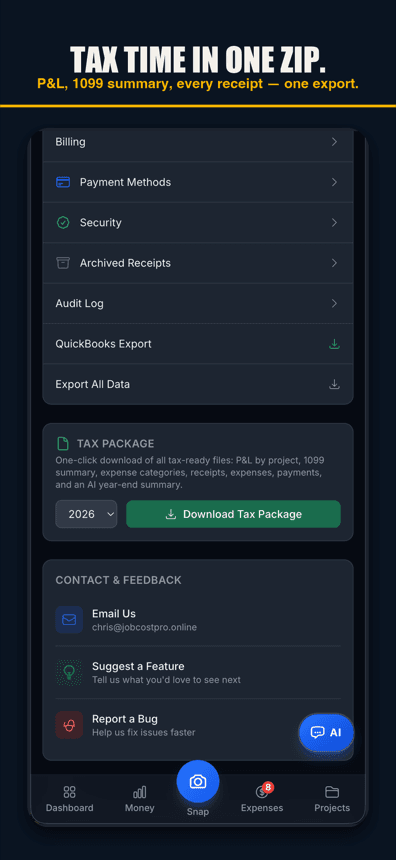
Year-end categorized expenses and receipts, ready for your CPA. No shoebox.
Crew roles
Foremen scan receipts and clock in without seeing your margins. You control who sees what.
Flat pricing with a real free tier
Free for 3 jobs and 50 receipts a month. Pro $29.99/mo plus any applicable sales tax. Contractor $49.99/mo plus any applicable sales tax, with unlimited crew. Business: $149.99/mo plus any applicable sales tax, with 50-photo receipt batches. No demo, no onboarding fee, cancel any time.
Simple pricing
Start free. Upgrade when you're ready.
Free
3 jobs, 50 receipts/month — get started free
- 3 jobs
- 50 receipts/month
- AI chat: 10 messages a month; 3 per job, never reset
- Help chat: 25 messages/month for you, 15 for each crew member
- AI Bid Builder: 2 finished bids/month, on 1 trial job
- AI receipt scanning
- 50 AI actions a month
- 1 tax package/year
- Basic reports
- 3 crew seats: clock in + My Pay
- Client portal
- Payroll exports
Pro
For small crews — unlimited jobs & receipts, up to 10 team members
- Unlimited jobs
- Unlimited receipts
- Help chat: 100 messages/month for you, 50 for each crew member
- AI Bid Builder: 10 finished bids/month
- 10 crew members
- AI receipt scans, AI chat & AI actions: no monthly count
- Invoice sending
- Your logo on invoices & bids
- Unlimited tax packages + QuickBooks export
Contractor
For crews — unlimited team, automatic clock-in (iPhone app; opt-in for each crew member) & payroll records
- Unlimited jobs
- Unlimited receipts
- Help chat: 250 messages/month for you, 100 for each crew member
- AI Bid Builder: 30 finished bids/month
- Everything in Pro
- Unlimited team members
- Automatic clock-in (iPhone app; opt-in for each crew member)
- Track payroll & record paychecks — the app never sends money
- Custom colors & tagline
Business
Everything in Contractor, plus 50-photo batches
- Unlimited jobs
- Unlimited receipts
- Help chat: 1000 messages/month for you, 500 for each crew member
- AI Bid Builder: 100 finished bids/month
- Everything in Contractor
- Scan up to 50 receipt photos at once
Website plans renew automatically at the price shown for the selected interval (monthly or yearly) until you cancel, and are charged in US dollars plus any applicable sales tax. Business is monthly only. If we change the price of a website plan, we email you at least 30 days before your next renewal. Plans purchased in the iPhone app are billed by Apple in your App Store currency.
Website plans: cancel anytime in Settings → Billing — iPhone app plans: cancel in iPhone Settings → Subscriptions at least 24 hours before renewal. All sales are final; no refunds except a double charge or a renewal charge for a plan you had already cancelled before the renewal date (website purchases; tell us within 30 days). Bought on our website before October 22, 2026? Older refund terms may apply. Refund Policy · Terms

Who built this
Chris Sibley — remodeling contractor, Fort Worth, TX
Chris closed a $42,000 bathroom remodel thinking he’d made 30%. His accountant ran the real numbers months later: 12% — $7,500 in receipts never made it onto the job. He built Job Cost Pro so that never happens again, and still runs his remodeling company with it every day. That company is the legal entity behind this app: Salvation Home Remodeling LLC, doing business as Job Cost Pro.
FAQ
How is this different from a job costing spreadsheet?
A spreadsheet works exactly as long as someone types every cost in, every day. That's the part that fails at 3+ active jobs. Here the capture is a photo or a sentence, and the totals, categories, and margin math happen on their own. There's a free spreadsheet template on the blog if you want to start there — it's honestly where the founder started.
How does it compare to Foundation, Sage, or Knowify?
Those are strong platforms aimed at bigger operations — office staff, controllers, integrated accounting. JobCost Pro is deliberately the other end: owner-operators and small crews who need field capture and live margins without an implementation project. If you have 30+ people and a back office, look at those. If you ARE the back office, this was built for you.
Is it construction-specific?
Yes. Categories, exports, and workflows assume contracting: materials by trade (lumber, plumbing, electrical, tile and more), labor, reimbursables and change orders. It was built by a remodeling contractor for his own jobs first.
How long does setup take?
Sign up, name a project, snap a receipt — that is the whole setup. No implementation call, no training fee, no contract.
What happens to my data if I leave?
On any plan, Settings → Export All Data downloads all your records. On the Pro plan you can also export QuickBooks formats and a bundle with receipt images and invoice PDFs. Your job history is yours.
Related
Know every job's margin as costs come in.
Start job costing
today.
Start freeFree tier. No credit card. No demo call.