QuickBooks alternative
QuickBooks Alternative for Contractors — Built for the Job, Not the Books.
QuickBooks Online is solid accounting — and its job costing starts on the Plus plan. QuickBooks Online Plus — the cheapest QBO tier with project profitability — is $140/month at list price. JobCost Pro costs jobs from the field, starting free: snap the receipt, the margin updates. And when your accountant wants QuickBooks, we export straight into it.
Free plan: 3 jobs, 50 receipts a month. No credit card. Some features require a paid plan.
A cost only counts once someone enters it
The founder lived this one. Chris closed a $42,000 bathroom remodel thinking he'd hit 30% margin; the real number was 12% — $7,500 in receipts had never made it from the truck to the books. That isn't QuickBooks failing at accounting. It's the gap between where costs happen (the supply house, the jobsite) and where the books get updated. An accounting system can only cost the receipts that get entered.
Job costing that happens on the job
Snap the receipt at the counter. The AI reads vendor, line items, and total, one tap files it to its job, and your margin updates before you're back in the truck.
Not a $140/month upsell
In QuickBooks Online, project profitability tracking starts on the Plus plan — $140/month list price. In JobCost Pro, per-job costing is the whole product: free for 3 jobs, then $29.99/month plus any applicable sales tax.
Keep QuickBooks. Keep your accountant.
On the Pro plan, one tap exports categorized transactions — CSV for QuickBooks Online, IIF for Desktop — with categories pre-mapped to contractor account names. We replace the shoebox, not your books.
JobCost Pro vs QuickBooks Online
QuickBooks Online is accounting software for your books, and this page won't pretend otherwise. The real question is what runs your jobs day to day — and what that costs.
| Feature | JobCost Pro | QuickBooks Online |
|---|---|---|
| Starting price | $0 (real free tier) | $0 (Free plan: 1 user, 2 invoices/mo) |
| Per-job costing / project profitability | Every tier, live | Plus tier and up ($140/mo list) |
| Users on the plan with job costing | Unlimited crew on Contractor and up | 5 users on Plus |
| Built for | Contractors in the field | Every small business, books-first |
| Accounting books + bank connections | — (we export to QuickBooks instead) | Yes |
| Invoicing | Yes, built from job costs (email and link: Pro) | Yes |
| Works with your accountant | CSV/IIF export into QuickBooks (Pro) | Yes |
¹ QuickBooks Online Plus — the cheapest QBO tier with project profitability — is $140/month at list price. Other tiers per quickbooks.intuit.com/pricing, checked October 8, 2026 (list prices): Free $0/mo (1 user), Simple Start $38/mo (1 user), Essentials $85/mo (3 users), Plus $140/mo (5 users), Advanced $340/mo (25 users). Intuit offers an intro discount (50% off for 3 months) and a 30-day free trial; list prices shown.
Independent comparison. JobCost Pro is not affiliated with or endorsed by QuickBooks Online.

New on the App Store — free tier, no card required.
What QuickBooks does better
It's accounting software: your books, bank connections and invoicing, all listed on its pricing page. If the question is "what should run my company's books," QuickBooks is a fine answer — which is exactly why JobCost Pro ships an export into it instead of a replacement for it.
Where JobCost Pro wins
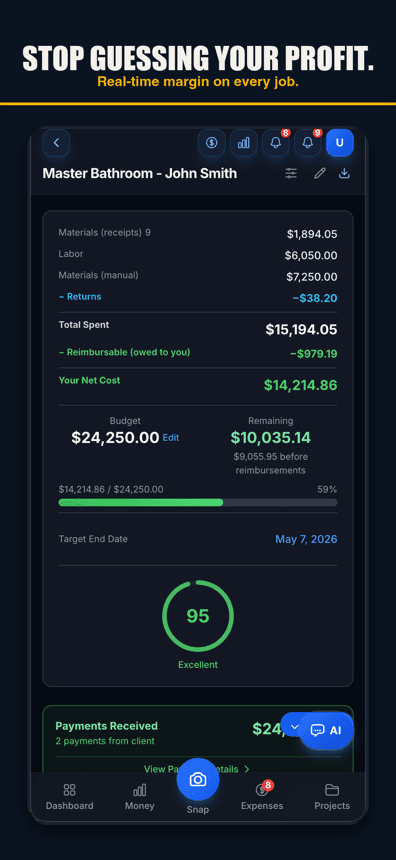
The job. Costs land while they happen — receipt scanned at the counter, confirmed to the right job with one tap, line items and all, margin recalculated before you're back in the truck. Job costing isn't a $140/month QuickBooks Plus tier here; it's the whole product, and it starts free.
AI receipt scanning
Line items and returns read from the receipt photo in the field, and one tap files each receipt to its job.
Voice-to-expense
Hands full? Say the amount, vendor, and job. Logged before you leave the parking lot. Voice works in browsers with speech input, like Chrome and Safari, and in the iPhone app on version 1.0.8 or newer.
Live budget vs. actual per job
Every job's margin updates as you record costs. A job running over its budget shows up as the costs come in, not at closeout.
QuickBooks export built in
On the Pro plan: CSV for QuickBooks Online, IIF for QuickBooks Desktop, with contractor account mapping ("Construction Materials", "Subcontractor Labor"). A bundle option packs receipt images and invoice PDFs alongside.
GPS time tracking for crews
Geofenced one-tap clock-in in the iPhone app (Android and web: clock in by hand), a forgotten-shift backstop, a mileage log for trips between jobs — labor lands on the job it belongs to.
Invoices from actual job costs
Build the invoice from what the job really cost — reimbursables included — as a PDF; on Pro, send it by email or a share link.
Year-end tax package
A year-end package of categorized expenses and receipts in the format your CPA actually wants.
A real free tier
Free plan: three jobs and 50 receipts a month. Run a whole job through it before paying anything.
Job costing from $0 — not from the $140 tier
Free for 3 jobs and 50 receipts a month. Pro at $29.99/mo plus any applicable sales tax. Contractor at $49.99/mo plus any applicable sales tax, with unlimited crew. Business: $149.99/mo plus any applicable sales tax, with 50-photo receipt batches. Flat pricing, no per-user meter.
Simple pricing
Start free. Upgrade when you're ready.
Free
3 jobs, 50 receipts/month — get started free
- 3 jobs
- 50 receipts/month
- AI chat: 10 messages a month; 3 per job, never reset
- Help chat: 25 messages/month for you, 15 for each crew member
- AI Bid Builder: 2 finished bids/month, on 1 trial job
- AI receipt scanning
- 50 AI actions a month
- 1 tax package/year
- Basic reports
- 3 crew seats: clock in + My Pay
- Client portal
- Payroll exports
Pro
For small crews — unlimited jobs & receipts, up to 10 team members
- Unlimited jobs
- Unlimited receipts
- Help chat: 100 messages/month for you, 50 for each crew member
- AI Bid Builder: 10 finished bids/month
- 10 crew members
- AI receipt scans, AI chat & AI actions: no monthly count
- Invoice sending
- Your logo on invoices & bids
- Unlimited tax packages + QuickBooks export
Contractor
For crews — unlimited team, automatic clock-in (iPhone app; opt-in for each crew member) & payroll records
- Unlimited jobs
- Unlimited receipts
- Help chat: 250 messages/month for you, 100 for each crew member
- AI Bid Builder: 30 finished bids/month
- Everything in Pro
- Unlimited team members
- Automatic clock-in (iPhone app; opt-in for each crew member)
- Track payroll & record paychecks — the app never sends money
- Custom colors & tagline
Business
Everything in Contractor, plus 50-photo batches
- Unlimited jobs
- Unlimited receipts
- Help chat: 1000 messages/month for you, 500 for each crew member
- AI Bid Builder: 100 finished bids/month
- Everything in Contractor
- Scan up to 50 receipt photos at once
Website plans renew automatically at the price shown for the selected interval (monthly or yearly) until you cancel, and are charged in US dollars plus any applicable sales tax. Business is monthly only. If we change the price of a website plan, we email you at least 30 days before your next renewal. Plans purchased in the iPhone app are billed by Apple in your App Store currency.
Website plans: cancel anytime in Settings → Billing — iPhone app plans: cancel in iPhone Settings → Subscriptions at least 24 hours before renewal. All sales are final; no refunds except a double charge or a renewal charge for a plan you had already cancelled before the renewal date (website purchases; tell us within 30 days). Bought on our website before October 22, 2026? Older refund terms may apply. Refund Policy · Terms

Who built this
Chris Sibley — remodeling contractor, Fort Worth, TX
Chris closed a $42,000 bathroom remodel thinking he’d made 30%. His accountant ran the real numbers months later: 12% — $7,500 in receipts never made it onto the job. He built Job Cost Pro so that never happens again, and still runs his remodeling company with it every day. That company is the legal entity behind this app: Salvation Home Remodeling LLC, doing business as Job Cost Pro.
FAQ
Is JobCost Pro a replacement for QuickBooks?
For accounting, no — and it doesn't try to be. If QuickBooks runs your books, bank feeds, and taxes, keep it; JobCost Pro replaces the receipt-shoebox-to-QuickBooks step and the "how is this job actually doing" blind spot. You can also run JobCost Pro alone and hand your CPA the year-end tax package.
Does JobCost Pro export to QuickBooks?
Yes, on the Pro plan. CSV formatted for QuickBooks Online import, IIF for QuickBooks Desktop, with categories pre-mapped to contractor account names like "Construction Materials" and "Subcontractor Labor." There's also a bundle export that includes the receipt images and invoice PDFs for your records.
Doesn't QuickBooks already do job costing?
It does — project profitability tracking starts on the Plus plan ($140/month list price) and works well once costs are entered. The catch is the word "entered": it depends on every receipt making it from the truck to the books. That entry gap is the $7,500 lesson this app was built on.
What does QuickBooks Online cost vs. JobCost Pro?
QuickBooks Online Plus — the cheapest QBO tier with project profitability — is $140/month at list price. Other tiers per quickbooks.intuit.com/pricing (checked October 8, 2026, list prices): Free $0/mo, Simple Start $38/mo, Essentials $85/mo, Advanced $340/mo. JobCost Pro: free tier, then paid plans from $29.99/month plus any applicable sales tax; Contractor is $49.99/month plus any applicable sales tax; unlimited crew comes with Contractor and up.
Can I run QuickBooks and JobCost Pro together?
That's the designed workflow for crews that already have books: capture and cost everything in JobCost Pro during the job, then export categorized transactions into QuickBooks for month-end (Pro plan). Field capture where it's fast, accounting where your accountant lives.
My accountant insists on QuickBooks. Does that rule this out?
No — it's the main reason the QuickBooks export (Pro plan) exists. Your accountant keeps their system and gets cleaner data than a shoebox of receipts; you get live job margins they were never going to give you mid-job.
Related
Built for the job, not the books.
Try the QuickBooks
alternative free.
Start freeFree tier. No credit card. Your accountant keeps QuickBooks.