Contractor invoicing
Contractor Invoice Software That Knows What the Job Actually Cost.
Generic invoice apps make you retype what you spent. Here the invoice is built from the job's real costs — receipts, reimbursables, change orders, payments already made — so the number is right and nothing gets forgotten.
Free plan: 3 jobs, 50 receipts a month. No credit card. Some features require a paid plan.
The invoice is only as good as your cost records
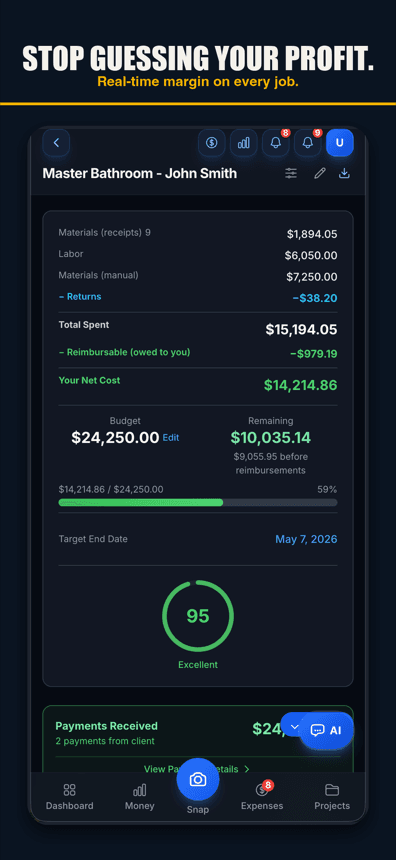
Every contractor has eaten a cost they forgot to bill: the second trip to the supply house, the sub's extra half day, the $82 of fittings paid out of pocket. Invoice-first apps can't catch that — they only know what you remember to type. When invoicing sits on top of job costing, the reimbursables are already on the job, the balance already accounts for payments, and the invoice fills in from what you recorded — you review it before it goes out.
This is the actual app
Built from actual costs
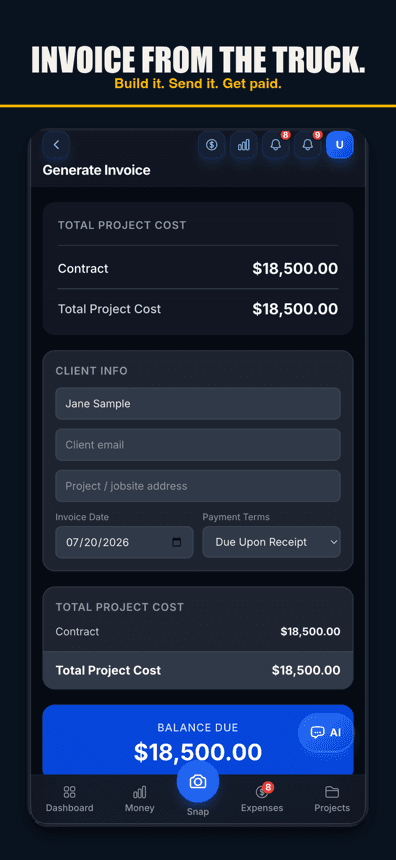
Pull the job's real numbers — cost-plus reimbursables, change orders, prior payments — into a clean, itemized invoice instead of retyping from memory.
Send it, share it, print it
On Pro, a PDF by email or a share link the client opens in their browser — with one-tap Save as PDF and print on their side; your logo on it with Pro, your colors with Contractor and up.
Balance that stays true
Payments are recorded against the job, so "still owed" is always current — on the invoice and on your dashboard.

Free plan: 3 jobs, 50 receipts a month. No credit card. Some features require a paid plan.
Itemized from job records
Line items come from what actually hit the job — tracked expenses, change orders, reimbursables — not from a blank form.
Share links clients can open anywhere
On Pro: no client login. A clean page with the invoice, a PDF download, and print — on any phone or desktop.
Payment tracking
Record deposits and installments; the balance due updates everywhere at once.
Change orders on the bill
On Pro, signed change orders flow onto the statement so extras don't get lost between the handshake and the invoice.
Refresh from project
Job kept moving after you invoiced? Refresh the invoice from the project's current costs — same number, same link, updated amounts.
AI receipt capture underneath
The cost records feeding your invoices come from receipts scanned in the field.
QuickBooks export
On the Pro plan, send categorized transactions to QuickBooks Online or Desktop when the books need them.
Free tier included
You can build invoices on every tier — including free. Sending one to your client (email or share link) needs Pro.
Invoicing included — not a separate subscription
Free for 3 jobs. Pro $29.99/mo plus any applicable sales tax. Contractor $49.99/mo plus any applicable sales tax, with unlimited crew. Business: $149.99/mo plus any applicable sales tax, with 50-photo receipt batches. Invoicing, job costing, and receipt capture in one bill.
Simple pricing
Start free. Upgrade when you're ready.
Free
3 jobs, 50 receipts/month — get started free
- 3 jobs
- 50 receipts/month
- AI chat: 10 messages a month; 3 per job, never reset
- Help chat: 25 messages/month for you, 15 for each crew member
- AI Bid Builder: 2 finished bids/month, on 1 trial job
- AI receipt scanning
- 50 AI actions a month
- 1 tax package/year
- Basic reports
- 3 crew seats: clock in + My Pay
- Client portal
- Payroll exports
Pro
For small crews — unlimited jobs & receipts, up to 10 team members
- Unlimited jobs
- Unlimited receipts
- Help chat: 100 messages/month for you, 50 for each crew member
- AI Bid Builder: 10 finished bids/month
- 10 crew members
- AI receipt scans, AI chat & AI actions: no monthly count
- Invoice sending
- Your logo on invoices & bids
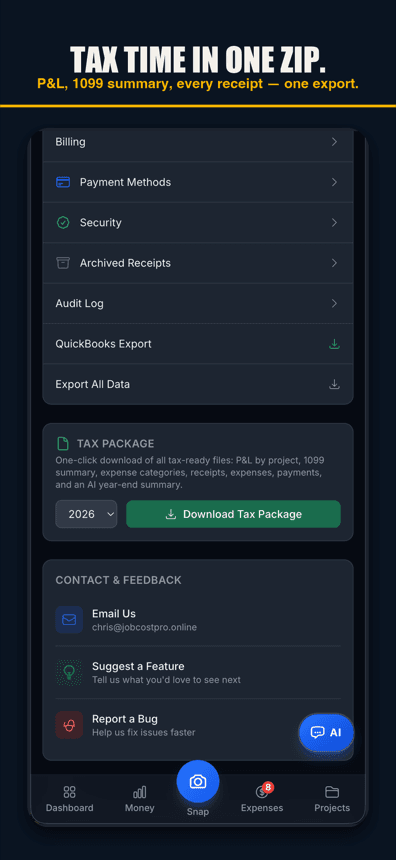
- Unlimited tax packages + QuickBooks export
Contractor
For crews — unlimited team, automatic clock-in (iPhone app; opt-in for each crew member) & payroll records
- Unlimited jobs
- Unlimited receipts
- Help chat: 250 messages/month for you, 100 for each crew member
- AI Bid Builder: 30 finished bids/month
- Everything in Pro
- Unlimited team members
- Automatic clock-in (iPhone app; opt-in for each crew member)
- Track payroll & record paychecks — the app never sends money
- Custom colors & tagline
Business
Everything in Contractor, plus 50-photo batches
- Unlimited jobs
- Unlimited receipts
- Help chat: 1000 messages/month for you, 500 for each crew member
- AI Bid Builder: 100 finished bids/month
- Everything in Contractor
- Scan up to 50 receipt photos at once
Website plans renew automatically at the price shown for the selected interval (monthly or yearly) until you cancel, and are charged in US dollars plus any applicable sales tax. Business is monthly only. If we change the price of a website plan, we email you at least 30 days before your next renewal. Plans purchased in the iPhone app are billed by Apple in your App Store currency.
Website plans: cancel anytime in Settings → Billing — iPhone app plans: cancel in iPhone Settings → Subscriptions at least 24 hours before renewal. All sales are final; no refunds except a double charge or a renewal charge for a plan you had already cancelled before the renewal date (website purchases; tell us within 30 days). Bought on our website before October 22, 2026? Older refund terms may apply. Refund Policy · Terms

Who built this
Chris Sibley — remodeling contractor, Fort Worth, TX
Chris closed a $42,000 bathroom remodel thinking he’d made 30%. His accountant ran the real numbers months later: 12% — $7,500 in receipts never made it onto the job. He built Job Cost Pro so that never happens again, and still runs his remodeling company with it every day. That company is the legal entity behind this app: Salvation Home Remodeling LLC, doing business as Job Cost Pro.
FAQ
How is this different from invoice apps like Joist?
Invoice-first apps are built around the document; the costs behind it are your problem. JobCost Pro is job-costing-first: costs are captured all job long, so the invoice is generated from the record instead of typed from memory. If you're comparing directly, there's an honest Joist comparison page on this site.
Can clients pay online?
Not inside the app. Clients get a clean share-link page with the invoice, your bank or check details, PDF download and print, and they pay you directly. Payments you receive — however they're paid — are recorded against the job so the balance stays true.
Does it handle deposits and progress payments?
Yes — record payments as they land and the remaining balance updates on the invoice, the project, and your dashboard.
What about cost-plus and reimbursables?
Reimbursable costs tagged on the job flow onto the invoice automatically — that out-of-pocket fitting run stops slipping through.
Is invoicing on the free tier?
Yes. Free tier lets you build invoices on your 3 jobs. Sending one to your client — by email, or a public share link with the PDF — needs Pro.
Related
The invoice fills in from the job — you review it before it goes out.
Send your next invoice
from real costs.
Start freeFree tier. No credit card.