Workyard alternative
Workyard Alternative — Cost the Whole Job, Not Just the Hours.
Workyard is a strong GPS time-tracking tool priced per user (from $6 per user per month billed annually; higher plans by quote). JobCost Pro starts free and costs the entire job — receipts, materials, subs, and hours — with your margin live on your phone.
Free plan: 3 projects, 50 receipts a month. No credit card. Some features require a paid plan.
Labor hours are half the job. Where did the other half go?
Workyard answers "who was on site and for how long" with precision GPS — genuinely well. But labor is only part of a job's cost. Materials runs, sub invoices, dump fees, and the $60 fitting trips decide your margin too. Workyard's Pro plan tags purchases to projects and shows each project's time and cost; JobCost Pro is built the other way around — receipts and materials first, with hours on the same job, so the job's margin is the center of the app. Workyard publishes only its starting price ($6 per user per month, billed annually; Pro, Autopilot and Enterprise are by quote).
The whole job cost, not just labor
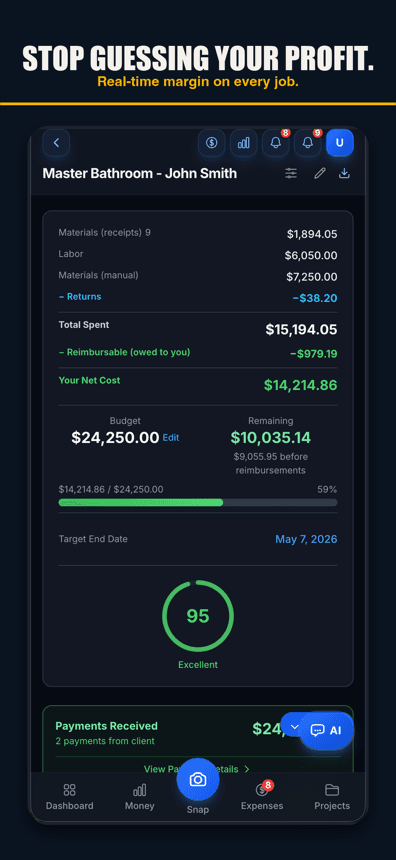
Receipts scanned by AI, materials, subs, fees, and GPS-tracked hours all land on the same job ledger. The margin you see is the real one, not the labor-only version.
Free to start, flat to grow
A real free tier — 3 projects, 50 receipts a month. Contractor is $49.99/month flat with unlimited crew. No company base fee, no per-user meter running.
Margins live, from the field
Budget vs. actual per job, updating as costs land. A job running over its budget shows up as soon as its costs are recorded, while you can still act on it.
JobCost Pro vs Workyard
Workyard is excellent at what it's built for: precise GPS time tracking and labor compliance. The real question is whether your problem is a time clock or a job ledger.
| Feature | JobCost Pro | Workyard |
|---|---|---|
| Starting price | $0 (real free tier) | From $6/user/mo (annual) |
| Free tier | Yes | No (14-day trial) |
| Per-user fees | None — Contractor crew is unlimited | From $6/user/mo (annual); higher plans by quote |
| GPS time tracking | Yes (geofenced, one-tap) | Yes — their specialty |
| AI receipt scanning | Yes (line items + returns) | Receipt photos on time cards; no AI scanning listed |
| Voice expense capture | Yes (web; iPhone app 1.0.8+) | Not listed |
| Materials and sub payments on the job | Yes, at capture | Purchases tagged to projects (Pro plan) |
| Live per-job margin (all costs) | Yes | Project dashboard with time and cost (Pro); margin not listed |
| Native invoicing | Yes (email and link: Pro) | Not listed |
| Mobile-first field capture | Yes | Yes (time; receipt photos on time cards) |
¹ Workyard pricing per workyard.com/pricing, checked October 8, 2026: plans start at $6 per user per month billed annually (monthly billing also offered; its price is not listed); Pro, Autopilot and Enterprise by quote. 14-day free trial, no card. Features per the same page, checked October 12, 2026: receipt photos on time cards (Starter), project expense tagging and labor cost by project (Pro), mileage and travel-time reports, QuickBooks exports; invoicing, voice entry and Spanish are not listed.

New on the App Store — free tier, no card required.
What Workyard does better
GPS time tracking is Workyard's whole product, and it shows: high-accuracy location data, geofence precision, workforce scheduling, and labor-compliance reporting built for bigger field teams. If your only problem is knowing exactly where field hours go — and the office already handles everything else — Workyard is a strong pick.
Where JobCost Pro wins
The full picture. Receipts, materials, sub payments and hours land on the job as you record them, so the margin you see is the real one. Plus a real free tier, flat crew pricing, invoicing on Pro, and AI capture built for dirty hands.
Free tier
Free plan: three projects and 50 receipts a month. Workyard offers a 14-day trial; JobCost Pro lets you run a whole real job free first.
AI receipt scanning
Snap the receipt; vendor, amount, and line items are read, and the right job is suggested for a one-tap confirm.
Voice-to-expense
Hands full? Say the amount, vendor, and job. Logged. Voice works in browsers with speech input, like Chrome and Safari, and in the iPhone app on version 1.0.8 or newer.
GPS time tracking included
Geofenced one-tap clock-in, a 12-hour backstop for forgotten shifts, a mileage log for trips between jobs — you don't give up time tracking by switching.
Native invoicing + client portal
Invoices with a clean homeowner page showing what they owe and have paid — sent by email on Pro with your logo, and your colors on Contractor. No separate invoicing app.
Budget alerts
Overrun warnings before a job blows its budget — not in the month-end report.
Bilingual UI + AI
Spanish on most screens and an AI that answers in the user's language.
QuickBooks export
On the Pro plan, categorized exports drop into QuickBooks Online or Desktop. Keep your accountant.
Flat pricing, no base fee, no per-user meter
Free for 3 projects. Pro at $29.99/mo. Contractor at $49.99/mo with unlimited crew. The whole crew on one bill.
Simple pricing
Less than a single trip to Home Depot.
Start free. Upgrade when you're ready.
Free
3 projects, 50 receipts/month — get started free
- 3 projects
- 50 receipts/month
- AI chat: 10 messages/month + 3 per job
- Help chat: 25 messages/month (15 per crew member)
- AI Bid Builder: 2 finished bids/month
- AI receipt scanning
- 50 AI actions a month
- Voice capture (web; iPhone app 1.0.8+)
- 1 tax export/year
- Basic reports
- 3 crew seats: clock in + My Pay
- Client portal
- Payroll exports
Pro
For small crews — unlimited projects & receipts, 10 crew
- Unlimited projects
- Unlimited receipts
- Help chat: 100 messages/month (50 per crew member)
- AI Bid Builder: 10 finished bids/month
- 10 team members
- AI scans & chat
- Invoice sending
- Your logo on invoices & bids
- Unlimited tax packages + QuickBooks export
Contractor
For crews — unlimited team, auto clock-in & payroll
- Unlimited projects
- Unlimited receipts
- Help chat: 250 messages/month (100 per crew member)
- AI Bid Builder: 30 finished bids/month
- Everything in Pro
- Unlimited team members
- Opt-in automatic clock-in
- Run payroll & record paychecks
- Custom colors & tagline
Paid plans renew automatically at the price shown for the selected interval (monthly or yearly) until you cancel. You'll be charged in US dollars plus any applicable sales tax.
Cancel anytime in Settings → Billing — no refunds for past billing periods. Refund Policy · Terms

Who built this
Chris Sibley — remodeling contractor, Fort Worth, TX
Chris closed a $42,000 bathroom remodel thinking he’d made 30%. His accountant ran the real numbers months later: 12% — $7,500 in receipts never made it onto the job. He built Job Cost Pro so that never happens again, and still runs his remodeling company with it every day. That company is the legal entity behind this app: Salvation Home Remodeling LLC, doing business as Job Cost Pro.
FAQ
Does JobCost Pro track time like Workyard?
Yes — geofenced GPS clock-in and clock-out with one-tap prompts, a 12-hour backstop for forgotten shifts, and a mileage log for trips between jobs, with hours tied to each job's cost at each worker's own rate. If you need enterprise-grade workforce scheduling and compliance reporting across large teams, that's genuinely Workyard's lane.
Can I run Workyard and JobCost Pro together?
You can — keep Workyard for workforce operations and use JobCost Pro for job costs. Or use one app: hours already land on the job ledger here.
Is there a free trial?
Better — a real free tier. Three projects and 50 receipts per month, indefinitely. Run a real job through it before spending anything.
Can I bring my history over from Workyard?
Export your time reports from Workyard as CSV and keep them for your records; a new job in JobCost Pro needs only the basics, and costs land as you scan them. There is no import of past transactions today; your costs build up from there.
What does Workyard actually cost vs. JobCost Pro?
Per Workyard's pricing page (checked October 8, 2026): from $6 per user per month on annual billing; Pro, Autopilot and Enterprise are by quote. JobCost Pro: free plan, then $29.99 (Pro) or $49.99 (Contractor, unlimited crew) flat.
Related
The whole job, not just the hours.
Try the Workyard
alternative free.
Start freeSign up free. No credit card.