Construction expense tracker
Construction Expense Tracker — Every Receipt Tied to a Job.
Generic expense apps tell you what the company spent. A construction expense tracker has to tell you what each JOB spent — that's the number that decides whether you made money. Snap the receipt; the app suggests the category, suggests the job when the receipt names it or you scan at the jobsite, and one tap files it.
Free plan: 3 jobs, 50 receipts a month. No credit card. Some features require a paid plan.
Company-wide expense totals don't answer the question
"We spent $18,400 on materials last month" is an accounting fact. The question that pays your mortgage is "which jobs ate it, and are they still profitable?" Expense apps built for offices — cards, categories, monthly reports — can't answer that, because they don't think in jobs. Every cost here goes on a job: pick the job, or let the AI suggest one when the receipt names it or you scan at the jobsite. So the per-job totals stay current.
This is the actual app
Capture at the counter
Snap the receipt at the supply house. AI reads vendor, line items, and total and suggests the category. It suggests the job when the receipt names it or you scan at the jobsite, and one tap confirms it.
Subs and 1099s tracked
Payments to subs and a crew member's out-of-pocket receipts are recorded on the job, so the year-end 1099 summary and paying the crew back aren't a reconstruction project.
Works with your bookkeeping
On the Pro plan, categorized exports — CSV, QuickBooks Online, QuickBooks Desktop IIF — hand your bookkeeper clean data instead of a shoebox.

Free plan: 3 jobs, 50 receipts a month. No credit card. Some features require a paid plan.
AI receipt scanning
Line items, returns and how it was paid are read; anything it can’t read clearly is marked Needs Review for you to check.
Voice capture
Say the amount, vendor, and job with your hands full. It's logged. Voice works in browsers with speech input, like Chrome and Safari, and in the iPhone app on version 1.0.8 or newer.
Per-job running totals
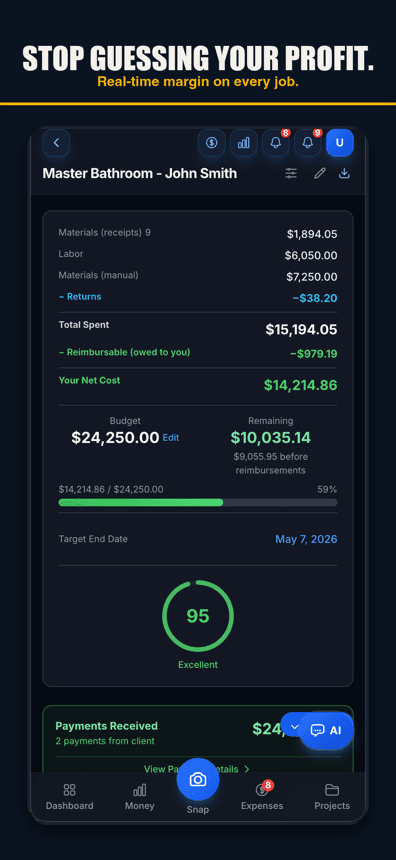
Materials and labor per job, updating as you record them, with budget vs. actual.
Reimbursable tracking
When a crew member pays out of pocket, the receipt still goes on its job (one tap confirms the job) and shows as owed to them until you mark it paid back.
Mileage log
Mileage logged at the IRS rate for tax season.
Offline capture
Receipts wait on the phone in spotty service; once signal returns, they finish uploading from the Snap screen.
Year-end tax package
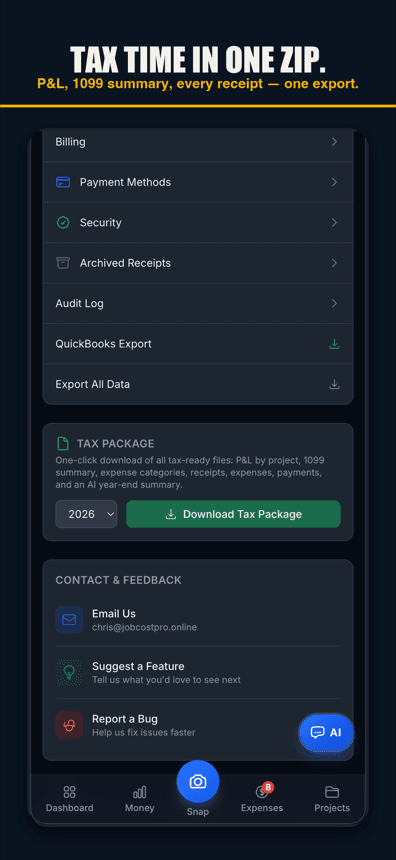
Categorized year-end expenses, mileage, a 1099 summary and a list of every receipt in one download for your CPA.
Crew roles
Foremen capture expenses without seeing job financials.
Free to start — upgrade when the crew grows
Free tier: 3 jobs, 50 receipts a month, AI scanning included. Pro $29.99/mo plus any applicable sales tax. Contractor $49.99/mo plus any applicable sales tax, with unlimited crew. Business: $149.99/mo plus any applicable sales tax, with 50-photo receipt batches.
Simple pricing
Start free. Upgrade when you're ready.
Free
3 jobs, 50 receipts/month — get started free
- 3 jobs
- 50 receipts/month
- AI chat: 10 messages a month; 3 per job, never reset
- Help chat: 25 messages/month for you, 15 for each crew member
- AI Bid Builder: 2 finished bids/month, on 1 trial job
- AI receipt scanning
- 50 AI actions a month
- 1 tax package/year
- Basic reports
- 3 crew seats: clock in + My Pay
- Client portal
- Payroll exports
Pro
For small crews — unlimited jobs & receipts, up to 10 team members
- Unlimited jobs
- Unlimited receipts
- Help chat: 100 messages/month for you, 50 for each crew member
- AI Bid Builder: 10 finished bids/month
- 10 crew members
- AI receipt scans, AI chat & AI actions: no monthly count
- Invoice sending
- Your logo on invoices & bids
- Unlimited tax packages + QuickBooks export
Contractor
For crews — unlimited team, automatic clock-in (iPhone app; opt-in for each crew member) & payroll records
- Unlimited jobs
- Unlimited receipts
- Help chat: 250 messages/month for you, 100 for each crew member
- AI Bid Builder: 30 finished bids/month
- Everything in Pro
- Unlimited team members
- Automatic clock-in (iPhone app; opt-in for each crew member)
- Track payroll & record paychecks — the app never sends money
- Custom colors & tagline
Business
Everything in Contractor, plus 50-photo batches
- Unlimited jobs
- Unlimited receipts
- Help chat: 1000 messages/month for you, 500 for each crew member
- AI Bid Builder: 100 finished bids/month
- Everything in Contractor
- Scan up to 50 receipt photos at once
Website plans renew automatically at the price shown for the selected interval (monthly or yearly) until you cancel, and are charged in US dollars plus any applicable sales tax. Business is monthly only. If we change the price of a website plan, we email you at least 30 days before your next renewal. Plans purchased in the iPhone app are billed by Apple in your App Store currency.
Website plans: cancel anytime in Settings → Billing — iPhone app plans: cancel in iPhone Settings → Subscriptions at least 24 hours before renewal. All sales are final; no refunds except a double charge or a renewal charge for a plan you had already cancelled before the renewal date (website purchases; tell us within 30 days). Bought on our website before October 22, 2026? Older refund terms may apply. Refund Policy · Terms

Who built this
Chris Sibley — remodeling contractor, Fort Worth, TX
Chris closed a $42,000 bathroom remodel thinking he’d made 30%. His accountant ran the real numbers months later: 12% — $7,500 in receipts never made it onto the job. He built Job Cost Pro so that never happens again, and still runs his remodeling company with it every day. That company is the legal entity behind this app: Salvation Home Remodeling LLC, doing business as Job Cost Pro.
FAQ
How is this different from Expensify or a card app?
Those track company spend by category for reimbursement and reporting. This tracks JOB spend for profitability — every cost lands on a project, and each project shows budget vs. actual live. Different question, different tool.
What are the free tier limits exactly?
3 jobs, 50 receipts per month, AI receipt scanning at full quality, voice capture, 1 tax package per year, basic reports, and 10 AI chat messages a month. No credit card to start.
Does it handle subcontractor and 1099 expenses?
Yes — payments to subs are recorded on the job, and the year-end tax package includes a 1099 summary so January isn't archaeology.
Can my bookkeeper get the data?
On the Pro plan, one tap: CSV, QuickBooks Online CSV, or QuickBooks Desktop IIF, with contractor account mapping. There's also a full bundle export with receipt images and invoice PDFs.
Does it work in the field with bad service?
Yes. Receipts snapped with no service wait on the phone; once service comes back, they finish uploading from the Snap screen.
Related
Know where every dollar went.
Track your next job's
expenses free.
Start freeFree tier. No credit card.