Joist alternative for contractors
Outgrew Joist? Real Job Costing for Contractors.
Joist is a great low-cost estimate-and-invoice tool. If you're tracking margins on jobs and not just sending invoices, you've outgrown it. JobCost Pro adds real-time job costing, AI receipt scanning, GPS, and live margins on top of native invoicing.
Free plan: 3 projects, 50 receipts a month. No credit card. Some features require a paid plan.
Joist is invoice-first. Job costing is a different problem.
Joist's product is estimate → invoice → payment. It does that loop well for service trades. JobCost Pro adds the cost side: real-time cost capture from the field, project-level P&L, and budget warnings before a job goes over.
Live margins on every job
Project-level P&L updates the moment a receipt is filed. You see gross profit, materials, labor, and subs broken out — not just whether the invoice was paid.
AI receipts + voice capture
Snap a receipt or speak the expense from the truck. The AI tags the job, parses line items, handles returns.
GPS time tracking + payroll
Geofenced one-tap clock-in, a forgotten-shift backstop, mileage, and payroll exports — built in. Joist focuses on the invoice; we cover the labor side too.
JobCost Pro vs Joist
Joist is the right tool for an invoice-first business. JobCost Pro is the right tool when invoices are downstream of margin tracking.
| Feature | JobCost Pro | Joist |
|---|---|---|
| Per-project P&L from costs recorded so far | Yes | No |
| AI receipt scanning | Yes (line items + returns) | No |
| Voice expense capture | Yes (web; iPhone app 1.0.8+) | No |
| GPS clock-in + mileage | Yes, every plan (opt-in automatic clock-in: Contractor) | No |
| Payroll exports | Yes | No |
| Native invoicing | Yes | Yes (primary feature) |
| Online payments | No — the invoice shows your bank or check details | Yes (primary feature) |
| Estimating | Yes (line items + saved templates) | Yes (mature) |
| Free tier | Yes (3 projects, 50 receipts/mo) | Yes (limited documents) |
| Bilingual UI + AI | Yes | No |
| Built for jobsite vs. desk | Mobile-first contractor | Mobile-first service trades |

New on the App Store — free tier, no card required.
What Joist does better
A simple, fast, cheap estimate → invoice → payment loop, especially for service trades like fencing, flooring, drywall, and small remodel handymen. Mature payment processing. Low-friction onboarding for businesses where invoicing is the central workflow. If invoicing is 80 % of what you need software for, Joist is excellent.
Where JobCost Pro wins
Margin clarity. Receipt-to-margin in seconds. Crew hours are charged to each job. Real job costing for contractors who do more than send invoices.
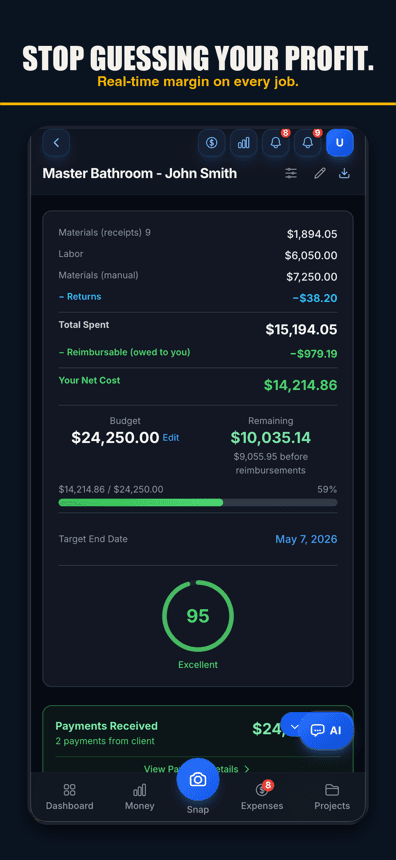
Per-project P&L
Live revenue, materials, labor, sub costs, and gross margin per job. Tap any line for the receipts behind it.
AI line-item receipt scanning
OCR plus an LLM second-pass that catches what plain OCR misses. Returns and deposits handled correctly.
Voice expense capture
Log a cost without typing when you're on a ladder (voice works in browsers with speech input, like Chrome and Safari, and in the iPhone app on version 1.0.8 or newer).
Budget vs actual at line-item depth
Set the bid by line. Watch each line tick toward the cap. Know whether you're losing on cabinets or labor before the punch list.
GPS clock-in for crews
Geofenced jobsites and a forgotten-shift backstop for accurate labor cost in the P&L.
Native invoicing + client portal
Yes — you still send branded invoices and record every payment against the job. One difference from Joist: JobCost Pro does not process card payments; the client pays you directly. You add real job costing on top.
Budget warnings
A daily check warns you as a job nears its budget and again if it goes over — and you can ask the AI chat how any job is tracking.
Bilingual app + AI
Full Spanish UI plus an AI that responds in the user's preferred language.
Pay for the depth, not the seat
Free for 3 projects. Pro at $29.99/mo for unlimited projects. Contractor at $49.99/mo for unlimited crew and opt-in automatic clock-in.
Simple pricing
Less than a single trip to Home Depot.
Start free. Upgrade when you're ready.
Free
3 projects, 50 receipts/month — get started free
- 3 projects
- 50 receipts/month
- AI receipt scanning
- Voice capture (web; iPhone app 1.0.8+)
- 1 tax export/year
- Basic reports
- 3 crew seats: clock in + My Pay
- Client portal
- Payroll exports
Pro
For small crews — unlimited projects & receipts, 10 crew
- Unlimited projects
- Unlimited receipts
- 10 team members
- AI scans & chat (monthly AI allowance)
- Budget alerts
- Invoice sending
- All exports (tax, CSV, PDF)
Contractor
For crews — unlimited team, auto clock-in & payroll
- Unlimited projects
- Unlimited receipts
- Everything in Pro
- Unlimited team members
- Opt-in automatic clock-in
- Run payroll & record paychecks
- Custom branding
Paid plans renew automatically at the price shown for the selected interval (monthly or yearly) until you cancel. You'll be charged in US dollars plus any applicable sales tax.
Cancel anytime in Settings → Billing — no refunds for past billing periods. Refund Policy · Terms

Who built this
Chris Sibley — remodeling contractor, Fort Worth, TX
Chris closed a $42,000 bathroom remodel thinking he’d made 30%. His accountant ran the real numbers months later: 12% — $7,500 in receipts never made it onto the job. He built Job Cost Pro so that never happens again, and still runs his remodeling company with it every day. That company is the legal entity behind this app: Salvation Home Remodeling LLC, doing business as Job Cost Pro.
FAQ
Should I keep using Joist for invoicing?
You can — JobCost Pro doesn't require you to drop it. But you don't need to. JobCost Pro's native invoicing covers the same estimate-to-payment loop, plus the cost side: receipts, crew hours and margin per job.
Can I import my Joist clients and invoices?
There is no Joist import today. Add your open jobs in a few taps and snap receipts as they come in; your costs build up from there.
Does JobCost Pro process payments like Joist?
No. JobCost Pro does not process card or ACH payments. Your invoice shows your bank or check details, the client pays you directly, and you record the payment against the job so the balance stays true.
Is JobCost Pro overkill if I only need to send invoices?
If invoicing is genuinely 80 %+ of your software need and you don't track margins on jobs, Joist is the cheaper, simpler tool. JobCost Pro's value compounds when you do care about margin clarity.
How does the free tier compare to Joist Basics?
Joist Basics caps you at 5 documents per month. JobCost Pro's free tier gives you 3 projects and 50 receipts per month, plus AI receipt scanning, voice capture, and project-level P&L. Different cap, different focus.
Can my crew use it without seeing my margins?
Yes. Crew accounts scan receipts and clock in without seeing financials — 10 crew seats on Pro, no seat limit on Contractor. Owners control role-based visibility.
Related