Handyman invoice app
Invoice From the Truck. Keep the Profit Straight.
A handyman’s whole business fits in three moves: do the work, bill it the same day, and know what the job paid you after materials. This app does all three from your phone — build the invoice on-site, snap the Home Depot receipt and confirm it to that job with one tap, and see the margin from what you recorded. Free for 3 active jobs and 50 receipts a month. No credit card.
Free forever — 3 projects, 50 receipts a month. No credit card.
Small jobs are where the money leaks
Nobody loses $5,000 on one handyman job. You lose $30 at a time — the caulk and fasteners that never made the bill, the second trip nobody charged for, the invoice that went out a week late because it waited for the laptop. Ten small jobs a month with $40 of untracked materials each is $4,800 a year, gone quietly. The fix isn’t discipline. It’s making the capture take five seconds.
This is the actual app
Free on the App Store — and free actually means it
The free tier is not a 14-day trial. It’s 3 active jobs, 50 receipts a month, and full AI scanning, for as long as you want. For a solo handyman running a few jobs at a time, that is the whole workload — you may simply never pay us, and that’s fine.
Get it on the App StoreNew on the App Store — free tier, no card required.
Three moves, one app
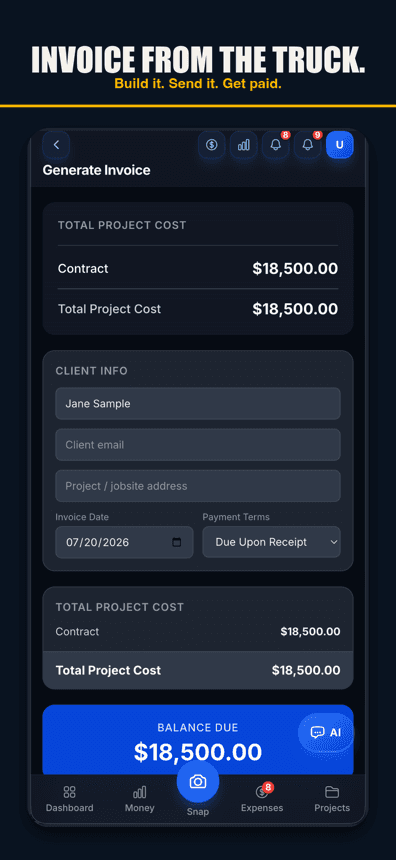
Invoice in the driveway
Build it from the job’s real costs, send it before you pull away, and the "I’ll bill you next week" era is over. Faster invoices get paid faster — that part you already know.
Receipts go to the job in one tap
Photograph the receipt in the checkout line. The AI reads it and suggests the right job — one tap files it, so the materials on the deck-repair bill are the materials the deck repair used.
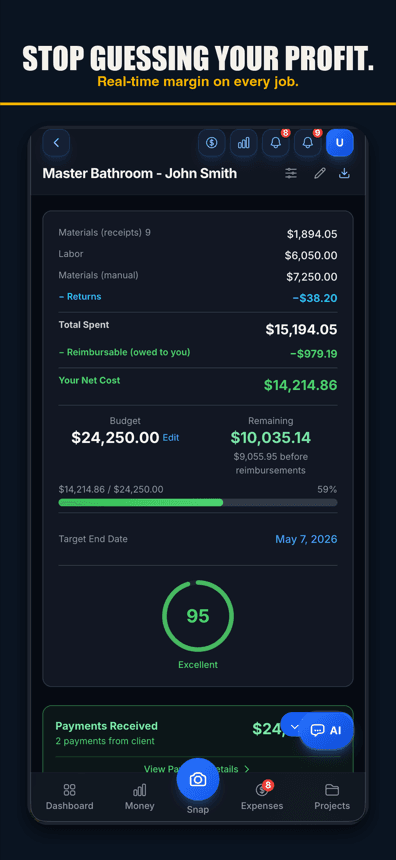
Profit per job, not per year
Charged minus materials minus your hours — per job. You find out which work is worth your Saturday and which jobs you’ve been doing for wages.
Free forever — 3 projects, 50 receipts a month. No credit card.
What you get
AI receipt scanning
Line items and returns read off the ticket and filed to the job with one tap. 50 a month on free.
Same-day invoicing
Clean invoices from your phone, with the job’s costs behind every line.
Voice capture
On the ladder? Say the amount, the store, and the job — logged. Voice works in browsers with speech input, like Chrome and Safari, and in the iPhone app on version 1.0.8 or newer.
Mileage tracking
Trips logged against jobs — the deduction most handymen leave on the table.
Payment tracking
Who paid, who hasn’t, and what’s still owed across every open job.
Live margin per job
The number that tells you whether the job was worth taking.
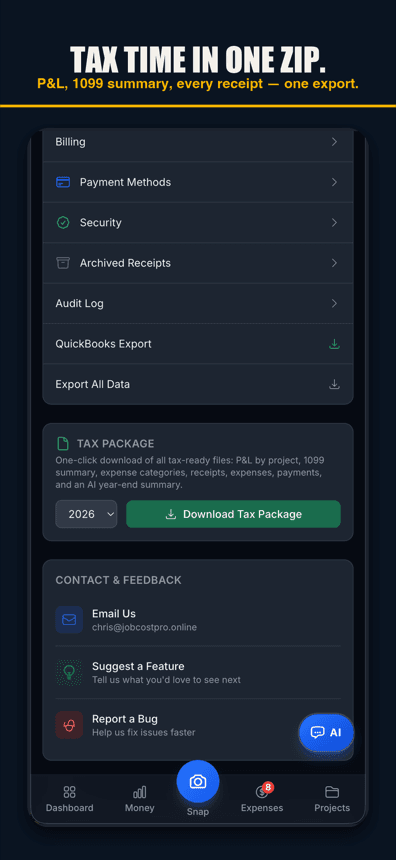
Tax package export
P&L by job, expense categories, and a list of your receipts in one year-end download.
Works offline at the jobsite
Receipts queue on the phone when there are no bars and upload when service is back.
A three-line job, start to finish
Take a bathroom-fan replacement plus a couple of doors, quoted at $650. Fan and materials at the big-box run $118 — snap the receipt, it lands on the job. Three and a half hours of your time at the $60/hour you decided your hands are worth: $210. Invoice goes out from the driveway for $650; the app shows the job cost $328 and paid you $322 over your own labor rate — a real 49% margin, not a warm feeling.
Do that math on every job for a month and patterns show up fast: the small electrical swaps that clear 60%, the "quick" drywall patches that never do, the client whose jobs always grow a second trip. That’s what job costing gives a handyman — not accounting, a filter for which work deserves you.
When you need more than us
Straight talk: this app does not do scheduling, dispatch, or estimates. If you’re running crews across a calendar and booking online appointments, a field-service platform like Jobber is built for that, and it’s good. What those platforms are weakest at is the part this app lives in — receipts, job-level costs, and the honest margin per job.
Plenty of solo operators run just this app and a calendar. Some run both worlds. Start free, run three real jobs through it, and let the numbers argue for themselves.
Free covers a working handyman
3 active jobs, 50 receipts a month, AI scanning and voice capture included — free, no card. If you grow past that, Pro is $29.99/month flat.
Simple pricing
Less than a single trip to Home Depot.
Start free. Upgrade when you're ready.
Free
3 projects, 50 receipts/month — get started free
- 3 projects
- 50 receipts/month
- AI receipt scanning
- Voice capture (web; iPhone app 1.0.8+)
- 1 tax export/year
- Basic reports
- 3 crew seats: clock in + My Pay
Pro
For small crews — unlimited projects & receipts, 10 crew
- Unlimited projects
- Unlimited receipts
- 10 team members
- AI scans & chat (monthly AI allowance)
- Budget alerts
- Client portal
- Invoice sending
- All exports (tax, CSV, PDF)
Contractor
For crews — unlimited team, auto clock-in & payroll
- Unlimited projects
- Unlimited receipts
- Everything in Pro
- Unlimited team members
- Opt-in automatic clock-in
- Payroll exports
- Custom branding
Paid plans renew automatically at the price shown for the selected interval (monthly or yearly) until you cancel. You'll be charged in US dollars plus any applicable sales tax.
Cancel anytime in Settings → Billing — no refunds for past billing periods. Refund Policy · Terms

Who built this
Chris Sibley — remodeling contractor, Fort Worth, TX
Chris closed a $42,000 bathroom remodel thinking he’d made 30%. His accountant ran the real numbers months later: 12% — $7,500 in receipts never made it onto the job. He built Job Cost Pro so that never happens again, and still runs his remodeling company with it every day. That company is the legal entity behind this app: Salvation Home Remodeling LLC, doing business as Job Cost Pro.
FAQ
Is there really a free handyman invoice app?
Yes — the free tier here is the real product, not a trial: 3 active jobs, 50 receipts a month, full AI receipt scanning, invoicing, and job margins. No credit card to start and no time limit.
Can I send an invoice from my phone at the job?
Yes. Build the invoice from the job’s costs and send it before you leave the driveway. You can track payment against it from the same screen.
Does it track my materials from Home Depot and Lowe’s?
Snap the receipt and the AI reads the line items — including returns, which net against the original purchase on the same job so your costs stay honest.
What about my hours? I work alone.
Log your own time to the job (or clock in like a crew of one). Pick the hourly rate your hands are worth and the margin math includes it — profit above your labor, not instead of it.
Does it do scheduling or estimates?
No. It does money: invoices, receipts, job costs, margins, mileage, and a year-end tax package. If dispatch and booking are what you need most, a field-service platform fits better — and this app still beats them on the money side.
Related
No credit card. No trial clock.
Bill today’s job
before you leave the driveway.
Start freeFree — 3 jobs, 50 receipts a month, AI scanning included.