Free download — no email required
Change Order Template
A change order puts extra work in writing before you do it: what changes, what it costs, how it moves the contract total and the finish date, and a signature from both sides. This free template has all of that on one page, with numbered cost lines and a running contract total, so the extra work gets paid instead of argued about at the final invoice.
How to fill out a change order
- Name the job and the contract. Client, job address, the contract date, and a change order number in order on this job: CO-001, CO-002 and so on.
- Describe the change in plain words. What is added, removed or changed, and who asked for it. "Swap laminate countertop for quartz, client request" survives a dispute; "kitchen changes" does not.
- Price it line by line. Quantity times unit price for each line. The Excel version does the math and adds the lines up for you.
- Show the new contract total. Original contract, plus change orders already approved, plus this one, equals the new total. The client sees where the job stands, not just this one line.
- Show the schedule change. Extra work usually takes extra days. Write the number of days, even when it is zero.
- Get both signatures before the work. Then keep a copy with the job file, and put it on the next invoice.
A change order example, filled in
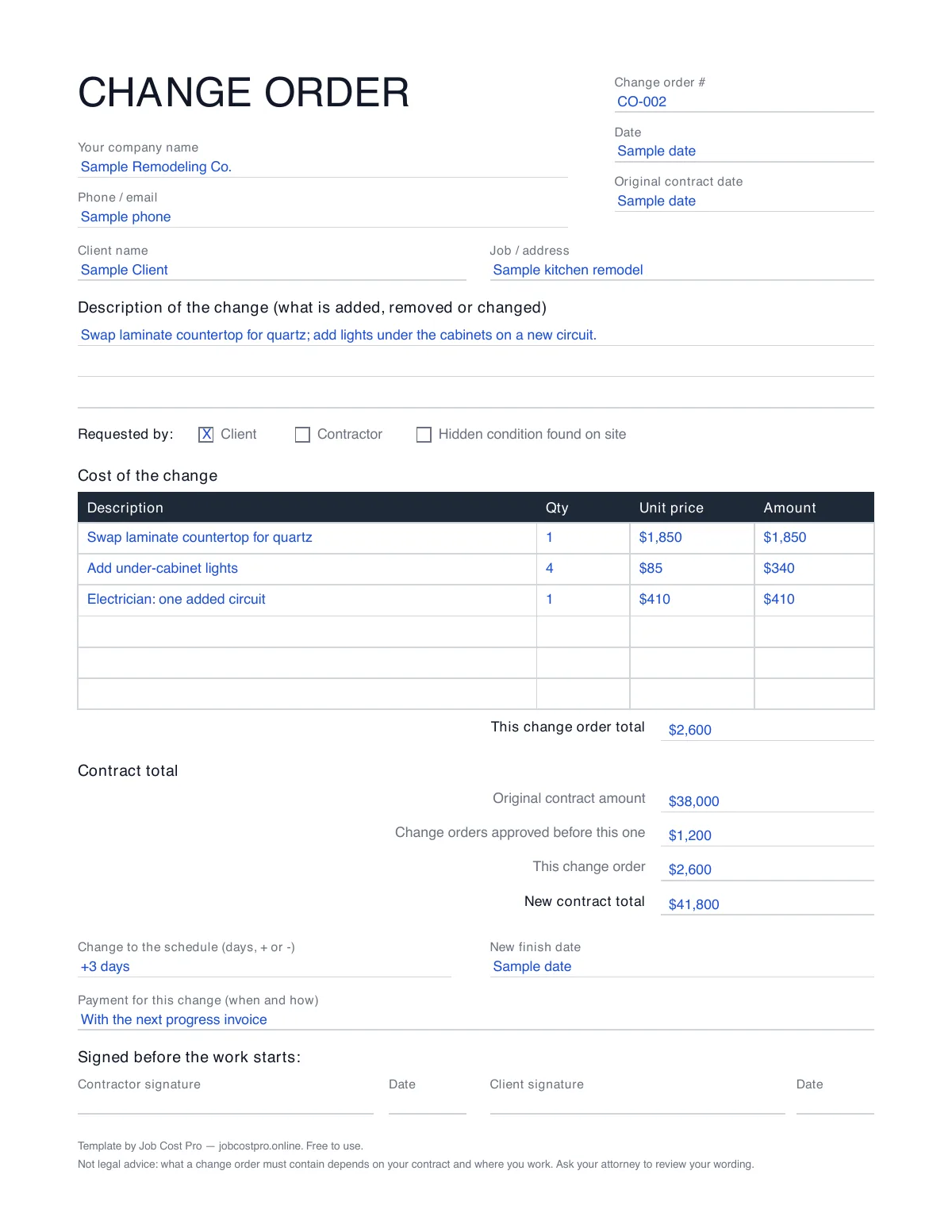
Here is change order CO-002 on a sample kitchen remodel, with made-up numbers. The client asked for a quartz countertop instead of laminate and for lights under the cabinets.
| Description | Qty | Unit price | Amount |
|---|---|---|---|
| Swap laminate countertop for quartz (client request) | 1 | $1,850 | $1,850 |
| Add under-cabinet lights | 4 | $85 | $340 |
| Electrician: one added circuit for the lights | 1 | $410 | $410 |
| This change order total | $2,600 | ||
Below the lines, the contract math: original contract $38,000, plus change orders already approved $1,200, plus this change order $2,600, makes a new contract total of $41,800. The schedule moves by 3 days. Both names and dates go on the signature lines before the countertop is ordered.
When to write one, and what it has to say
Write a change order any time the work, the price or the finish date moves from what the contract says: the client asks for something new, an allowance runs over, or the walls open up and show something nobody could see at bid time. Small ones too. Ten small "while you are here" favors add up to a lost week and a margin you cannot find at the end. If you price change orders often, the change order tracking guide shows how to keep them from slipping off the invoice, and the markup calculator checks the margin on each line before you send it.
What a change order must contain depends on your contract and on the rules where you work. This template covers the common parts, but it is not legal advice: ask your attorney to review your contract and your change order wording. When the change order is signed, it goes on the next invoice; the free contractor invoice template has a line for it.
How to price a change order
Price a change order the same way you priced the job, line by line, not as one round number agreed in the driveway. For each line, write down what it really takes:
- Materials at what you will pay, plus the trip to get them.
- Labor at your loaded hourly cost, including the time to tear out work that is already done.
- Subs at their written price for the extra work.
- Your markup, the same one the original bid carried. Extra work uses the same truck, insurance and office time as the rest of the job.
- Days: if the change pushes the finish date, write how many.
A credit works the same way in reverse: when the client removes work, list it as a line with a minus amount, and the new contract total goes down. Writing credits down too keeps the running total honest and shows the client you track both directions.
Keeping change orders on the job
The paper form works. The hard part is the same on every job: the change order gets signed, then nobody puts it on the invoice, and the extra work is done for free. In Job Cost Pro change orders, you write the change order from the job, it stays on the job as pending, billed or cancelled, and it is there when you build the invoice. On cost-plus jobs only, your client can sign it from a link with no login. The app never emails or texts your client on its own, and it does not take payment. Change orders take the Pro plan or higher.
The free plan has 3 active jobs at a time and 50 receipts a month, so you can see how it fits before you pay — on iPhone or in any browser. The template stays free either way.
FAQ
What is a change order in construction?
A written change to the contract after it is signed. It says what work is added, removed or changed, what it costs, how it moves the contract total and the schedule, and both sides sign it. It turns a conversation on the job into a record.
What should a change order include?
The job and the contract it changes, a change order number and date, a plain description of the change and who asked for it, the cost lines, the change order total, the new contract total, the change in days, payment terms, and a signature and date from you and the client.
Should a change order be signed before the work starts?
Getting the signature before the extra work starts is the habit that avoids arguments later. What your contract and your state require is a legal question, so ask your attorney to review your contract and your change order wording.
How do I number change orders?
Number them in order on each job: CO-001, CO-002 and so on. The template carries the original contract amount and the total of change orders already approved, so every new change order shows the running contract total.
Can my client sign a change order online?
This template is a file: print it, or use a PDF signing tool you already have. In Job Cost Pro, a client can sign a change order from a link with no login on cost-plus jobs only; on other jobs the change order stays on the job for you to bill.
Is this change order template free?
Yes. No email, no signup, use it on every job. It comes as a PDF to print, a Word file to type in, and an Excel file that adds up the lines and the new contract total for you.