Drywall job costing software
The Bid Covered the Board. Did It Cover the Finish?
Drywall jobs rarely lose money on the first delivery. They lose it on the second and third trips for board, the extra buckets of mud, and the finishing coats that took a day longer than the bid. This app records those costs on the job as they happen: receipts are confirmed to the job with one tap, the crew clocks in on the job, and the margin from recorded costs updates while there is still time to act.
Free plan: 3 active jobs at a time, 50 receipts a month. No credit card. Some features require a paid plan.
Hanging is easy to count. Finishing is not.
Board count is on the delivery ticket. What disappears is everything after it: the corner bead picked up on the way in, the extra compound for a ceiling that needed another coat, the patch-up visit after the painter walked the house, and the finisher hours spread across three jobs in one week. When those land on no job, every drywall job looks better on paper than it was.
This is the actual app
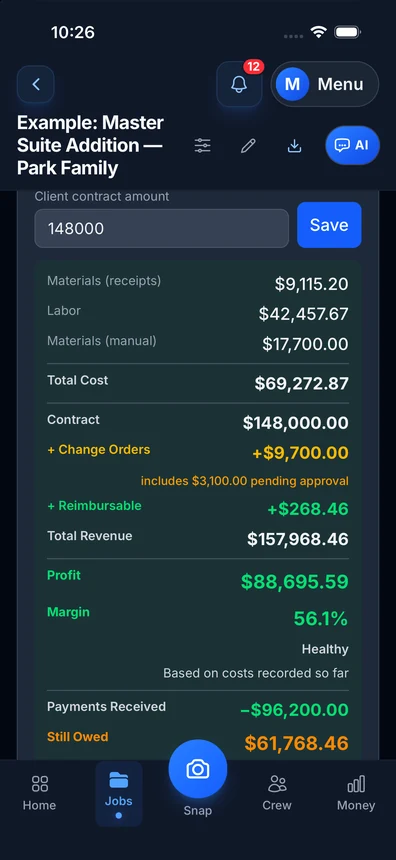
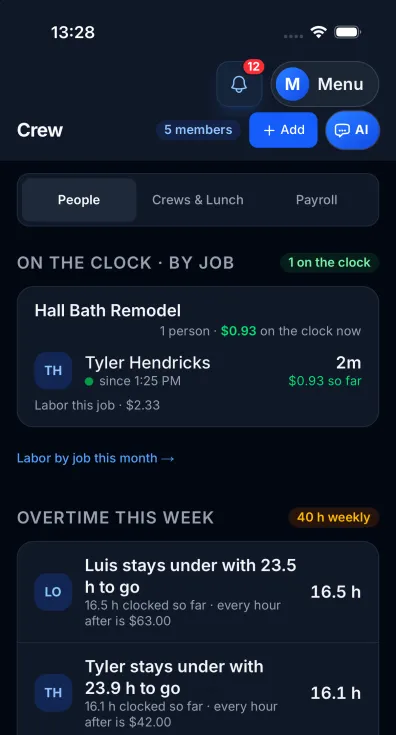
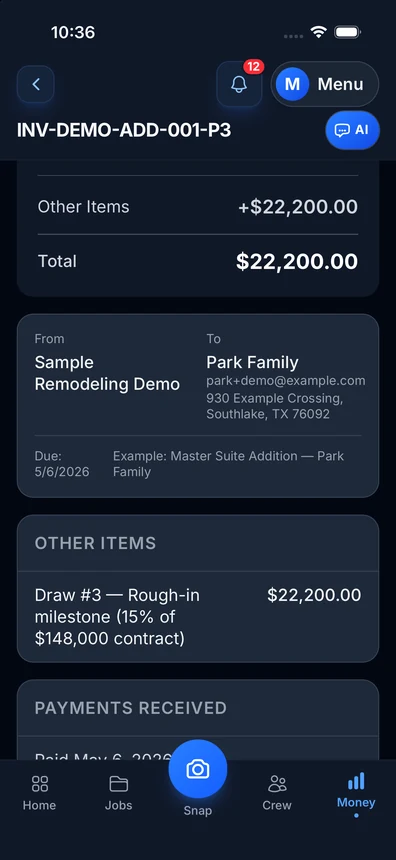
On the App Store, free to start
The free tier is the real app: 3 active jobs, 50 receipts a month, AI scanning, GPS clock-in. A small hang-and-finish crew can run on it indefinitely — upgrade when the job count grows, not before.
Get it on the App StoreNew on the App Store — free tier, no card required.
Built for how drywall jobs actually spend
Supply house tickets, filed
Snap the ticket for board, mud, tape and beads — the AI reads it and suggests the job when the ticket names it or you scan at the jobsite; one tap confirms it. A return scans the same way.
Finishing hours on the job
The crew clocks in on the job and the hours land on that job at each worker’s real cost. Taping, coats and sanding stop being a guess at the end of the week.
Margin while the job runs
Charged minus spent, live. A job running past its finishing budget shows up mid-week, while the extra work is still a conversation with the builder, not a surprise on the last invoice.
 Get it onGoogle PlayFreeGoogle Play: US only.
Free plan: 3 active jobs at a time, 50 receipts a month. No credit card. Some features require a paid plan.
What you get
AI receipt scanning
Board, compound, tape, beads and fasteners — line items read and job-tagged.
GPS time clock
Geofenced clock-in at the jobsite in the iPhone app (Android and web: clock in by hand); a shift still open after 12 hours ends at the 12-hour mark as a safety stop.
Live job margin
Every clock-in and receipt moves the number the moment it lands.
Material returns handled
Leftover board or an unopened bucket goes back. A return scans like a receipt and lowers that job’s material cost, so the cost is not counted twice.
Crew without your numbers
Workers see clock-in and their own submissions — never your margins.
Invoicing + payments
Bill from the job and the costs you mark to bill back; see what’s paid and what’s owed. Sending invoices: Pro or higher.
Reimbursements
A finisher picks up a box of screws on the way in — tracked, owed, and paid back without sticky notes.
Tax package export
P&L by job, 1099 summary, a list of your receipts — one download.
What a drywall job actually costs
The buckets are simple to name and hard to keep honest: board by the sheet and by the delivery, compound and tape, corner bead and trim, screws and adhesive, the lift or scaffold for a high ceiling, disposal of the scrap, hanging hours, finishing hours, and the return visit for touch-ups. The bid prices all of it. The question is how much of it the job really used.
Job costing means each of those dollars lands on the job that caused it, on the day it happens. Hanging hours and the first board delivery are rarely the problem. Finishing hours, the second material run and the touch-up visit are where a good drywall bid turns into a thin one, because they arrive late, in small amounts, and often with no job name on them.
When every ticket and every clock-in is on the job, you can compare what the job used with what you bid, job by job, and see which kind of work — new construction, remodel patches, high ceilings, smooth finishes — really pays.
Finishing labor is where the margin moves
A crew can hang a house in a predictable number of days. Finishing is less predictable: drying time between coats, a ceiling that needs another pass, sanding that runs long, or a punch list after the painter walks through. Each extra visit is labor the bid may not have priced.
With the crew clocking in on the job, those hours land where they belong instead of in a weekly total. In the iPhone app, a geofenced clock-in at the jobsite ties the time to the job; on Android and on the web the crew clocks in by hand. Either way, the job shows its own labor, not a share of the week.
The crew sees what it needs — clock in, clock out and, on Pro or higher, submit a receipt — and never your margins or your bid.
One supply run, more than one job
Drywall crews often buy for two or three jobs on one trip. When one ticket covers more than one job, receipt splitting (Pro or higher) moves the line items each job used to that job, so each job carries only its own board and mud.
Returns work the same way. When leftover board or an unopened bucket goes back to the supply house, the return scans like a receipt and lowers that job’s material cost, so the material is not counted twice.
Price the next drywall job from your own job costs
Your last finished jobs are the best price list you have, because they hold what the work really cost you, finishing included. Divide a past job’s recorded cost by its square feet of board, then price the next job of the same kind from that number.
Example: a past remodel job had 2,400 square feet of board. Its recorded cost was $1,560 in board, mud, tape and bead, 72 crew hours (32 hanging, 40 finishing) at a loaded $38 an hour = $2,736, and $180 for a lift and a dump run. Total $4,476, or $1.865 a square foot ($4,476 / 2,400).
The next job of the same kind has 3,000 square feet: 3,000 x $1.865 = $5,595 of expected cost. With a 30% markup the price is $5,595 x 1.30 = $7,273.50. If that job has higher ceilings or a smoother finish, price it from a past job that had them too.
This only works when every ticket and every hour landed on the job while it ran. That is the part this app records.
What this app is not
It is not full takeoff software: it does not count sheets for an order. On Pro or higher, the AI reads uploaded plans for room sizes and the materials they call out. Its main job is the money layer on the job: what each job cost, what each job was charged and what each job made, from the receipts and hours you record.
You can keep your takeoff tool and use this app to track what each job costs once it starts.
Free tier first. Flat pricing after.
Free: 3 active jobs, 50 receipts a month, AI scanning, GPS clock-in. Growing? Pro is $29.99/month plus any applicable sales tax; Contractor $49.99/month plus any applicable sales tax, with unlimited crew seats; Business $149.99/month plus any applicable sales tax, with 50-photo receipt batches.
Simple pricing
Start free. Upgrade when you're ready.
Free
3 active jobs at a time, 50 receipts/month — get started free
- 3 jobs
- 50 receipts/month
- AI chat: 10 messages a month (new each month); 3 per job, never reset
- Help chat: 25 messages/month for you, 15 for each crew member
- AI receipt scanning
- 50 AI actions a month
- 1 tax package/year
- Basic reports
- 3 crew seats: clock in + My Pay
- Client portal
- Payroll exports
- Up to 10 photos per invoice
- Add up to 50 job photos at a time
Pro
For small crews — unlimited jobs & receipts, up to 10 team members
- Unlimited jobs
- Unlimited receipts
- Help chat: 100 messages/month for you, 50 for each crew member
- 10 crew members
- AI receipt scans, AI chat & AI actions: no monthly count
- Invoice sending
- Your logo on invoices
- Unlimited tax packages + QuickBooks export
- Up to 25 photos per invoice
- Add up to 50 job photos at a time
Contractor
For crews — unlimited team, automatic clock-in (iPhone app; opt-in for each crew member) & payroll records
- Unlimited jobs
- Unlimited receipts
- Help chat: 250 messages/month for you, 100 for each crew member
- Everything in Pro
- Unlimited team members
- Automatic clock-in (iPhone app; opt-in for each crew member)
- Track payroll & record paychecks — the app never sends money
- Custom colors & tagline
- Up to 50 photos per invoice
- Add up to 100 job photos at a time
Business
Everything in Contractor, plus 50-receipt scan batches
- Unlimited jobs
- Unlimited receipts
- Help chat: 1000 messages/month for you, 500 for each crew member
- Everything in Contractor
- Scan up to 50 receipt photos at once
- Up to 100 photos per invoice
- Add up to 100 job photos at a time
Website plans renew automatically at the price shown for the selected interval (monthly or yearly) until you cancel, and are charged in US dollars plus any applicable sales tax. Business is monthly only. If we change the price of a website plan, we email you at least 30 days before your next renewal. Plans purchased in the iPhone app are billed by Apple in your App Store currency.
Website plans: cancel anytime in Settings → Billing — iPhone app plans: cancel in iPhone Settings → Subscriptions at least 24 hours before renewal. All sales are final; no refunds except a double charge, or a charge after you cancelled: a renewal of a plan you had already cancelled before the renewal date, or the first charge of a free trial you cancelled before it ended (website purchases; tell us within 30 days). App Store purchases: Apple handles refunds (Refund Policy 3c). Bought on our website before October 22, 2026? Older refund terms may apply. Refund Policy · Terms

Who built this
Chris Sibley — remodeling contractor, Fort Worth, TX
Chris closed a $42,000 bathroom remodel expecting a 50% margin. He made 32% — about $7,500 gone, in costs he had not counted on the job. He built Job Cost Pro after that job, and still runs his remodeling company with it every day. That company is the legal entity behind this app: Salvation Home Remodeling LLC, doing business as Job Cost Pro.
FAQ
What is job costing for a drywall contractor?
Tracking every cost one job creates — board, compound, tape, beads, fasteners, equipment, disposal, hanging and finishing hours — against what you charged for it, per job. It shows which jobs paid and which ones only kept the crew busy.
Can I put one supply house ticket on two jobs?
Yes, on Pro or higher. Receipt splitting moves the line items each job used to that job, so each job carries only its own materials.
How does the crew clock in?
In the iPhone app, with a geofenced clock-in at the jobsite. On Android and on the web, the crew clocks in by hand. The hours land on that job.
Can my crew see what I make on jobs?
No. Workers get a limited view — time clock and their own submissions. Margins and pricing are owner-only.
Does it do takeoffs?
Not a full takeoff. It does not count sheets or buckets for an order. On Pro or higher, the AI reads uploaded plans for room sizes and the materials they call out. Its main job is money on the job: job costs, crew hours, receipts, invoices and margins.
Related
No credit card. No demo. No contract.
Next job,
real number.
Start freeFree — 3 active jobs at a time, 50 receipts a month, GPS clock-in included.