HVAC invoice app
An HVAC Invoice App Built on Your Recorded Job Costs.
Most invoice apps start with a blank form. This one starts with the job: the equipment receipt, the parts run and the hours your techs clocked are already on it, so the invoice you send and the profit you see come from the same numbers. Sending invoices is on the Pro plan, $29.99 a month plus any applicable sales tax. Free plan available. Some features require a paid plan.
Free plan: 3 active jobs at a time, 50 receipts a month. No credit card. Some features require a paid plan.
The invoice went out. Did the job make money?
An HVAC invoice is easy to write and hard to trust. The changeout was billed at the price you agreed, but the second trip for parts, the extra fittings and the helper’s half day are on receipts in the truck and hours in somebody’s head. The invoice says what the customer owes. It does not say what the job cost you. When those two numbers live in two places, you find out at tax time which installs paid well and which ones only kept the trucks moving.
This is the actual app
On iPhone, and in any browser
The iPhone app is on the App Store, and the same account works at jobcostpro.online in a browser on a phone or a computer. The Free plan covers 3 active jobs at a time, 50 receipts a month and 3 crew seats, with no credit card to start. Free plan available. Some features require a paid plan.
Get it on the App StoreNew on the App Store — free tier, no card required.
One job, one set of numbers
Costs are on the job before you bill
Snap the supply-house receipt and the app reads the line items. Confirm the job and the cost is on it. Equipment, parts and materials sit under the job they were bought for.
Tech hours count as job cost
Your crew clocks in and out on the job from a phone. Their hours, at the pay rate you set, show as labor cost on that job next to the receipts.
Invoice and profit from the same screen
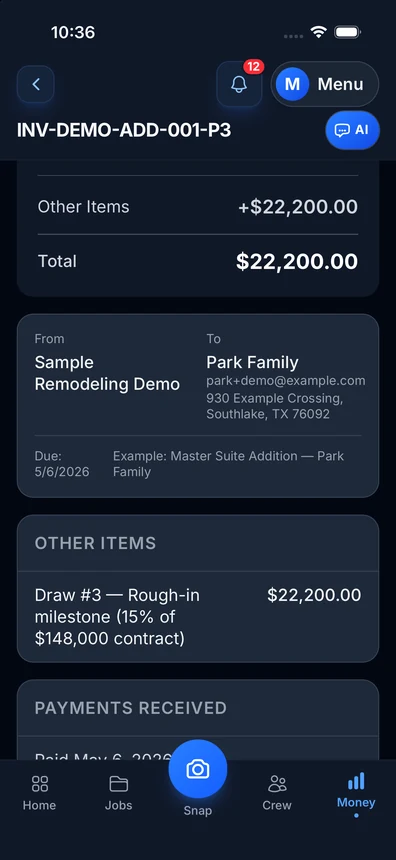
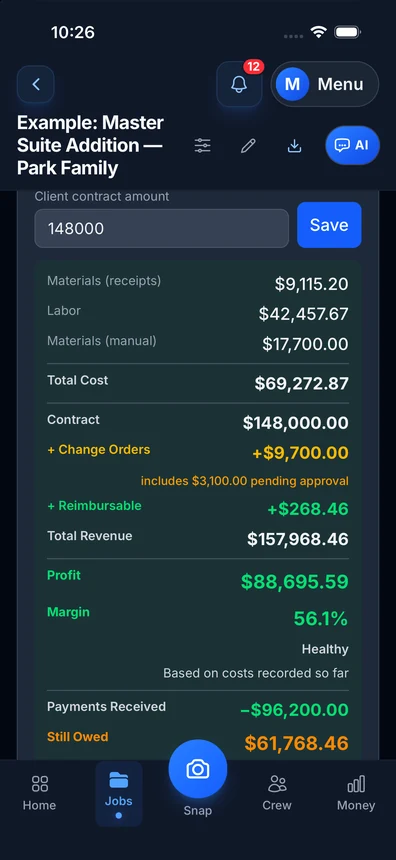
Build the invoice on the job, send it on the Pro plan, and mark what was paid. The job shows what you billed, what it cost and the profit from the costs you recorded.
 Get it onGoogle PlayFreeGoogle Play: US only.
Free plan: 3 active jobs at a time, 50 receipts a month. No credit card. Some features require a paid plan.
What is in the app
Invoices from your phone
Build an invoice on the job with your line items. On Pro, send it by email or a link. On the Free plan you can build it and keep it as a draft.
AI receipt scanning
Take a photo of the receipt. The app reads the store, the total and the line items, and you confirm the job. The Free plan includes 50 receipts a month.
Returns lower the job cost
Took a part back? Scan the return like a receipt and it lowers that job’s material cost, so the cost you see matches what you kept.
Crew time on the job
Techs and helpers clock in and out on a job. You see hours and labor cost per job, and who worked which day.
Payments marked against the invoice
Record a payment when the customer pays and see what is still owed on each job. The app records payments; it does not charge cards.
Profit per job
Each job shows billed, cost and profit from what you recorded. You see which kind of work pays and which does not.
Mileage by hand
Log a trip with a date and the miles, and tie it to a job if you want. You enter trips by hand on every plan.
Year-end tax package
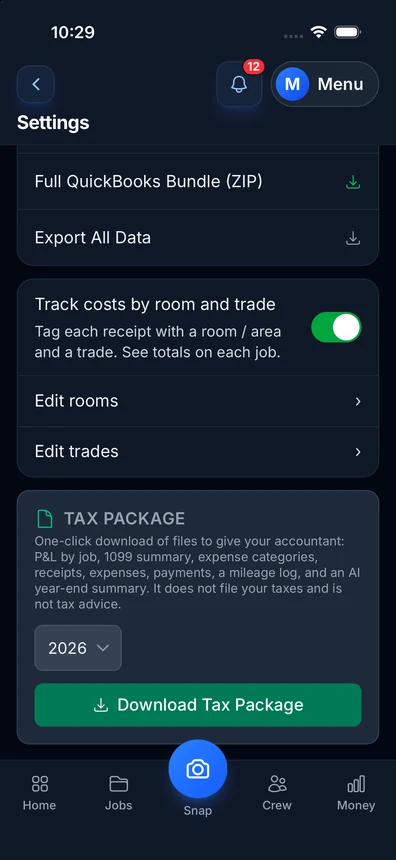
One download with profit and loss by job, expense categories and a list of your receipts. The Free plan includes 1 tax package per tax year.
An example: one changeout, start to invoice
These numbers are an example to show the math, not a real customer job. Say you agree to replace a condenser and coil for $7,800. The equipment receipt from the supply house is $3,950. Line set, fittings, pad and other parts across two more receipts come to $420. Two techs work the install, 14 hours between them, and at the pay rates you set that is $560 of labor.
Each receipt was a photo at the counter, and the hours came from the techs clocking in on the job. So when you open the job to build the invoice, the job already shows $4,930 of recorded cost against the $7,800 you are about to bill. That leaves $2,870, about 37 percent, from the costs recorded on the job. You send the invoice from the driveway and you already know what the job made.
Now change one thing. A second trip adds $85 of parts and 3 more tech hours. With the costs on the job, you see the profit drop to about $2,665 the same day, while there is still time to decide what to do about it. Without them, the invoice looks the same and the job is quietly worth less.
What an HVAC invoice should carry
A clear HVAC invoice names the job site, the work done, and the equipment, parts and labor you are charging for, with the total and what has been paid. Customers can see what they are paying for. Building the invoice on the job, where the receipts and hours already are, keeps you from leaving a part off the bill.
If you only need a blank form, use our free contractor invoice template and fill it in by hand. The app is for when you want the invoice and the job cost to stay together.
What this app does not do
Straight talk, so you can pick the right tool. Job Cost Pro is not a dispatch board and it does not do scheduling. It has no price book and no maintenance plan tracking, and it does not charge cards. If booking calls and routing techs is your main need, a field-service platform is built for that.
What this app does is the money side of each job: receipts, crew hours, invoices, payments you record and profit per job. It was built by a Fort Worth remodeling contractor who wanted to see what each job made. It can sit next to the calendar you already use.
Free to start. Pro to send invoices.
The Free plan covers 3 active jobs at a time, 50 receipts a month and 3 crew seats, with invoice drafts and profit per job. Sending invoices to customers is on Pro at $29.99/month plus any applicable sales tax. Free plan available. Some features require a paid plan.
Simple pricing
Start free. Upgrade when you're ready.
Free
3 active jobs at a time, 50 receipts/month — get started free
- 3 jobs
- 50 receipts/month
- AI chat: 10 messages a month (new each month); 3 per job, never reset
- Help chat: 25 messages/month for you, 15 for each crew member
- AI receipt scanning
- 50 AI actions a month
- 1 tax package/year
- Basic reports
- 3 crew seats: clock in + My Pay
- Client portal
- Payroll exports
- Up to 10 photos per invoice
- Add up to 50 job photos at a time
Pro
For small crews — unlimited jobs & receipts, up to 10 team members
- Unlimited jobs
- Unlimited receipts
- Help chat: 100 messages/month for you, 50 for each crew member
- 10 crew members
- AI receipt scans, AI chat & AI actions: no monthly count
- Invoice sending
- Your logo on invoices
- Unlimited tax packages + QuickBooks export
- Up to 25 photos per invoice
- Add up to 50 job photos at a time
Contractor
For crews — unlimited team, automatic clock-in (iPhone app; opt-in for each crew member) & payroll records
- Unlimited jobs
- Unlimited receipts
- Help chat: 250 messages/month for you, 100 for each crew member
- Everything in Pro
- Unlimited team members
- Automatic clock-in (iPhone app; opt-in for each crew member)
- Track payroll & record paychecks — the app never sends money
- Custom colors & tagline
- Up to 50 photos per invoice
- Add up to 100 job photos at a time
Business
Everything in Contractor, plus 50-receipt scan batches
- Unlimited jobs
- Unlimited receipts
- Help chat: 1000 messages/month for you, 500 for each crew member
- Everything in Contractor
- Scan up to 50 receipt photos at once
- Up to 100 photos per invoice
- Add up to 100 job photos at a time
Website plans renew automatically at the price shown for the selected interval (monthly or yearly) until you cancel, and are charged in US dollars plus any applicable sales tax. Business is monthly only. If we change the price of a website plan, we email you at least 30 days before your next renewal. Plans purchased in the iPhone app are billed by Apple in your App Store currency.
Website plans: cancel anytime in Settings → Billing — iPhone app plans: cancel in iPhone Settings → Subscriptions at least 24 hours before renewal. All sales are final; no refunds except a double charge, or a charge after you cancelled: a renewal of a plan you had already cancelled before the renewal date, or the first charge of a free trial you cancelled before it ended (website purchases; tell us within 30 days). App Store purchases: Apple handles refunds (Refund Policy 3c). Bought on our website before October 22, 2026? Older refund terms may apply. Refund Policy · Terms

Who built this
Chris Sibley — remodeling contractor, Fort Worth, TX
Chris closed a $42,000 bathroom remodel expecting a 50% margin. He made 32% — about $7,500 gone, in costs he had not counted on the job. He built Job Cost Pro after that job, and still runs his remodeling company with it every day. That company is the legal entity behind this app: Salvation Home Remodeling LLC, doing business as Job Cost Pro.
FAQ
Is this HVAC invoice app free?
There is a Free plan: 3 active jobs at a time, 50 receipts a month and 3 crew seats, with no credit card to start. On Free you can build an invoice and keep it as a draft. Sending invoices to customers is on the Pro plan. Some features require a paid plan.
Can I send an invoice from my phone at the job site?
Yes, on the Pro plan. Build the invoice on the job and send it by email or a link, then record the payment against it when the customer pays.
Does it put equipment and parts costs on the invoice’s job?
Yes. Take a photo of the supply-house receipt, the app reads the line items, and you confirm the job. The cost then shows on that job next to the invoice, so you see billed, cost and profit together.
Does it count my techs’ hours as job cost?
Yes. Crew members clock in and out on a job, and their hours at the pay rate you set show as labor cost on that job. On the Free plan, the 3 crew seats are for clocking in and My Pay.
Does it do dispatch, scheduling or a price book?
No. Job Cost Pro does not do dispatch or scheduling, has no price book and does not charge cards. It covers the money side of a job: receipts, crew hours, invoices, payments you record and profit per job.
Related
No credit card to start.
Bill the job
and see what it made.
Get the appFree plan available. Some features require a paid plan.